


Google Plus

Configure conky-Lua in Ubuntu (12.10 & 13.04 Raring Ringtail), Fedora, debian and LinuxMint | Howto Conky

Written by M. Zinoune on . Posted in eyecandy, Fedora, Linux Mint, Linux tutorials, Ubuntu

Updated 05-04-2013: Conky is a free, light-weight system monitor for X, that displays any information on your desktop. There are many nice themes available for conky that can display clock, CPU usage, ram usage, swap, disk, net and more, one of these nice themes is Conky-Lua,  this theme (See screensot bellow) allow you to display nice rings for Clock, cpu …, the theme is available for Ubuntu, Linuxmint, fedora, and Debian.

See also Next Generation, another nice conky theme from Conky-Lua author
In this post i will show you step by step on how to install and configure this awesome conky script called Conky-Lua. The installation has been done in Ubuntu 12.04 LTS Precise Pangolin also tested in Ubuntu 12.10 and Ubuntu 13.04 Raring Ringtail. As usual, i tried to make the post newbies freindly
1- First of all we need to install conky, use the folowing command:
- For Ubuntu, LinuxMint and Debian use:

sudo apt-get install conky-all

-For Fedora use :

yum install conky-all

2- Download Conky-Loa from this Link

3- Now go to your Download folder and extract manually the file (double click on the archive or right click and select extract)
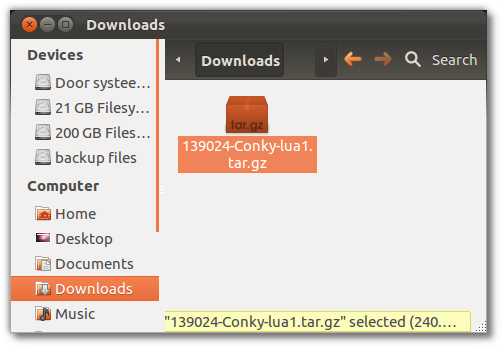
4- Now extract the 6 archives by selecting  and extracting them
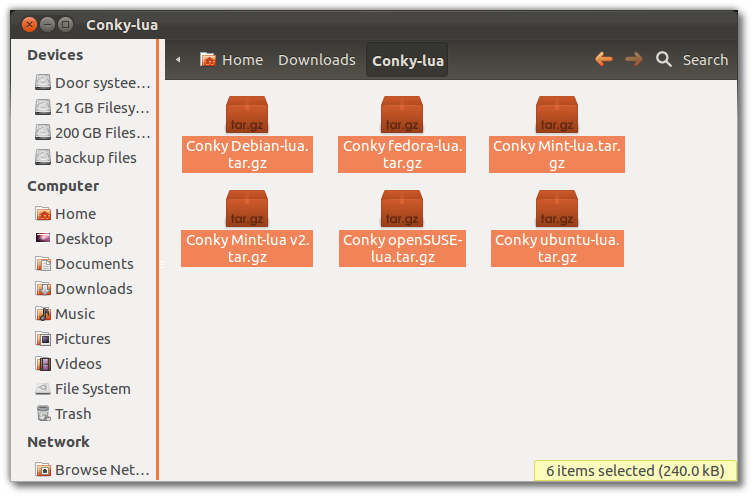
5- Now select the folder you need, for example if you want to install it on LinuxMint select Conky Mint-lua, for Ubuntu use Conky ubuntu-lua (In my case i`m installing this on Ubuntu 12.04 Precise Pangolin).

6-Now open the folder you chosed (For Ubuntu use : conky ubuntu-lua folder) and rename the file called conkyrc to .conkyrc, then move it to your home directory.
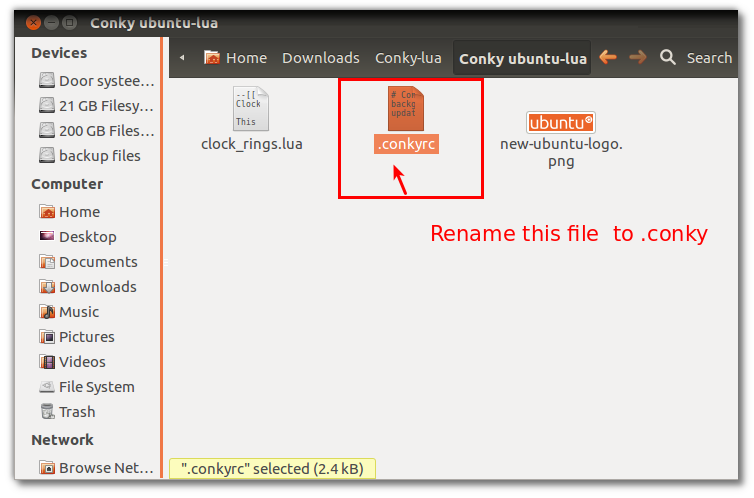
7- Now move the renamed file .conkyrc  to your home directory
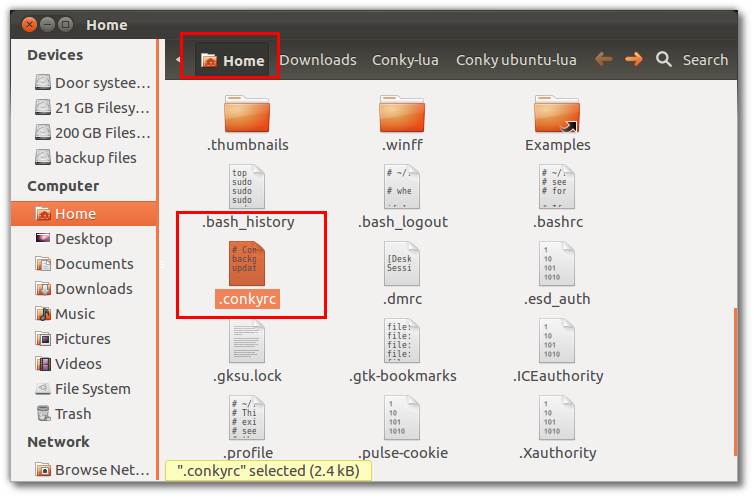

8- Now Open your home directory and unhide the folders, create a new folder called .conky and copy the other 2 files to this new folder(PNG image and clock_rings.lua).
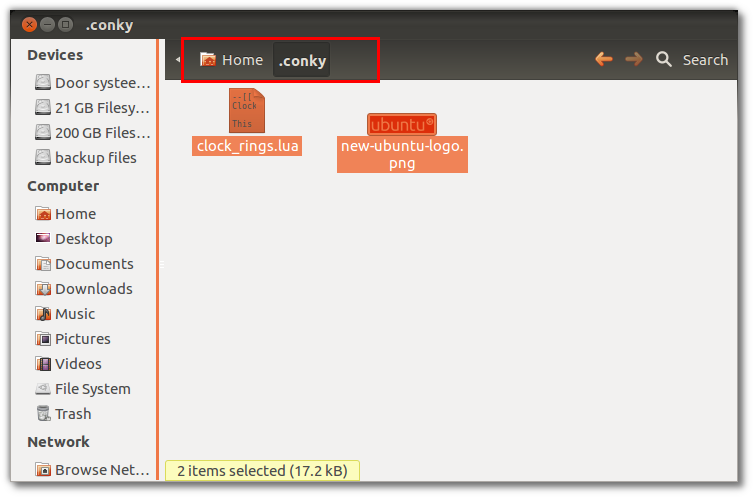

9- Now open the file .conkycr (Right click on the file and use open with text editor) to edit or by command :

 gedit .conky

10- Now change the patch to the new one in the home folder (See screenshot bellow):

/~.lua/scripts/clock_rings.lua
 to
 ~/.conky/clock_rings.lua
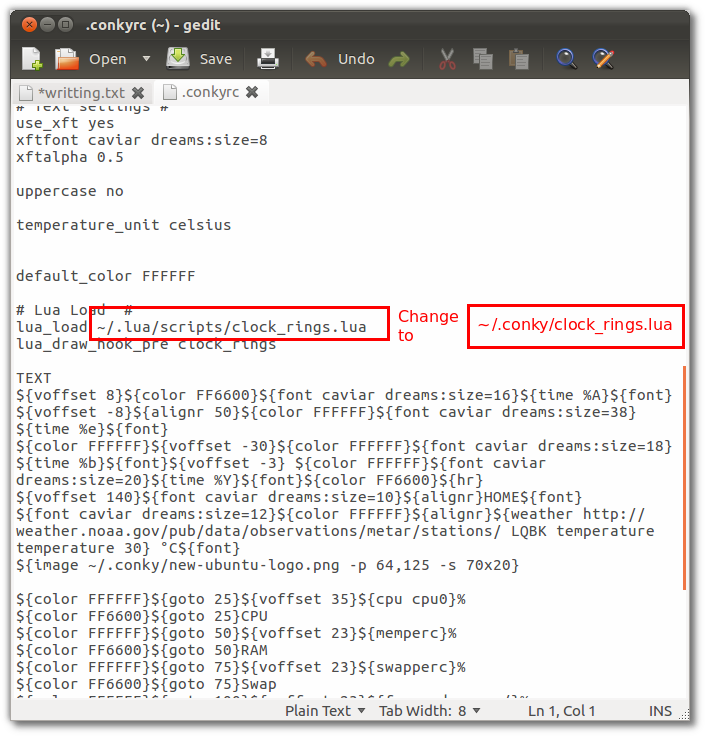
11- Now open terminal and run conky

Update:  If you are using wireless, and you want to have Net working on conky, edit .conkyrc and change eth0 with wlan0 (Thanks to Alius)

conky
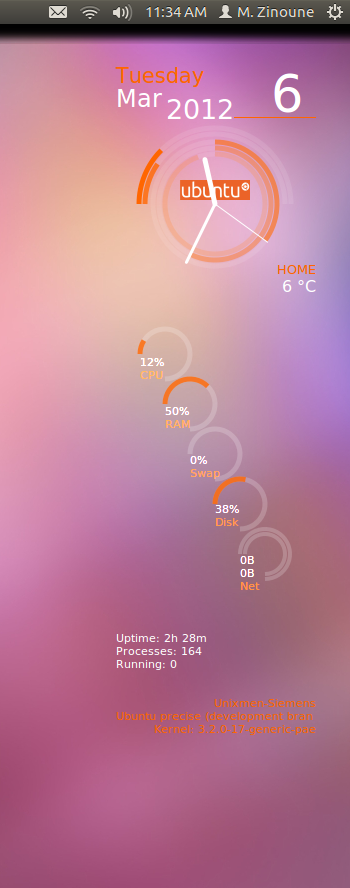
Enjoy.

Read alsoInfinity- A stunning theme for conky | Ubuntu, LinuxMint & Fedora

If you have any question or any help is needed, please use the forum to ask. Thanks

For questions please refer to our Q/A forum at : http://ask.unixmen.com

  • Delicadaz

    so i just get this error when running conky in terminal
     valueConky: llua_do_call: function conky_clock_rings execution failed: attempt to call a nil valueConky: llua_do_call: function conky_clock_rings execution failed: attempt to call a nil valueConky: llua_do_call: function conky_clock_rings execution failed: attempt to call a nil valueConky: llua_do_call: function conky_clock_rings execution failed: attempt to call a nil valueConky: llua_do_call: function conky_clock_rings execution failed: attempt to call a nil valueConky: llua_do_call: function conky_clock_rings execution failed: attempt to call a nil valueConky: llua_do_call: function conky_clock_rings execution failed: attempt to call a nil valueConky: llua_do_call: function conky_clock_rings execution failed: attempt to call a nil valueConky: llua_do_call: function conky_clock_rings execution failed: attempt to call a nil valueConky: llua_do_call: function conky_clock_rings execution failed: attempt to call a nil valueConky: llua_do_call: function conky_clock_rings execution failed: attempt to call a nil valueConky: llua_do_call: function conky_clock_rings execution failed: attempt to call a nil valueConky: llua_do_call: function conky_clock_rings execution failed: attempt to call a nil valueConky: llua_do_call: function conky_clock_rings execution failed: attempt to call a nil valueConky: llua_do_call: function conky_clock_rings execution failed: attempt to call a nil valueConky: llua_do_call: function conky_clock_rings execution failed: attempt to call a nil value

    when changing this …… /~.lua/scripts/clock_rings.lua
    to
    /.conky/clock_rings.lua
    you end up with a second document that is blank and you have to name it and save it………….
    so how do i fix this

    • zinovsky

       I  think you missed something, did you edit the .conkycr correctly?
      You shloud :
      /~.lua/scripts/clock_rings.lua
      to
      ~/.conky/clock_rings.lua
      I think you removed ~ that is why you are getting the error.

      • Delicadaz

        cheers zinovsky,  got it to work …….. i am using NetrunnerKDE ….similar to Mint and is based off Kubuntu11.10
        My conky lua has a black box around it …….. just like screenshots on gnome-look page
        but your screen shot doesnt, it is see thru clear to see wall paper …………
        how do i get that
        cheers DD

        • http://www.facebook.com/profile.php?id=1183131967 Alius Panfilovas

           Open .conkyrc and check for:
          own_window_transparent yes

          • Delicadaz

            Yes i already have this line marked as YES

            own_window_transparent yes ………

            I have installed another conky and it does the same thing with the black box … and i have that marked as yes too

            i am wondering if it is a KDE thing …………….. will test a couple of other conky scripts and also try on a Gnome desktop

            cheers for the help everyone

          • Delicadaz

            All 4 scripts i have run on this KDE desktop have the black back ground and 2 of them i know are transparent on Gnome

            it must be a Plasma ….. thing !!!!

            so off to KDE i go to ask the question
            thanks, DD

        • Bill Bordallo

          Don’t work for me too…
          I followed the instructions, and the line ~/.conky/clock_rings.lua in .conkyrc file is changed correctly.
          And looks like the back box :(
          What can I have missed?

    • http://twitter.com/14tweets Hanson

      Awesome

  • Sasa

    awesome! thanks! :))

  • http://www.facebook.com/profile.php?id=1183131967 Alius Panfilovas

    Does not work for me, getting this error:
    Conky: llua_do_call: function conky_clock_rings execution failed: /home/aliokas/.conky/clock_rings.lua:286: attempt to perform arithmetic on local ‘value’ (a nil value)

    • http://www.facebook.com/profile.php?id=1183131967 Alius Panfilovas

       Alright figured that out, needed to edit clock_rings.lua added a line on top of line 286:
      if value == nil then value = 0 end

    • NiKTh

       It must be responsible the swap partition , i am not sure , but same problem i had , solved as i activated the swap partition.
      Check it out.

  • http://twitter.com/14tweets Hanson

    that’s Awesome…
    Finally got that :)

  • Gaurav

    Nice one..
    Thanks…

  • woody

    Followed Instructions – it looks nice,

    One small snag I think – the memory required by Conky keeps growing – started at 2Mb, after 15 minutes – 4.5 Mb and so on…

    Is there some memory leak ?

  • Rj Najera

    well i did everything you said but i cant get the rings, i only have the info but not the rings, when i run it the terminal shows this

    *************:~$ conky -c clock_rings.lua
    Conky: invalid configuration file ‘clock_rings.lua’

    Conky: desktop window (1e00095) is subwindow of root window (af)
    Conky: window type – override
    Conky: drawing to created window (0×6200001)
    Conky: drawing to double buffer

    can someone tell me what is the problem..?

    • Guest
    • raja krishnan

      i am too getting the same trouble.

    • Kmelkon

      same here 

    • xin3n

      Follow the instructions carefully, I think you made a syntax mistake in  “clock_rings.lua” or didn’t provide a correct path……..

    • Kevinostrem

       put the clock_rings.lua in the .conky folder, not in the .lua/scripts folder.

    • Piremerd Piremerd

      Dude, I had same problem as you are facing. Mine is works fine now. Try to uninstall & remove all files and folders related CONKY ( sudoapt-get remove conky* ) ( apt-get autoremove ) (delete all files and folders you created for CONKY) then re-apply the given instructions above. Good look. By the way thank you very much for the people who created that nice program and to M. Zinoune for sharing with us.

    • Nico E

      Try this:
      it works for me but not under cinnamon just under Gnome classic – don’t know why
      In cinnamon it shows on top and cant do anything. anyone has a fix?

      #!/bin/bash
      sleep 20
      conky

    • Manish A.Shetty

       edit .conkyrc
      own_window_type override  ->  own_window_type normal

      http://www.youtube.com/videoorchard

  • fejao

    any idea how you can change the weather location if you are not in america? Just because it uses weather.noaa.gov. Also I can’t manage to make it count the total upload and download. Thanks in advance

    • adi_8079

      To find out your nearest station go here: http://www.nws.noaa.gov/tg/siteloc.shtml
      and look for the ‘ICAO Location Indicator’, should be four letters (e.g., ETBA).
      Once you have the indicator open your .conkyrc file (should be in your home directory) and search for ‘weather’, You should find this line: ‘http://weather.noaa.gov/pub/data/observations/metar/stations/ LQBK’. Now replace ‘LQBK’ with your location indicator.
      Save the file.

    • adi_8079

      To find out your nearest station go here: http://www.nws.noaa.gov/tg/siteloc.shtml
      and look for the ‘ICAO Location Indicator’, should be four letters (e.g., ETBA).
      Once you have the indicator open your .conkyrc file (should be in your home directory) and search for ‘weather’, You should find this line: ‘http://weather.noaa.gov/pub/data/observations/metar/stations/ LQBK’. Now replace ‘LQBK’ with your location indicator.
      Save the file.

    • adi_8079

      To find out your nearest station go here: http://www.nws.noaa.gov/tg/siteloc.shtml
      and look for the ‘ICAO Location Indicator’, should be four letters (e.g., ETBA).
      Once you have the indicator open your .conkyrc file (should be in your home directory) and search for ‘weather’, You should find this line: ‘http://weather.noaa.gov/pub/data/observations/metar/stations/ LQBK’. Now replace ‘LQBK’ with your location indicator.
      Save the file.

    • adi_8079

      To find out your nearest station go here: http://www.nws.noaa.gov/tg/siteloc.shtml
      and look for the ‘ICAO Location Indicator’, should be four letters (e.g., ETBA).
      Once you have the indicator open your .conkyrc file (should be in your home directory) and search for ‘weather’, You should find this line: ‘http://weather.noaa.gov/pub/data/observations/metar/stations/ LQBK’. Now replace ‘LQBK’ with your location indicator.
      Save the file.

      • fejao

        Thank you for your reply…I managed to fix it from this webpage…it was a bit tricky. I puted also a few more things there in the configuration, like changing the internet from eth0 to wlan0. I just can not manage to make a ring to display the CPU and HD temperature, that it would be AMAZING

    • ColonelPanic

      NOAA has non-US locations too.  I’m in New Caledonia (most decidedly _not_ an American location) and had no problems getting weather data from NOAA.
      The trick will be coming up with the ICAO code for the nearest airport.

  • Missiongeek

    Maybe I’m slow.  it says to rename the file to conky and place in home dir.  Then it says to create a folder named .conky.  It doesnt let me use the name twice.

  • andesho91

    Hi, I have configured this so that it doesn’t have the swap ring (by removing the swap entries from the code and moving the other rings to fit), and my clock now has hands, which I haven’t coded. Any idea what’s happened?

    @fejao:disqus Go to the website and look up your local area and it will give you the code. Mine is EGLL (for London) and change it in the .conkyrc.

  • andesho91

    Hi, I have configured this so that it doesn’t have the swap ring (by removing the swap entries from the code and moving the other rings to fit), and my clock now has hands, which I haven’t coded. Any idea what’s happened?

    @fejao:disqus Go to the website and look up your local area and it will give you the code. Mine is EGLL (for London) and change it in the .conkyrc.

  • andesho91

    Hi, I have configured this so that it doesn’t have the swap ring (by removing the swap entries from the code and moving the other rings to fit), and my clock now has hands, which I haven’t coded. Any idea what’s happened?

    @fejao:disqus Go to the website and look up your local area and it will give you the code. Mine is EGLL (for London) and change it in the .conkyrc.

  • andesho91

    Hi, I have configured this so that it doesn’t have the swap ring (by removing the swap entries from the code and moving the other rings to fit), and my clock now has hands, which I haven’t coded. Any idea what’s happened?

    @fejao:disqus Go to the website and look up your local area and it will give you the code. Mine is EGLL (for London) and change it in the .conkyrc.

  • Songkranm

    Could you please advisse how to make conky autostart ?

    • http://twitter.com/pirasathk ♔ Pirasath Kirupa ♔

      Search for startup applications from Dash home. Click open it. Then add the command /usr/bin/conky in the command space. You are good to go.

      • Jonathan Culp

        When I do that and restart my computer, conky shows up on top of everything

        • Manimaran

          if you restart your conky this problem will resolved.
          i also had that problem. so i write a little script to restart the conky after a few seconds automatically.

          #!/bin/bash
          sleep 3
          pid=$(pgrep conky)
          kill $pid
          conky

          give executable permission and add it to startup applications.

  • Guest_GGMU

    Thanks alot! it was very helpful indeed! thanks :)

  • http://malsasa.tk/ Ade Malsasa Akbar

    Okay, i found it! Thank you!

  • Arcturusarabia

    how to run conky in terminal?


  • Whynot

    To make it start on login, you need to go to application stratup add a new application.

    the command should be:

    sh -c “sleep 30s; conky -c ~/.conkyrc”

    this is a litle hack if it does not load correctly.

    @b6e0c0ea51424533d5630d54a0b15b49:disqus it’s not conky -c clock_rings.lua but conky -c ~/.conkyrc

  • Arcturusarabia

    i installed and run conky but  the problem is conky is on top of everything, on top of page i use, it would suppose to be under and stick on the desktop… please help… i can’t make it under the windows i am working…

  • Arcturusarabia

    i installed and run conky but  the problem is conky is on top of everything, on top of page i use, it would suppose to be under and stick on the desktop… please help… i can’t make it under the windows i am working…

  • Guest_Poster

    I’ve got the local temperature displaying, and I changed it to use Fahrenheit, because I was raised in the American School system. (I also changed the C to an F, and Home to the name of my city)

    Question:
    I also changed the Network to display Wifi as noted, but the circles don’t seem to fill in at all. They stay gray even if I’m downloading a file.  Both the data values go up and down a lot, but the circle bars remain gray.   Is there a setting I need to adjust?

    • thorsen_v

      I’ve not used conky before and never coded in LUA but being as I had this problem too, I thought I’d taker a look.

      In my case it seems to be because clock_rings.lua is hard wired to eth0 (It’s eth1 on my laptop)
      Look for the line:

             arg=’eth0′,

      And change it to whatever is appropriate for you system. (if you don’t know, you can try running “iwconfig” which will list the possible wireless connections. It should be obvious at that point)

      THERE ARE TWO OF THESE LINES TO CHANGE, FOR THE TWO DIRECTIONS OF TRAFFIC, SO CHANGE BOTH

      But we’re not quite there yet….

      The next line in both cases:

              max=100,

      Is only appropriate if your connection is 100k in both directions :)
      I changed mine to 500 for download and 50 for upload, and now the graphics animate nicely

      Hope this helps.

    • Free Libyan

      you only need to modify “eth0″ to “wlan0′ in “conkyrc” and  in  “clock_rings.lua”  which you will find it in your home file .conky
      change the max value for download speed and ubload speed in “clock_rings.lua” from 100 for both to what you want
      I use 500 for download and 80 for upload
      change the colours to what  you want
      use your text editor  save , log out,  log in again
      now you are supposed to get conky like the one I have

  • Smyttie41

    Well I am a newbie, Trying too hard to use Linux as my main O.S. I am sure it drives you guys nuts, us Newbies but at end of post, Author tells us to open Terminal and run Conkey.  OK and what do I type in Terminal to run Conkey. This is one of my main reasons I cant use linux as everyday O.S. Most of the tutorials are written for the people who know Ubuntu and Linux. I do appreciate your effort to help us Newbies out, Thank you for your time and effort much appreciated, but everything I try and do always goes wrong or is incomplete and I end up do a full re-install way to many times, any suggestions Linux users all help will go much appreciated Thank you angain everyone Thanks

    • Junkmail Hulscher

      use 2 partitions and install Linux on both and dualboot and use 1 to experiment with

      or … more easy

      install Linux and install Virtualbox
      It is not difficult to use, plenty of how to’s on Google

      Within Virtualbox you can install a Linux distribution, update it and you can copy it so you have 2 same distributions which you can boot.

      use the 1st as back up
      and use the 2nd for experimenting, you mess up, delete the 2nd and copy again from the 1st (it takes 15 min on a average pc to do this)
      It saves you a lot of time but you can learn without worrying breaking your system!

      Linux for newbies based on Ubuntu (all restricted software installed and you do not have to worry about anything as with Ubuntu you still need to activate
      https://help.ubuntu.com/community/RestrictedFormats
      https://help.ubuntu.com/community/Medibuntu

      Easy Ubuntu based distro:
      http://hacktolive.org/wiki/Super_OS

      http://zorin-os.com/

      http://www.linuxmint.com/

      http://moonos.org/

      http://ultimateedition.info/

      http://www.ylmf.org/en/

      http://www.linuxdeepin.com/

      Do note that if you start with virtualbox and you have a 64bit processor and more than 3gb memory you should install a 64bit system and not a 32bit system because a 32bit system has a 3gb memory limit.
      The more memory you have the more you can select to use for Virtualbox and the faster this will run.

      • Smyttie41

        Thank you very much for the help I feel a sense of direction now Thanks again

  • Priyanga

    Great app, looking forward to do lot of modifications. Anyway I have two problems.

    1.Is there any change as for wireless to get Mobile Broadband working?
    2.When I start this using Startup applications using the command /usr/bin/conky conky runs on top of everything else. But just typing “conky” in terminal runs without prob. How to fix this?

    Thanx. Btw I’m in Precise if that helps.

    • Priyanga

       Ok I found answers.
      1. Use “ppp0″ for “eth0″ to get mobile broadband.
      2. Use following startup command.
      sh -c “sleep 30s; conky -c ~/.conkyrc”

      • Hishan Melanga

        thanks

  • raja krishnan

    how to run conky in terminal.

    • Priyanga

      Just type conky.

  • http://twitter.com/kushdilip dilip kushwaha

    Superb.. !!! looks awesome . works perfectly. thanks :)

  • Joe Hanson

    Got it set up without any hassle, only thing I did extra was change it to fahrenheit and put my weather code in there :)

  • Peter Everett

    For info on how to autostart conky on boot, check out this thread on the forums
    http://ask.unixmen.com/question/276/how-to-run-conky-on-startup

  • John Watts

    For Conky…

    The default weather info is wrong for most people.
    You need to edit the .conkyrc to change your airport code or you’ll be getting temperature readings from somewhere else.For me, since my nearest airport is Charlotte, NC. I edited this line with my airport code thus…http://weather.noaa.gov/pub/data/observations/metar/stations/ KCLTWhere KCLT is the aiport code for Charlotte, NC.Get your airport code here…http://www.airportcodes.aero/Also, you can change the C to F for Fahrenheit temp on this line…temperature_unit fahrenheitStop and re-start conky for the changes to take effect

  • Al-hoooti

    can you explain the step 11 because conkey dosent work with me and i am sure that i did all steps very well?

  • Peachfrancia

    Thank you for this. If I wanted to remove the clock, which parts of the rings_lua script should i delete?

  • Private_ryan

    Hi
    thanks it worked like a charm i also was able to add battery indicator ring but now i want to a weather forecast  with sun and cloud .. icons have any one already done it in this conky config ?

  • http://www.facebook.com/gunparashar Gunjan Parashar

    i am not getting any rings just text instead i love it plz help me out

  • http://www.facebook.com/rotke Hector Torres

    Great! It was very helpful! How do I change location and units for the weather?

  • rojovilla

    still can’t get this to work as a startup app…followed your instructions to a “t”.  using ubuntu 12.04lts

  • stick-man

    neither this nor new configuration doesn’t work for me :/ 

    when I use command ‘conky’ in terminal this is what I get:

    Conky: desktop window (1000024) is subwindow of root window (ae)Conky: window type – overrideConky: drawing to created window (0x2e00001)Conky: drawing to double buffer

    Nothing happens, there’s nothing on my desktop. I did everything exactly as said in guide. 

    I am using ubuntu with gnome shell though, not unity. 

  • xin3n

    Great Awesome I really like it

  • Shubh

    This configuration works great in Unity, but nothing appears on Gnome shell,what additional steps are required to make it work on gnome shell.
    Please post answer to make it work on gnome shell.

  • Kernelklink

    How do you stop it from overlaying other program windows such as chrome? I just want it to be in the background.

  • Clr123

    how do you extract the .conkyrc file to home?

    it just doesnt appear to be there

  • V Esmaeilzadeh

    I start conky but an error occurred :
     Conky: desktop window (e00024) is subwindow of root window (b0)
     Conky: window type – override
     Conky: drawing to created window (0x2c00001)
     Conky: drawing to double buffer
     X Error of failed request:  BadDamage (invalid Damage parameter)
       Major opcode of failed request:  153 (DAMAGE)
       Minor opcode of failed request:  3 (XDamageSubtract)
       Serial number of failed request:  8362
       Current serial number in output stream:  8363

  • Zclinux

    this is awesome. thanks!

  • Dustin Metcalf

    I put what you said to auto start but it doesn’t do it…

  • https://launchpad.net/~jiboy79 alxrone

    for unity do like Pirasath said & set delay 
    #!/bin/bash
    sleep 30conky
    -save as conky.sh in hpme folder, make it excute…
    -go to start application, edit conky command “/usr/bin/conky” & navigate to “conky.sh”
    -it works for me….

  • Manimaran

     wow just beautiful…
    my internet usage is not showing… i’m using mobile broadband

  • Matthew N

     it wont let me have a folder named conky if there is a file already named the same

    • http://twitter.com/Sohaeb Suhaib Nabiel

      Then remove it :) and copy the file

  • Davoud

    I just installed it.
    That is what I needed and it’s perfect.
    Thanks a million.

  • Sremog

    Shouldnt conky and top show the same stats, the ram usage dont match

  • AvicenaFathurahman

    Waow.. you can get this app and other top rated apps for Ubuntu 12.04 offline installer at http://www.delavega.blogspot.com, semoga mempermudah hidup anda :)

  • stu

    I folloed the instructions for conky and had it working great i place it in my startup programs but when i did a restart it had dissapeared from my desk top but is still showing in my start up programs ???? any ideas

    • http://twitter.com/Sohaeb Suhaib Nabiel

      YUP, you should type “conky” in the command field

  • stu

    I have noticed that no one seems to have answered this but i have conky sitting on top of all other applications how do i change this?

  • Sohum-Bilawal Joshi

    I have a question about this installation when I type conky in the terminal and hit enter it says
    The program ‘conky’ can be found in the following packages:
     * conky-cli (You will have to enable component called ‘universe’)
     * conky-std (You will have to enable component called ‘universe’)
    Try: sudo apt-get install

    what do I do here thanks.

    • http://twitter.com/Sohaeb Suhaib Nabiel

      this weird ? Ok try this: i presume you are using 12.04 Ubuntu

      press Alt + F2. Then type: conky

      If you still have the same error then remove conky and install it again.

      to remove Conky type: sudo apt-get remove conky-all –purge

      and do the steps again

  • http://www.facebook.com/nipunshakya Nipun Shakya

    Helped me.. Thanks alot

  • Nico E

    Hi, thank you for a very good guide. I followed the instructions and i can not make it work on Linux Mint 13 with Cinnamon. When i switch to Gnome Classic it works great.
    Please help i wanna be able to use Cinnamon.

    • http://twitter.com/Sohaeb Suhaib Nabiel

      I think the conky people did not make it compatible with Cinnamon

  • http://www.facebook.com/brendan.mccarthy.188 Brendan McCarthy

     how do i get rid of the outline and shadow of the window

  • http://www.facebook.com/d.satan Dëệp Hệärt

     how to start it using terminal ??

    • http://twitter.com/Sohaeb Suhaib Nabiel

      Ubuntu: alt-f2 (brings up the run-a-command window)
      conky

  • akmal

    the link provided in step 2 doesnt work. Please note.

  • dom

    What is the temp under home? I assume it is weather or cpu. If weather how does one set the location for it?

  • Guest

    How do you run conky in Terminal?

    • qpgmr

      Ubuntu: alt-f2 (brings up the run-a-command window)
      conky

  • Asdadas

    Can’t create the folder.:The name “.conkyrc” is already used in this folder. Please use a different name.

    • http://twitter.com/Sohaeb Suhaib Nabiel

      dude : create it some where else and then copy it :)

  • http://thepeoplescube.com/ Privacy Cube

    Nothing says needless resource consumption quite like constantly updating resource consumption stats visually


  • Mubasheer

    woooow its working fine for me on ubuntu12.04. and simple and nice explanation. thanks :)

  • Subito Piano

    Conky minimized when i click to minimize all windows so i thought it wasn’t working. Editing the .conkyrc file to “own-window_type desktop” did the trick.
    From http://conky.sourceforge.net/docs.html :
    own_window_typeif own_window is yes, you may specify type normal, desktop, dock, panel or override (default: normal). Desktop windows are special windows that have no window decorations; are always visible on your desktop; do not appear in your pager or taskbar; and are sticky across all workspaces. Panel windows reserve space along a desktop edge, just like panels and taskbars, preventing maximized windows from overlapping them. The edge is chosen based on the alignment option. Override windows are not under the control of the window manager. Hints are ignored. This type of window can be useful for certain situations.

  • Samuel

    i got that problem there…. someone have an idea about hw to fix it?

    • http://twitter.com/Sohaeb Suhaib Nabiel

      you did not follow the tutorial correctly. What you have in the picture is the original conky config meaning: Go and do step 6 and 7 again :)

  • ambar

    This is awesome. Thanks!

  • Marekk

    This how-to is full of misinformation.

    • Zinovsky

      All steps with screenshots and you say miss information??

      • Richie

        ubuntu 12.19 say when i typed command run conky…. run command not found.

        • Richie

          Ubuntu 10.12

  • http://www.facebook.com/danny.narane Danny Narane

    Deu me uma grade trabalheira mais acabei cinsegindo….. Brigadooooo

  • Sancho

    It works fine here, but I can’t see the clock handles. They disappear at the moment the rings appear

  • Marco

    Wow. amazing. thank you so much!

  • Diônitas

    thanks man!

  • http://www.facebook.com/Psyckus Rodrigo Waitforit Padilla

    Conky is working but how do I move Conky to the right side of the screen???

    • http://www.facebook.com/Psyckus Rodrigo Waitforit Padilla

      alright I solved that!

  • Danilo

    How can i make it work on Gnome Shell?
    Nothing happens when i follow these instructions…

  • Lateralus138

    Hey got it working great and have customized it to my needs except I can’t seem to figure out how to change Celsius to Fahrenheit. usually with weather you can set the –imperial, but it comes up with an error. I see a temperature_unit Fahrenheit in the config, but it doesn’t seem to do anything. Can you help please?

    • http://www.facebook.com/ChaoticHuman Justin Thompson

      TEXT
      ${voffset 8}${color FF6600}${font caviar dreams:size=16}${time %A}${font}${voffset -8}${alignr 50}${color FFFFFF}${font caviar dreams:size=38}${time %e}${font}
      ${color FFFFFF}${voffset -30}${color FFFFFF}${font caviar dreams:size=18}${time %b}${font}${voffset -3} ${color FFFFFF}${font caviar dreams:size=20}${time %Y}${font}${color FF6600}${hr}
      ${voffset 140}${font caviar dreams:size=10}${alignr}HOME${font}
      ${font caviar dreams:size=12}${color FFFFFF}${alignr}${weather http://weather.noaa.gov/pub/data/observations/metar/stations/ LQBK temperature temperature 30} °F${font}
      ${image ~/.conky/new-ubuntu-logo.png -p 64,125 -s 70×20}

      Besides changing the temperature unit to fahrenheit, you also have to Change the symbol which is in the second to bottom line.

  • m3m

    i cant update speed of internet——–i have a wireless router connection—how could i do that…?

  • m3m

    if is Use “ppp0″ for “eth0″ to get mobile broadband or wireless router internet connection…where i write “ppp0″ for “eth0″,,,,?

  • Jansen

    Nice desktop you have with conky, but better don’t installed on your computer. Errors in the script,files not found and so on. i have 3 words for conky Bye Bye Conky!

  • Ulises

    Hi! Thank you for the tutorial,very nice theme.But since I have installed it, when I restart the computer there is no wallpaper(black screen) and conky it doesnt shows. Do i have to run conky on the terminal every single time?

  • moni

    am not getting rings just a square box ant the info’s :-(

  • khaled musleh

    i really like this site- i visit her all the time . every thing i learn her works just fine. thanks to unixmen.

  • travelfool

    I try to run conky through terminal but get only this?

    keiran@keiran-Satellite-Pro-A300:~$ conky &
    [1] 2478
    keiran@keiran-Satellite-Pro-A300:~$ The program ‘conky’ can be found in the following packages:
    * conky-cli
    * conky-std
    Try: sudo apt-get install

    anybody help please?

    thanks

    • travelfool

      and when i try

      Ubuntu: alt-f2 (brings up the run-a-command window)
      conky

      and click on the icon nothing happens

  • Zombie Bbq

    awesome im a noob at linux and this was easy to follow thank you

  • CT

    how do i exit conky without remove it?

    • JB

      Go to System Monitor, Processes and kill it.

  • Michael Washington

    ok so adding this to Startup Applications, using /usr/bin/conky doesn’t actually start this at start up, any help?

    • Tondi

      just use the command ‘conky’ it worked for me

  • Kinetos

    Everything worked great for me in Ubuntu 12.04, except I cant find where to put the wlan0 for the wireless internet option.

    This is my .conkyrc file:
    # Conky settings #
    background no
    update_interval 1

    cpu_avg_samples 2
    net_avg_samples 2

    override_utf8_locale yes

    double_buffer yes
    no_buffers yes

    text_buffer_size 2048
    #imlib_cache_size 0

    temperature_unit fahrenheit

    # Window specifications #

    own_window yes
    own_window_type override
    own_window_transparent yes
    own_window_hints undecorate,sticky,skip_taskbar,skip_pager,below

    border_inner_margin 0
    border_outer_margin 0

    minimum_size 200 250
    maximum_width 200

    alignment tr
    gap_x 35
    gap_y 55

    # Graphics settings #
    draw_shades no
    draw_outline no
    draw_borders no
    draw_graph_borders no

    # Text settings #
    use_xft yes
    xftfont caviar dreams:size=8
    xftalpha 0.5

    uppercase no

    temperature_unit fahrenheit

    default_color FFFFFF

    # Lua Load #
    lua_load ~/.conky/clock_rings.lua
    lua_draw_hook_pre clock_rings

    TEXT
    ${voffset 8}${color FF6600}${font caviar dreams:size=16}${time %A}${font}${voffset -8}${alignr 50}${color FFFFFF}${font caviar dreams:size=38}${time %e}${font}
    ${color FFFFFF}${voffset -30}${color FFFFFF}${font caviar dreams:size=18}${time %b}${font}${voffset -3} ${color FFFFFF}${font caviar dreams:size=20}${time %Y}${font}${color FF6600}${hr}
    ${voffset 140}${font caviar dreams:size=10}${alignr}HOME${font}
    ${font caviar dreams:size=12}${color FFFFFF}${alignr}${weather http://weather.noaa.gov/pub/data/observations/metar/stations/ LQBK temperature temperature 30} °F${font}
    ${image ~/.conky/new-ubuntu-logo.png -p 64,125 -s 70×20}

    ${color FFFFFF}${goto 25}${voffset 35}${cpu cpu0}%
    ${color FF6600}${goto 25}CPU
    ${color FFFFFF}${goto 50}${voffset 23}${memperc}%
    ${color FF6600}${goto 50}RAM
    ${color FFFFFF}${goto 75}${voffset 23}${swapperc}%
    ${color FF6600}${goto 75}Swap
    ${color FFFFFF}${goto 100}${voffset 23}${fs_used_perc /}%
    ${color FF6600}${goto 100}Disk
    ${color FFFFFF}${goto 125}${voffset 25}${downspeed eth0}
    ${color FFFFFF}${goto 125}${upspeed eth0}
    ${color FF6600}${goto 125}Net

    ${color FFFFFF}${font caviar dreams:size=8}Uptime: ${uptime_short}
    ${color FFFFFF}${font caviar dreams:size=8}Processes: ${processes}
    ${color FFFFFF}${font caviar dreams:size=8}Running: ${running_processes}

    ${color FF6600}${font caviar dreams:size=8}${alignr}${nodename}
    ${color FF6600}${font caviar dreams:size=8}${alignr}${pre_exec cat /etc/issue.net} $machine
    ${color FF6600}${font caviar dreams:size=8}${alignr}Kernel: ${kernel}

    • JB

      Ctrl+F to search the text, eth0 is there twice. And just FYI, I had to close and restart Conky for the change to take effect.

  • chris

    I did this step by step but all i get is the following output from my terminal and conky doesnt show

    Conky: desktop window (2000003) is subwindow of root window (14f)
    Conky: window type – override
    Conky: drawing to created window (0×4200001)
    Conky: drawing to double buffer

    Am i doing something wrong?

  • http://www.gadgetboi.wordpress.com/ gadgetboi

    can we add windows partition for monitoring on lua?

  • Eddy Barratt

    This is awesome, but my conky panal isn’t transparent. It starts transparent but then appears to fail or something (after 20 seconds or so) and then has a white background. Pretty much any background other than white would be good! Could someone suggest which pat of the lua script will allow me to change the color of the background? Thanks.

    • voteslave

      same problem here – running Ubuntu 13.04 with Nvidia drivers

      though it seems to start ok then if i start a browser, then minimise the browser the background goes white

      • voteslave

        odd

        i thought i’d change the desktop to see if that reset it – but it reset after opening the change desktop screen even without actually changing anything

Like us on Facebook

This week Top Posts

Write for us

Recent Comments

AD

|

I need some Help on Linux,can you guide me ?

Edson Carlos

|

In debian no found. I need link download install in linux debian

jacky can

|

You can actually unzip your secret archive by leaving out the -t option, instead using:

unzip newPhoto.jpg

DragonFartOutLoud

|

it went to china.

DragonFartOutLoud

|

great review! i’ve been using it as my main OS since Beta 1 release. its been a awesome ride so far :)

 
IDG Tech Network
Copyright © 2008-2013 Unixmen.com .
Maintained by Anblik .