


Wine is a free and open source application that allows users to run Windows software on other operating systems. Wine is always under heavy development with the team preparing one release every 2 weeks. Yesterday, the founder and current leader of the project Alexandre Julliard, announced the availability of version 1.5.10 that brings some important additions and fixes.
What’s new in this release:
- – New version of the Gecko engine based on Firefox 14.
- – Support for OpenGL in the DIB engine using libOSMesa.
- – Off-screen rendering is now the default in Direct3D.
- – Some more WMI infrastructure.
- – Various bug fixes.

Most important specific applications problems addressed:
– Age of wonders 2: the application does not get any mouse input
– EVE Online hangs on focus restore after applying Empryan Age 1.1.1 patch
– Half Life 2 NPC characters appear stretched
– Adobe Acrobat Pro 7: Crashes when selecting the “edit” menu while having a file open.
– Baldur’s Gate 2: poor rendering with ddr=opengl
– Final Fantasy XIV beta: crashes if launching in full screen mode
– Half Life 2: wrong colors
– Mass Effect 2 Demo ignores keyboard input until mouse clicked
– 3DMark06: dies on msvcp71.dll.
– EA Origin wants msvcp100.dll.
– dsound/ds3d.ok crashes under WINEDEBUG=warn+heap
– Baldur’s Gate II – Throne of Bhaal crashes
– Civilization V demo has black screen, complains “Could not load width data” without native msvcp90
– League of Legends / Pando downloader crashes with builtin msvcp90
– GTA IV lacks some lights
– Visual Studio 2005 Trial “Server Explorer” needs IWbemClassObject::BeginMethodEnumeration when inspecting Management Classes
– Age of Empires 2: top of the screen turns white when creating a new player
– Steam fails to start, needs dwrite.dll.DWriteCreateFactory
Ubuntu and Linux Mint users do the following:
Open the Software Sources menu by launching the “Ubuntu Software Center” and selecting Edit->Software Sources. Choose the “Other Software” tab and click “Add”. Then copy and paste this ppa:ubuntu-wine/ppa as shown in the following picture:
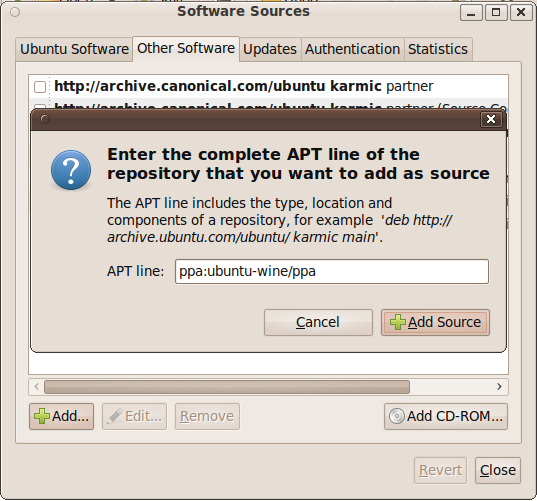
Once you add the repository you can update to the latest wine from your “Update Manager”.



