

Firefox 16, a treat for developers http://t.co/cnd27CzT
Pulse Audio 2.0 is here!
Pulse Audio is an advanced network sound server. To put it simply, Pulse Audio is a background process designed to accept sound input from a source, and redirect it to devices like sound cards, or other processes.
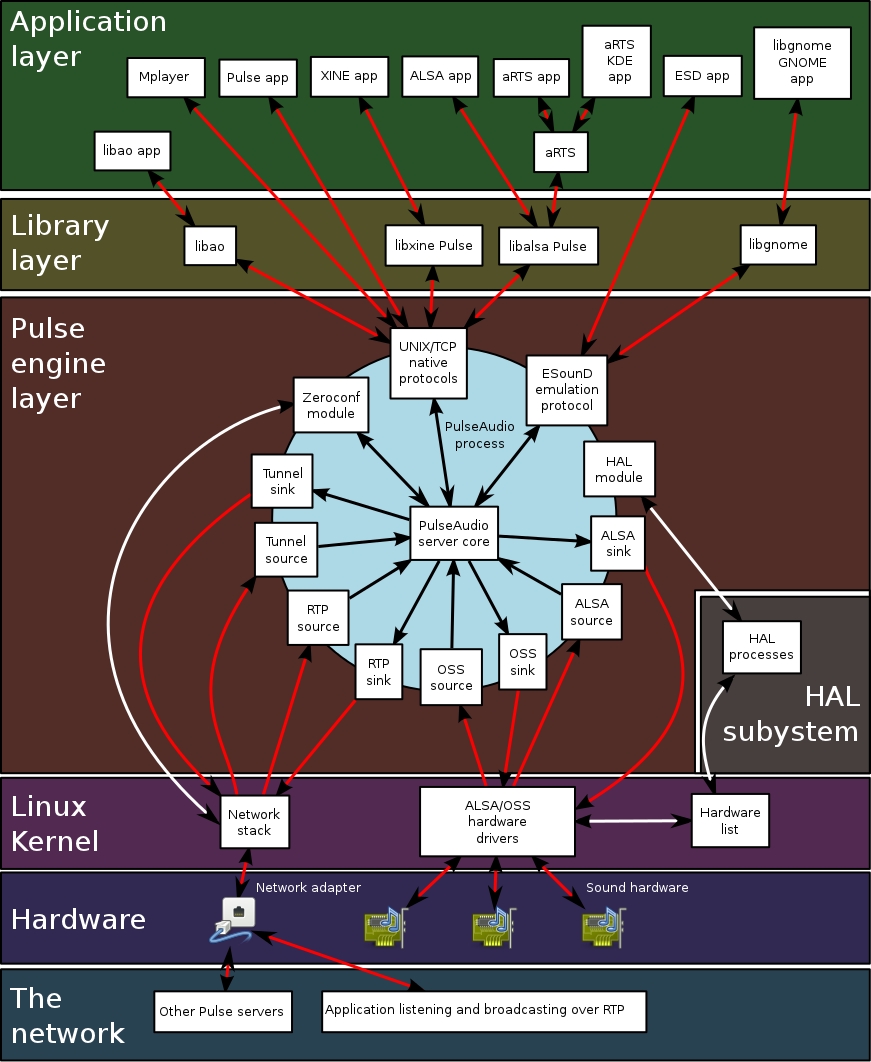
Pulse Audio allows the mixing of multiple audio streams, the sound playback or record on a different machine than the one it is running on, offers a Sound API abstraction, alleviating the need for multiple backends in applications to handle the wide diversity of sound systems, and gives the possibility of doing things like individual volumes per application. Maybe this diagram will help you understand the way things work:
Yesterday, Pulse Audio developers announced the release of version 2.0 which comes with some great new features and additions:
- Alternate sample rates
- Jack detection
- Echo cancellation: WebRTC canceller, automatic gain control, drift compensation
- Virtual Surround module
- Xen Paravirtualised audio sink
- Fixed HURD support
- A2DP decoder quality improvements

If you want to read more details about the new key features visit this webpage.

Like us on Facebook
This week Top Posts 
Top Things to do After Installing Ubuntu 13.04 ‘Raring Ringtail’ : Ubuntu 13.04 Raring Ringtail final is almost out. The final release it scheduled for release on Apri...0 comment(s) |
Install lamp with 1 command in Ubuntu 12.10, 13.04 Raring Ringtail & LinuxMint13 : Updated: 10/09/2012 :LAMP (Linux, Apache, MySQL and PHP) is an open source Web development platform ...0 comment(s) |
Howto: Upgrade to Ubuntu 13.04 Raring Ringtail from 12.04, 12,10 | Desktop & Server : Updated 05-04-2013: Ubuntu 13.04 Raring Ringtail will be released Soon, If you have ubuntu 12,10, 12...0 comment(s) |
Steganography- Hide Your Files Inside An Image in Linux : Nowadays, our personal computer is not only a work tool, it is also our private space where we sto...4 comment(s) |
How to use Remote Desktop in Ubuntu : Sometimes, we need to access our computer from other locations when we’re not at home and such. This...0 comment(s) |
Configure conky-Lua in Ubuntu (12.10 & 13.04 Raring Ringtail), Fedora, debian and LinuxMint | Howto Conky : Updated 05-04-2013: Conky is a free, light-weight system monitor for X, that displays any informatio...0 comment(s) |
Recent Posts
- Steganography- Hide Your Files Inside An Image in Linux
- Unix/Linux File Recognition. Did You Know?
- Migrate from MySQL to MariaDB in FreeBSD
- Connect Your Android Galaxy Tablet to Ubuntu via USB
- ElementaryOS Beta 1 and 2 Comparison and Review
- Introduction to the Linux Command Line
- A Secure Password
- Linux Kernel 3.10. It’s BIG!
- Monitoring Users Activity Using psacct or acct Tools in Linux
- Run Your Own Social Network Using elgg on RHEL / CentOS and Scientific Linux
Recent Comments


DragonFartOutLoud
| #
it went to china.
DragonFartOutLoud
| #
great review! i’ve been using it as my main OS since Beta 1 release. its been a awesome ride so far :)
jet li
| #
i try the method, and i unzip the image contain zip secret, i dont find the file that i was hide, where it go? and how to open it? :s
zinovsky
| #
Yes, it is possible using Steganography, we will post another quick howto do that in the next few days
SK
| #
Hey Abhishek
Yes there are many open source tools available to meet your requirements. They are easy to manage and has a decent web gui to configure. We will publish all of them one by one shortly. Stay tuned with us.

