

Google Plus

Howto- Install Cinnamon on Ubuntu 12.04 Precise Pangolin

Written by M. Zinoune on . Posted in Linux tutorials, Ubuntu

Cinnamon is a Gnome 3 fork that allow you to have a panel at the bottom with a classic Menu, this is useful for people that want to use Ubuntu with a classic Bottom Menu.

More info about Cinnamon can be found in our previous post.

.

.

.

To install Cinnamon on Ubuntu 12.04 Precise Pangolin, use the following PPA:

sudo add-apt-repository ppa:gwendal-lebihan-dev/cinnamon-nightly
sudo apt-get update
sudo apt-get install cinnamon
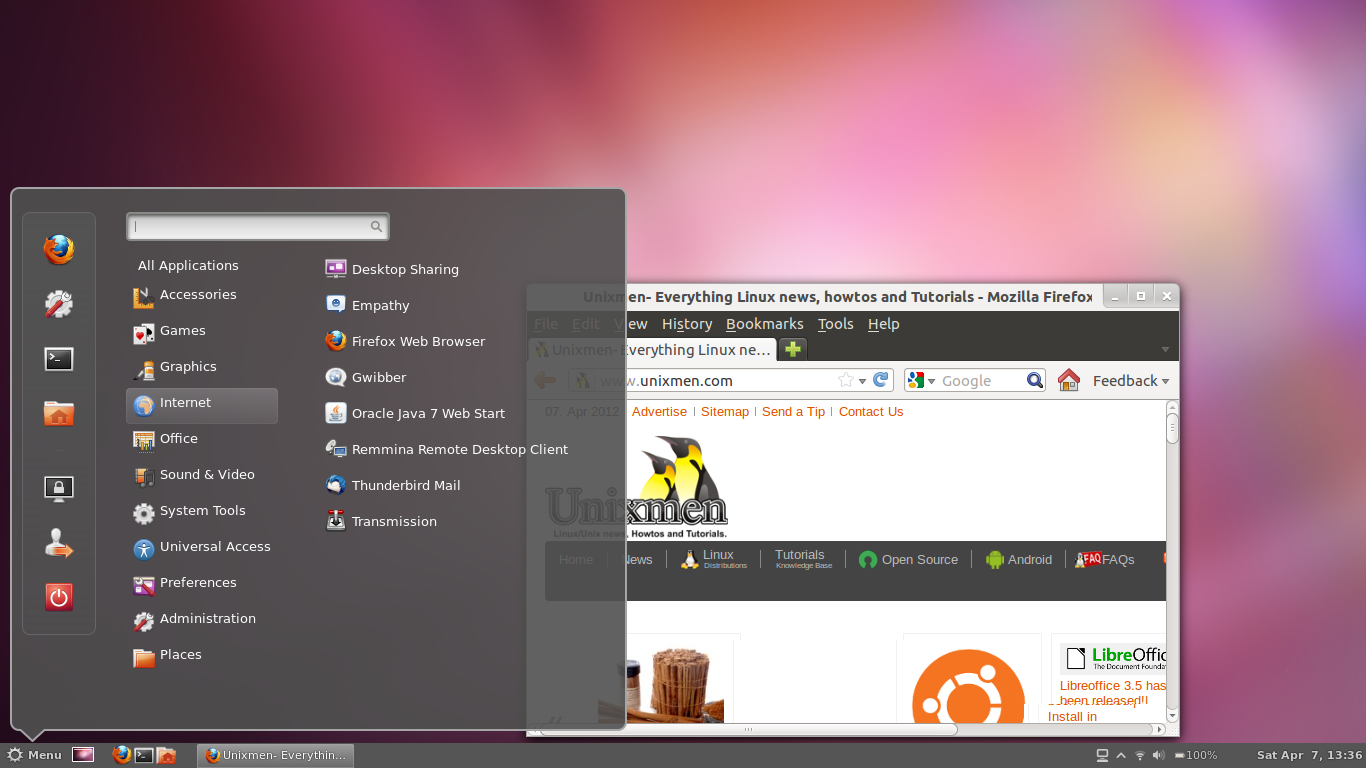

 

For questions please refer to our Q/A forum at : http://ask.unixmen.com

  • http://www.facebook.com/papa.rizzo Jay Ro

    Wow, old news is old. :|

    • zinovsky

      Is not old, you know that cinnamon stopped working on Ubuntu 12.04 for a while now, this is just to inform people that the PPA is working again on precise Pangolin.

  • http://twitter.com/Joakim_Wahlgren Joakim Wahlgren

    Thanks for sharing :)

  • Xzcallaway

    It’s nice to have options, but I can’t get it to work on my computer.  I’m thinking it’s the graphics card and seeing how it’s a laptop, there not much I can do about that.  Installing Solus Os has been easier for me.

    • http://pulse.yahoo.com/_M7L665JQMXNEEVUIBPB4MSBCYQ john j

       Might be your drivers. Cinnamon runs off of gdm3, if you can only run Gnome classic (fallback) then Cinnamon will not work. If you can run Gnome 3 fully then there is another underlying issue than the video card more than likely

  • Dan

    Thanks for the post

  • h4k

    Also having problems here, I have an ATI card with catalyst driver…. maybe because that?, I only can see wallpaper and nothing more.

  • Ytinu

    Funny! Looks like sudo apt-get install windows-xp, lol!

  • Guest

    It’s not even signed?

  • Vimal0212

    After successfully installing cinnamon, cinnamon desktop look lime Gnome classic.
    How can I get Cinnamon menu?

    • Guest

       I have the same problem… I’m wondering if it has to do with the fact that I also installed gnome-panel, the more “classic” verison of the new shell.

      • Nblank

         After reboot choose cinnamon instead of Ubuntu

    • Akash

      1 Uninstall any GPU drivers that you have.
      2 Uninstall cinnamon
      3 Do an Update
      4 Install cinnamon again

  • Devrim YILMAZ

    i can ear any sound yet

    • Devrim YILMAZ

       sorry. i can not ear any sound.

  • http://profile.yahoo.com/52EVP2UNGXDF673V6IASIIHDDI Alem

    this is nightly build not stable use sudo add-apt-repository ppa:gwendal-lebihan-dev/cinnamon-stable

Like us on Facebook

This week Top Posts

Write for us

Recent Comments

Pat L

|

I tried it and it works with a regular zip file, but if you password-protect the .zip file it does NOT work.

SK

|

Yes we can. What kind of help you need? We are doing outsourcing and technical support for Linux and Open source worldwide. To know more about the details visit here.

ClintB

|

After install as above, run shell script /opt/Citrix/ICAClient/wfica.sh manually and note lib errors still occur. I had the x64 motif loaded but had to manually install the x86 too. Got that from http://rpmfind.net/linux/rpm2html/search.php?query=libXm.so.4 Even after that, I still had to do a “yum install alsa-lib.i686 alsa-lib.x86_64″ to resolve any additional libasound.so.2 errors. Once those two lib issues were resolved, Citix Web Interface launched apps fine by telling browser to open launch.ica using /opt/Citrix/ICAClient/wfica.sh. Good luck Ernesto!

AD

|

I need some Help on Linux,can you guide me ?

Edson Carlos

|

In debian no found. I need link download install in linux debian

 
IDG Tech Network
Copyright © 2008-2013 Unixmen.com .
Maintained by Anblik .