Google Plus

Howto: Upgrade to Ubuntu 13.04 Raring Ringtail from 12.04, 12,10 | Desktop & Server

Written by M. Zinoune on . Posted in Linux tutorials, Ubuntu

Updated 05-04-2013: Ubuntu 13.04 Raring Ringtail will be released Soon, If you have ubuntu 12,10, 12.04 Precise Pangolin or older version of ubuntu installed on your system, and you want to upgrade to this new release,  you can do it by following these instructions.

Important: The most important things when it comes to upgrading are:

  1. That your data is safe
  2. That you end up with a fully functional system

Your personal data is the most valuable thing in your computer. If anything happens and you break your operating system, it’s not a problem, it can be reinstalled. If you lose your data… that’s a different story.

To be safe:

  1. Make a full backup of your data on an external device (USB stick or CD/DVD).
  2. Download and burn the liveCD of the newer release, and check that your hardware is fully functional with it.


- Desktop Upgrade:


a- Update the system before to upgrade:

Before to upgrade, we need to update the system, press Ctrl+Alt+T, and enter the following command:

sudo apt-get update && sudo apt-get dist-upgrade
  • b- Upgrade:

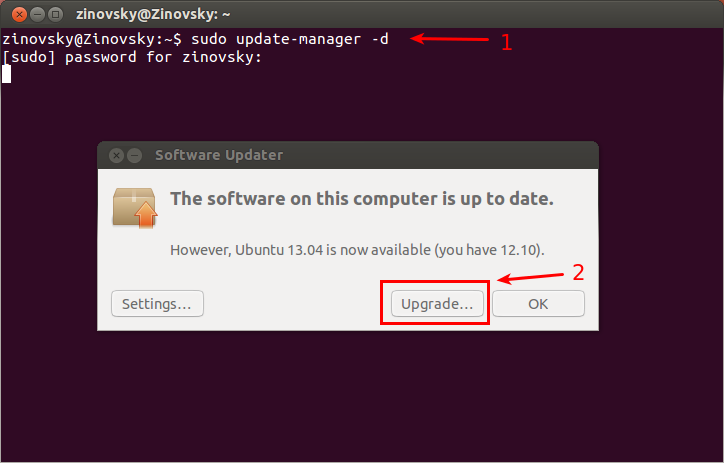
To upgrade, open terminal and enter the following command:

sudo update-manager -d

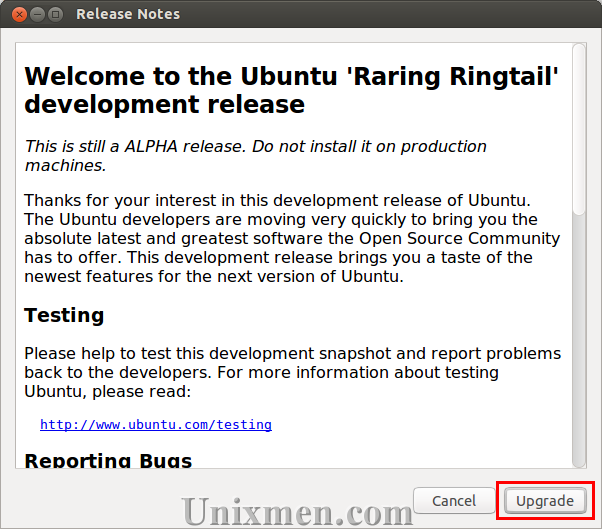
Update Manager should open up and tell you: New distribution release ’13.04‘ is available ( See screenshot bellow).
upgrade-ubuntu13.04

Then click : Upgrade

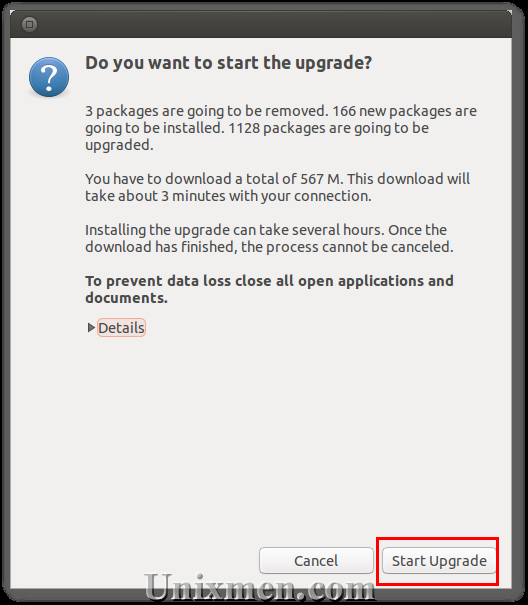
upgrade-2A new screen will appear asking you if you want to start Upgrade:
upgrade-4

Press start upgrade.

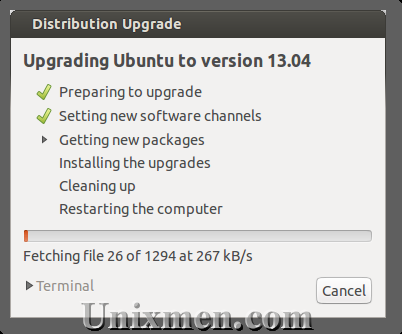
Now don`t close your computer until the upgrade is finished.
upgrade5

- Server Upgrade:

To upgrade from Ubuntu 12.10 on a server system to Ubuntu 13.04:

1- install the update-manager-core package if it is not already installed:

sudo apt-get install update-manager-core

2- Edit /etc/update-manager/release-upgrades and set Prompt=normal;

3- Launch the upgrade tool with the command

sudo do-release-upgrade -d

and follow the on-screen instructions.

Important: This is a beta release. Do not install it on production machines. The final stable version will be released 26th of April 2013.
For questions please refer to our Q/A forum at : http://ask.unixmen.com

  • J.kelum jayathissa

    plz send me a ubuntu new one for follow address j.kelum jayathissa,5/ela,Srawasthipura,Anuradhapura, Srilanka

  • J.kelum jayathissa

    plz send me a ubuntu new one for follow address j.kelum jayathissa,5/ela,Srawasthipura,Anuradhapura, Srilanka

  • http://enteryoursiteURL... Vishal

    Hi,
    Presently, I am using Ubuntu 10.10. Today I wanted to upgrade to Ubuntu 11.10 but, my Update manager is still showing "New Ubuntu release ’11.04′ is available". Eventhough in My Update manager settings, I have set my Release upgrade to Show new distribution releases to Normal releases. Please Help.

    • Anonymous

      you can only go one version to another, not just jump shift -_-

  • giannisnats

    how to upgrade from ubuntu 10.04 directly to 11.10

  • Akshay

    You can not upgrade directly from 10.04/10.10 to 11.10. Two ways to do the same:
    1. Download ubuntu 11.10, make bootable disk and install from scratch.
    2. Upgrade ubuntu step by step from one release to the next. ie 10.04 -> 10.10 -> 11.04 -> 11.10.

    However, When Ubuntu 12.04 comes, you would be able to upgrade directly from 10.04 to 12.04, since both are stable releases.

  • saeed Rana

    hey friends … plz. i wana some some help if one of you have it . plz. gide me how to install driver gx260 dell vga driver ?and the secnd is my ubuntu 11.10 does not detect my monitor configuration ..how can detect my ubuntu to detect my monitor configuration on system dell gx260 .i have board intel845 g
    plz. mail me too @ saeed28992@gmail.com i will b very thankful to the one who will send me information about it .. thanx
    Saeed Rana

  • Andy

    I upgraded from 11.04 (netbook), but failed to check for updates before doing that. Now in 11.10, many icons are missing, both on the app bar on the left and in the settings window. How can I fix this? Any ideas?

    • Andy

      SOLVED: In "appearance" I changed the theme from "ambiance" to "radiance" and back again to "ambiance". This did the trick.

  • kefe

    wurgat

  • Jim Smith

    Greetings,

    I keep getting only a partial upgrade to 11.10. I am a neophyte to Ubuntu and I’m trying. This is the message that I get -

    "Could not calculate the upgrade

    An unresolvable problem occurred while calculating the upgrade:
    The package ‘skype’ is marked for removal but it is in the removal blacklist.

    This can be caused by:
    *Upgrading to a pre-lease version of Ubuntu
    *Running the current pre-release version of Ubuntu
    *Unofficial software packages not provided by Ubuntu

    If none of this applies, then please report this bug using the command ‘ubuntu-bug update-manager’ in a terminal."

    And of course, I am lost. Any assistance would be appreciated.

    Thanks,

    Jim

  • Biswarup Nandi

    thank you..

  • http://aapeli.com Virusforgaming

    10.04 for 10.10 =DDDDDD

  • SIVA

    hai recently i installed 11.04 it was good, but iam facing some issue like while iam watching movie after few minutes its going to white blank screen and its not coming back if i press Esc button or ctrl+alt+del . how can i resolve the issue. [b]CAN ANY ONE HELP ME OUT PLZ….[/b]

  • Jovison

    how about upgrading jaunty into 11.04 in my desktop computer? i tried to upgrade my old release ubuntu,
    I need help badly, im upgrading my old version of ubuntu but the problem is, it sending me an error message.. "[color=blue]E: Unable to parse package file /var/lib/apt/lists/ph.archive.ubuntu.com_ubuntu_dists_lucid_universe_binary-i386_Packages (1)
    E: The package lists or status file could not be parsed or opened.[/color]" i’ve already tried .. opening the terminal and testing those commands update, upgrade and even software updates but still it keeps on sending me the said error message.. any idea how could this be solved?

    Or another option.. If ever i install new fresh copy of the latest release instead of just upgrading it (due to problem encountered during upgrade/update), is there a possibility that my files there may be erased (I’m using jaunty)?
    Looking forward for your responses..
    Please feel free to send me any views/responses in my post and i’ll be very thankful for your help regarding my problem.
    Thank you in advance..

  • neilalaer

    Can you tell me why I can’t upgrade from 10.04 to 11.10 directly via Update Manager? It looks like I have to upgrade to 10.10 first.

    • Hub Cap

      One step at the time. 10.04 to 10.10 to 11.04 to 11.10 or fresh install of 11.10

    • WingedTwilight

      Since 10.04 is a stable release you need to wait until 12.04 is released – which will also be LTS – or you just have to do upgrading in steps.

  • http://n/a LinuxNerd

    I did it from 10.04 to 11.10, but it took more than 3 hours!. My conecction was 200 mb wide!

  • Vicvic

    I upgrade my laptap to Ubuntu 11:10 but after the upgrade, i have a problem of shutting down. Is there anyway I could fix this, I’m not a Ubuntu expert, but it;s greatly appreciated if anyone up there have an idea to fix this problem

  • http://beeznest.wordpress.com/author/ywarnier Yannick

    You should remove the warning at the end… it’s pretty much stable now. Feel free to remove my comment afterwards.

  • Denis

    hi,sorry to bother you but i have a problem.
    Tried to upgrade from 10.10 following the above route from terminal(should point out i am a complete newby and well over sixty),entered the text ok and system listed lots of data but did not give me the screen at (2) and i am at a loss as to what to do now.
    Any help would be appreciated

  • basheer

    enter your message here…

  • basheer

    I AM USING 10.04 PLEASE SEND ME HOW I CAN UPGRADE THIS WITHOUT REINSTALLATION

  • http://enteryoursiteURL... tonie gambe

    enter your message here…

  • http://www.gritoo.com/ Abner SS

    thanks! worked properly.

  • Pinakidasgupta04

    Thanks…. Its very Helpful… Thanks a lot….

  • Abhishek

    Thanks a lot. Your post was very much helpful. It was easy to understand. Thanks :-)

  • Hornet_1981

    Hi, I’m running ubuntu 11.10 (oneiric) and I wanted to upgrade to the new realease, 12.04, but even tough I ran the instruction you wrote, I cannot upgrade to the new release.
    When the “update manager” starts running it doesn’t show me the button upgrade.
    Can you help me about that?

    • http://profile.yahoo.com/SQRCAZSG6ZRZS65UDG2OT4QCRA Josh S

      In update manager you need to choose any release not long term

      • Hornet_1981

         Josh S  I already did that option and nothing happened.
        Thanks Anyway

        • Devscrap

           I have the same problem too (from 11.10 to 12.04).

          • Ben

             12.04 has not been released yet. A release candidate should be available on April 19, 2012.

          • Gun

            I believe you need the “-d” to see the distribution. it worked for me on 10.04. 

  • Nikioko

    For me, sudo apt-get dist-upgrade did fine.

  • Eric Peacock

    thanx for this guide. i’ve always done a fresh install. this is my first actual upgrade. hope it keeps my settings, etc!

    i’m going from 10.04 to 12.04. so far i’ve made it thru the above steps and i’m on “Preparing to Upgrade”.

  • Eric Peacock

    thanx for this guide. i’ve always done a fresh install. this is my first actual upgrade. hope it keeps my settings, etc!

    i’m going from 10.04 to 12.04. so far i’ve made it thru the above steps and i’m on “Preparing to Upgrade”.

  • Eric Peacock

    thanx for this guide. i’ve always done a fresh install. this is my first actual upgrade. hope it keeps my settings, etc!

    i’m going from 10.04 to 12.04. so far i’ve made it thru the above steps and i’m on “Preparing to Upgrade”.

  • Eric Peacock

    thanx for this guide. i’ve always done a fresh install. this is my first actual upgrade. hope it keeps my settings, etc!

    i’m going from 10.04 to 12.04. so far i’ve made it thru the above steps and i’m on “Preparing to Upgrade”.

  • chuck428

    I’m running 11.04 Natty Narwal and every time I do the above instructions without fail it still says 11.10 available.  I don’t want 11.10 I want 12.04 LTS and it’s 4/28 it should be ready to say 12.04 is available. Anyone have any idea as to why that is? 

    • NickA

      I’m in almost the same position except that I’m on 10.10 and it only offers me 11.04.  Even after downloading dozens of megabytes when I press “check” I still only get 11.04 offered.

  • Animesh

    For ubuntu 11.10 onerica this doesn’t work. It never shows the “Upgrade” button. Is anyone else also facing the same problem? I cannot find any answers.

    The command line do-release-upgrade-d returns no new versions

  • http://www.techarun.net/ Arun Godwin Valdar

    I too experience same issue. There is no new update version available to upgrade from 10.04 LTS to 12.04

    • Surin

      I just do all steps in above threads and it’s working well, maybe you need close Update Manager before enter “update-manager -d” in Alt-F2′s window. Even that can’t help, i think you ‘d press Settings button on Update Manager’s window and change the status of Release Upgrade to “Normal releases”; now you can upgrade to 10.10, and do this again a few times to upgrade to 12.04 :D.
      Hope this help.

  • http://twitter.com/Johniexi Mulyanga Johnnie

    am using 11.10 but failed to upgrade. because i neither see system upgrade in the update manger or even when i use the terminal

  • Guest

    first i tried do-release-upgrade, but it filed. then id just edited the “/etc/update-manager/release-upgrades” and set Prompt=normalmaybe it will also work for you guys

  • Dobertw

    running 10.04 ‘update-manager -d’ came up with beta release of 12.04… no thanks

  • http://profiles.google.com/trenton.d.adams Trenton Adams

    No, this doesn’t help anything unless you’re on 11.10.  11.04 comes with a request to update to 11.10, not 12.04.

  • brucerod

    doesn’t work with 10.04 LTS despite changing settings in Update Manager
     

    • hwertz

       Yessir, I’ve read this is intentional.  The assumption is that users still running 10.04 value stability above all, and that 12.04 may have bugs as a new release, so they are planning to make the upgrade available when 12.04.1 is released in July or so.   You may be able to follow the procedure of changing /etc/apt/sources.list changing the version from hardy to precise, and running “apt-get update ; apt-get dist-upgrade”.  But there may be good reasons this upgrade is not available via update-manager yet!

  • brucerod

    Will work with 10.04, but first you have to go into Administration/Software Sources/Updates and select Pre-released Updates (lucid proposed)  before it will see the update.  Ubuntu recommends waiting until July before upgrading 10.04 LTS.

    • Guest

      Nope, doesn’t work even after selected Pre-released Updates

      • Someone

         Same here. All I see is a upgrade to 10.10. There’s no 12.04 LTS in the list.

    • Adrian

       I wish I had read this post before I started the upgrade from 10.04 LTS.

  • Ronnie

    worked great going from 10.04 -> 12.04. Thanks very much. 

  • John

    I’ve updated my server to 12.04. After restarting the machine the server is now unreachable via ssh… :(

    • http://twitter.com/Arizon Dread

      I have the same problem, luckily I took a snapshot before the installation that I could revert to..now what? does it have anything to do with grub-pc vs. grub?

  • Sachin Joshi

    Nice article… :) :)
    Guys please also have a look at this blog.. http://sachinjoshia14.wordpres

  • Coverturtle

    E: Could not perform immediate configuration on ‘python-minimal’.Please see man 5 apt.conf under APT::Immediate-Configure for details. (2)

  • Pingback: Ubuntu upgrade issues | Talking IT

  • http://www.fortycloud.com/ Amir

    Thanks, this helped me and work great from 10.4 to 12.04

  • Vijay Prakash Singh

    E: Could not get lock /var/lib/apt/lists/lock – open (11: Resource temporarily unavailable)
    E: Unable to lock directory /var/lib/apt/lists/
    vpsingh@vpsingh-Inspiron-N4030:~$
    tell me what can i do  for it , i am unable to update my 11.10, and update software , software market is not showing..
    kindly help me

    • http://twitter.com/Arizon Dread

      1. you need to use sudo
      2. you can’t have another application that handles updates running at the same time, i.e. update manager, synaptic or ubuntu software center or running updates in another shell simultaneously.

      good luck!

    • Vijay Prakash Singh

      vpsingh@vpsingh-Inspiron-N4030:~$ sudo
      usage: sudo -h | -K | -k | -L | -V
      usage: sudo -v [-AknS] [-g groupname|#gid] [-p prompt] [-u user name|#uid]
      usage: sudo -l[l] [-AknS] [-g groupname|#gid] [-p prompt] [-U user name] [-u
                  user name|#uid] [-g groupname|#gid] [command]
      usage: sudo [-AbEHknPS] [-C fd] [-g groupname|#gid] [-p prompt] [-u user
                  name|#uid] [-g groupname|#gid] [VAR=value] [-i|-s] []
      usage: sudo -e [-AknS] [-C fd] [-g groupname|#gid] [-p prompt] [-u user
                  name|#uid] file …
      vpsingh@vpsingh-Inspiron-N4030:~$ 
      after using sudo .. as upper showing , but problem didnt solve ,,, what to do?

      • http://twitter.com/Arizon Dread

        You need to use sudo to precede your upgrade command since updating the system requires root privileges. 

    • Artickl Root

      use sude before do-release-upgrade

  • Dominic

    I upgraded successfully running in a screen session using terminal over ssh – Ubuntu Server 10.04 LTS to Ubuntu 12.04 LTS. With a screen session you can drop out and come back later (screen -R). You need to check back on the process because it takes a long time and a few questions arise which have to be answered. All very smooth – much better than it used to be with earlier versions!

  • wookierookie

    nice one. somehow i crashed my update-routine and i was not able to update in anyway. command worked i’m new to ubuntu. seems there is something wrong with my system.(athlonXP,1gb,160gb hdd ide, asus a7n8x-e with extra sata-controller, ati hd 2600). could not install 12.04 from scratch. had to start from 9.10. seems that it works with gnome/kde, but not with unity.
    hopefully the upgrade works.

  • yatendra kumar

    hello
    when i running update-manager -d in terminal,
    i found this error….plz help me …

    Could not initialize the package information…………

  • Pingback: Daily Task 2012 Week24 (6/10 – 6/16) « Artist of Code

  • Timothy Guyer

    12.04 to 12.10. Thank you!

  • geisha

    what happens next after upgrade? will we lose access to ssh and usernames? what would be the new username and password then? ty

  • Pingback: Force Ubuntu Server Upgrade | kdmurray.blog

  • alex69

    from 12.04 to 12.10 it doesn’t work, update manager opens without any upgrade button available.

    • alex69

      I succeed! the problem was to leave “only LTS Version” from the flag “notify me when new version comes”.
      hallo

      • http://goodbyte.gr georgecm

        thanks !

      • Captainpeanutbutter

        i fail,even though I changed the flag to “notify me when new version comes”

  • ontagurun

    thanks! worked properly.

  • maurice

    Nice guide! I created a similar one, check it out and let me know what you think!
    http://www.maknesium.de/guide-upgrade-ubuntu-from-12-04-lts-precise-pangolin-to-12-10-quantal-quetzal

  • Darkkelte

    Thanks for this good informantion

  • Maknesium

    I have written a guide with some more screenshots which really closely follows the process of the upgrade to 12.10. You might want to check it out here http://www.maknesium.de/guide-upgrade-ubuntu-from-12-04-lts-precise-pangolin-to-12-10-quantal-quetzal

  • http://twitter.com/woepwoep Ronald Wopereis

    excellent !

  • http://www.facebook.com/pazitiff Pavel Popov
  • lwcary

    Any help would be GREATLY appreciated. :-)

    Lloyd

    *****

  • Pingback: Upgared Ubuntu 12.04 to 12.10 | Valutech

  • Daniel Benny Simanjuntak

    Very good guide and really easy to follow. Thanks! Also, through terminal one can upgrade as well using the command: sudo do-release-upgrade -d.

    – topspot-official.blogspot.com –

  • Nagaraja

    hai friends.. am using ubuntu12.04 LTS now am upgrade with the command
    sudo apt-get upgrade

    after completing i restart my system.. and it shows the error on my login
    ‘fail to load session”ubuntu”‘
    what can i do please help me friends
    contact dhanagaraja@gmail.com

  • opensas

    After upgrading to 13.04, you can check this list of tweaks:

Like us on Facebook

This week Top Posts

Write for us

Recent Comments

Pat L

|

I tried it and it works with a regular zip file, but if you password-protect the .zip file it does NOT work.

SK

|

Yes we can. What kind of help you need? We are doing outsourcing and technical support for Linux and Open source worldwide. To know more about the details visit here.

ClintB

|

After install as above, run shell script /opt/Citrix/ICAClient/wfica.sh manually and note lib errors still occur. I had the x64 motif loaded but had to manually install the x86 too. Got that from http://rpmfind.net/linux/rpm2html/search.php?query=libXm.so.4 Even after that, I still had to do a “yum install alsa-lib.i686 alsa-lib.x86_64″ to resolve any additional libasound.so.2 errors. Once those two lib issues were resolved, Citix Web Interface launched apps fine by telling browser to open launch.ica using /opt/Citrix/ICAClient/wfica.sh. Good luck Ernesto!

AD

|

I need some Help on Linux,can you guide me ?

Edson Carlos

|

In debian no found. I need link download install in linux debian

 
IDG Tech Network
Copyright © 2008-2013 Unixmen.com .
Maintained by Anblik .