

Google Plus

How to install Burg boot loader in Ubuntu 12.04 Precise “Pangolin” and LinuxMint13

Updated 23-05-2012burg is a brand-new boot loader based on GRUB. It uses a new object format which allows it to be built in a wider range of OS, including Linux/Windows/OSX/Solaris/FreeBSD, etc. It also has a highly configurable menu system which works in both text and graphic mode. In this post we will show you how to install Burg in Ubuntu 11.10 , 12.04 “Precise Pangolin” and LinuxMint13.
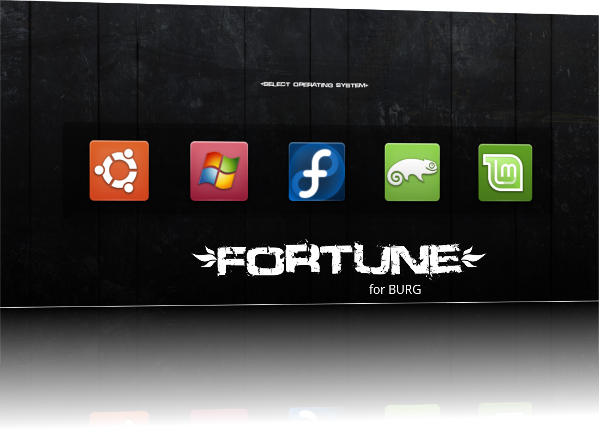
burg-theme


  • To Install Burg in Ubuntu 12.04 Precise Pangolin,  and LinuxMint, Open terminal and enter the following commands :
sudo add-apt-repository ppa:n-muench/burg
sudo apt-get update 
sudo apt-get install burg burg-themes
  • Now to make  BURG integrate the HardDisk enter the following command in terminal:
 sudo burg-install "(hd0)"

Remember to substitute ‘hd0′  with the drive on which your MBR is installed.

  • Now update burg:
 sudo update-burg
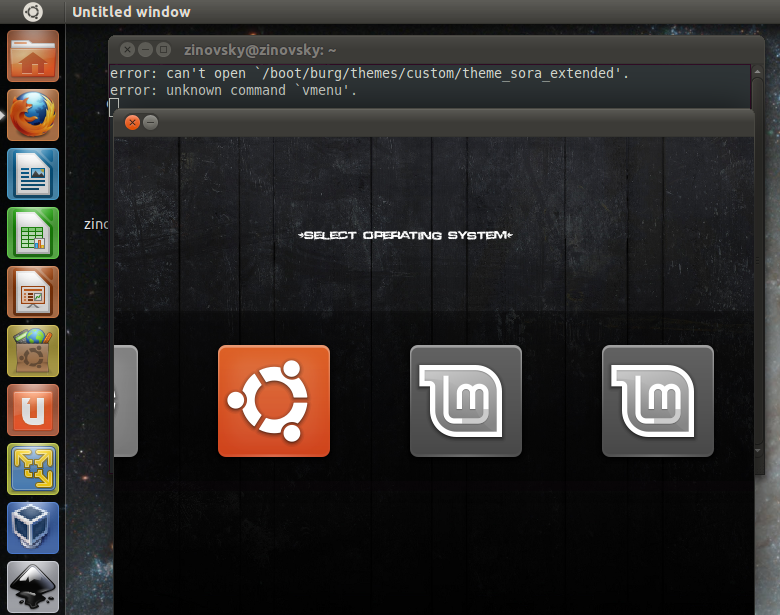
  • Finally, run the following to test and set your theme:
sudo burg-emu
burg4

Press F2 To change theme .

Press F3 to change resolution

If you want to use  another easy way to configue burg, you need to install Burg- manager, for this check our previuos post.

Here are the hot-keys defined in the boot menu:

  • t – Open theme selection menu
  • f – Toggle between folding mode
  • n – Jump to the next item with the same class
  • w – Jump to the next Windows item
  • u – Jump to the next Ubuntu item
  • e – Edit the command of current boot item
  • c – Open a terminal window
  • 2 – Open two terminal windows
  • h – Display help dialog (only available in sora theme)
  • i – Display about dialog (only available in sora theme)
  • q – Return to old grub menu
  • F5/ctrl-x – Finish edit
  • F6 – Switch window in dual terminal mode
  • F7 – List the folded boot items
  • F8 – Toggle between graphic and text mode
  • F9 – shutdown
  • F10 – reboot
  • ESC – quit from the current popup menu or dialog.

Useful Links: lffl.org/ , http://code.google.com/p/burg

For questions please refer to our Q/A forum at : http://ask.unixmen.com

  • khush

    is the add-repository command correct?

    shouldn’t it be:
    add-apt-repository ppa:n-muench/burg

  • rigbyrobot

    also it should be sudo burg-install (hdd with mbr)

  • Mantus

    You type it wrong
    It’s should be

    sudo apt-add-repository ppa:n-muench/burg

    Thanks

    • khush

      i meant with root access.

  • khush

    with root acce[quote=khush]i meant with root access.[/quote]

    the command seems right!

  • anonymous

    guys help ahaha i lose screen login when i install burg manager …it shoing only grub screen

    • zinovsky

      What you mean? You can not access to the system?

  • anonymous

    any help …guys

  • anonymous

    yes can’t loing into the sys win+ubuntu .. when i use this command to install burg-manager on ubuntu 11.04
    i lose login screen

  • anonymous

    only i have grub terminal

  • anonymous

    any suggestions to resolve this problems plz

  • http://www.pc-junkie.com Milan

    when i enter:

    sudo apt-get install burg burg burg-common-pc-emu burg burg burg-themes-themes-common

    i get:

    E: Unable to locate package burg-common-pc-emu
    E: Unable to locate package burg-themes-themes-common

    What to do, pls?

    • zinovsky

      refresh your repos first and try again :
      sudo apt-get update

  • Salmon Adelphi

    sudo apt-get install burg burg (two times?)

  • menchi

    I also get:

    E: Unable to locate package burg-common-pc-emu
    E: Unable to locate package burg-themes-themes-common

    this is even after apt-get update. No matter what I seem to try, I’m not finding burg.

  • menchi

    solution found.
    forget this nonsense:
    sudo apt-get install burg burg burg-common-pc-emu burg burg burg-themes-themes-common

    use this:

    sudo apt-get install burg

    that’s all you need.

  • indresh

    how to know in which disk the MBR is located i runned fooloeing command in terminal

    [b]sudo dd if=/dev/sda bs=1 skip=1049 count=2 | hexdump[/b]

    and the result was

    [b]2+0 records in
    2+0 records out
    2 bytes (2 B) copied, 0.00011454 s, 17.5 kB/s
    0000000 ffff
    0000002
    [/b]

    what is the meaning of [color=red]ffff[/color]

  • http://enteryoursiteURL... snvs

    mate, it would also be great if you could tell me how to remove it and switch back to grub.

  • ahmed

    you can restore grub here by follow this guider here http://www.youtube.com/watch?v=ajs9rO5upZA

  • ahmed

    and later you can remove burg after login
    form ubuntu software center

  • http://enteryoursiteURL... Jeff

    Hi,

    I have tried what the webmaster had suggested and unfortunately it didn’t work. I am on a dell E6510 laptop running 64 bit windows 7 and natty narwhal. I had tried use this site to install burg and now after I rebooted aftering trying it, I can’t use my computer. The screen reads:

    BURG version 1.98+20100623-1+maverick

    Mimimal BASH-like line editing is supported. For the first word TAB…….and so on.

    grub>

    I can’t figure out what will make it work one way or the other. Can anybody walk me through this. I’m new to linux, but it really interests me. I have a usb drive with ubuntu on it that I downloaded today.

    Please help!!!!

    Thank you!

    Jeff

  • http://enteryoursiteURL... Jeff

    well if anything goes wrong I learned the easiest thing to do is reinstall the partition itself….

    Thanks for the help unixmen!

    Jeff

  • Krish

    I did the above instruction but when i reboot the system it loaded to the grub recovery mode and I dont know what to do…….

    Help

  • Snoopy Nl

    Hi all,

    First of all, thanks for this post!!!!
    Easy to understand / to install and it works perfectly for me, really a easy way to install burg.

    I have installed on my system XP SP3 / Vista SP2 / Seven SP1 / Mac OSx Lion 10.7 DP4 and Ubuntu 11.04, everything works and starts since the Burg Menu.

    Just a word..try it because it is just amazing!!!

    Snoopy from Nl

  • Yoram

    All I got is that typical balck screen menu from grub!
    I had it working before updating to version 11.04.
    Any help is welcome

  • http://enteryoursiteURL... lagrande

    I got problem with dependencies on Natty, and now the source list got error
    [code]E: Type 'ain' is not known on line 3 in source list /etc/apt/sources.list.d/n-muench-burg-natty.list
    E: The list of sources could not be read.
    Go to the repository dialog to correct the problem.
    E: _cache->open() failed, please report.
    [/code]
    How to fix ?
    Thank you

  • Krishna

    What is the main difference between GRUB and BURG ?

    What benefits do we get by installing BURG ?

    Do we really need BURG ?

  • amd64

    buntu 11.04 has a big problem for the grub, only way for this try another o/s.

    like suse, sebian,

  • http://bsndesign.webs.com Bhavesh

    While installing it says that its built for Natty, would it work on 11.10 too?

  • http://enteryoursiteURL... Tom

    Unable to locate package burg…

    [code]ubuntu@ubuntu:~$ sudo apt-get install burg burg-themes
    Reading package lists... Done
    Building dependency tree
    Reading state information... Done
    E: Unable to locate package burg
    [/code]

    any suggestions?

  • dreu

    We do not want an otherr overcomplicated grub variant
    grub is and allways was the worst of unix

    with months of troublge it kills ubuntu 11.xx kompletely
    and this is not the firsy time. It is Not Kiss its design and
    architecture is stupid lost more time with stupid grub then ever gained with unix

    bam grub then you have my attention

  • Bender

    It causes my plymouth to change into text mode :(

    • http://atlasgreenshop.co.cc ichan

      it’s same like me

  • http://atlasgreenshop.co.cc ichan

    its work on my oneiric ocelot, but when I startup the ubuntu doesn’t exist, there’s only ubuntu recovery mode and windows 7 to choose. please help me how to fix it.
    if any ways to fix it I hope it’s can be fix by terminal, cause I can’t get into ubuntu at all
    please send me a message if any ways to fix it
    mishanmn@yahoo.com

  • Samjclarke

    The line:
    sudo add-apt-repository ppa:n-muench/burg sudo apt-get update

    should be:
    sudo add-apt-repository ppa:n-muench/burg && sudo apt-get update

    but other than that it works great! Thanks!

  • http://profile.yahoo.com/3PGPMRKTR4XB4C3JMJKZ7USPIA Ade

    Hi, I have a question regarding the installation of Burg on a partitioned hard drive. I have one hard drive in my computer and recently partitioned some of it for Ubuntu 11.10. When it comes to this step: sudo burg-install “(hd0)”, would I still use hd0 as the hard drive where my MBR is installed? If it helps, I remember using “sd3″ when partitioning my drive for Ubuntu.
    Also, as a follow-up question: will Burg replace the default Windows bootloader as well as the default Ubuntu bootloader?
    Thanks in advance!

    • Shubham

      Windows probably has the boot loader installed to its partition, Burg installs on the MBR and chainloads the Windows Boot Loader.

  • Thesalesandbuyers

    Hi first of all thanks for this post!  I have a question. How I do know where is the MBR (hd0, hd1, hd….etc.)?

    • matt

      “sudo fdisk -l”  (fdisk -l, is list all disks)

      If you have windows and linux, two should be stared.  Find the one that says “LInux” under System.  ( You will see it rather quickly once you run the program!)

      Good luck

      • Thesalesandbuyers

         Thanks Matt, it’s working great!  thanks very much. One question: how I do remove the recovery Windows icon? I looking around but nobody seems to know really how. even with the super boot manager.

        • Giannis Avgeris

           You can install Grub Customizer to delete the unnecessary items like recovery mode or memtest

  • Jaerick

    when I run:
    sudo add-apt-repository ppa:n-muench/burg && sudo apt-get update

    I get:
    W: Failed to fetch http://ppa.launchpad.net/bean123ch/burg/ubuntu/dists/oneiric/main/source/Sources  404  Not Found

    W: Failed to fetch http://ppa.launchpad.net/bean123ch/burg/ubuntu/dists/oneiric/main/binary-amd64/Packages  404  Not Found

    W: Failed to fetch http://ppa.launchpad.net/bean123ch/burg/ubuntu/dists/oneiric/main/binary-i386/Packages  404  Not Found

    E: Some index files failed to download. They have been ignored, or old ones used instead.

    And then the command:
    sudo burg-install /dev/sda2Returns:sudo: burg-install: command not foundHelp? Absolute beginner here!