

Google Plus

How to install and configure Webdav ubuntu 11.04/mint11

Written by Mel Kham on . Posted in Ubuntu

Web-based Distributed Authoring and Versioning (WebDAV) is a set of methods based on the Hypertext Transfer Protocol (HTTP) that facilitates collaboration between users in editing and managing documents and files stored on World Wide Web servers. WebDAV was defined in RFC 4918 by a working group of the Internet Engineering Task Force (IETF).

The WebDAV protocol makes the Web a readable and writable medium, in line with Tim Berners-Lee’s original vision.[1] It provides a framework for users to create, change and move documents on a server (typically a web server or “web share”). The most important features of the WebDAV protocol include:


I-Installl  webdav in Ubuntu 11.04 and LinuxMint11

  • I- Install apache and  encoding  moduls

sudo apt-get install apache2 libapache2-mod-encoding
I-2  enable  webdav modules

a2enmod dav_fs
a2enmod dav

1-3 create webdave  directory and add permissions

mkdir -p /var/www/webdav
chown www-data. /var/www/webdav
chmod 770 /var/www/webdav


1-4 Restart apche2 to take the last modifications

/etc/init.d/apache2  restart

Now configure webdav Server

 vi  /etc/apache2/conf.d/webdav.conf

and  add
######################################################################################

Alias /webdav /var/www/webdav
 <Location /webdav>
 DAV On
 #SSLRequireSSL
 Options None
 AuthType Basic
 AuthName WebDAV
 AuthUserFile /etc/apache2/conf.d/.htpasswd
 <LimitExcept GET OPTIONS>
 Order allow,deny
 Allow from all
# IP address you allow

Require valid-user
 </LimitExcept>
 </Location>

#######################################################################################

II-run this  command  to  apply  thewebdav   encoding

a2enmod dav* encoding
 Enabling module dav.
Considering dependency dav for dav_fs:
Module dav already enabled
Enabling module dav_fs.
Enabling module dav_lock.
Enabling module encoding.
Run '/etc/init.d/apache2 restart' to activate new configuration!


III-Make  access  to  webdav server  for  user  admin

III-1 run under root  access

 htpasswd  -c /etc/apache2/conf.d/.htpasswd admin
 New password:
# set password
 Re-type new password:
# confirm
Adding password for user admin
/etc/init.d/apache2 restart
 * Restarting web server apache2
... waiting ...done.


III-2 Now open the webdab with http://localhost/webdav  or with cadaver tool

root@pirat9-VirtualBox:~# cadaver http://localhost/webdav
Authentication required for WebDAV on server `localhost’:
Username: admin
Password:
dav:/webdav/>

Now   how  to connect   from Windows to  webdav server
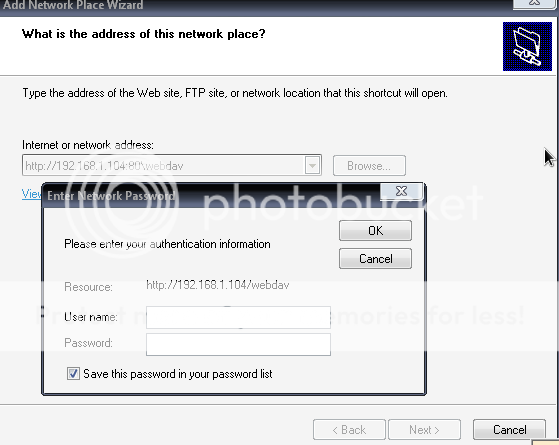


To connect  from Linux  (ubuntu   example)

For questions please refer to our Q/A forum at : http://ask.unixmen.com

Mel Kham

Founder of Unixmen, Living in Amsterdam. Am working in my free time to help people to understand the Opensource and to explain them in easy way how to make the fist steps to the the light. Working day and night with my Co-founder Zinovsky to keep this website live even with less resources.
  • amedli

    root@ubuntu:~# /etc/init.d/apache2 restart
    Syntax error on line 1 of /etc/apache2/conf.d/htpasswd:
    Invalid command ‘testing:B/Dan3V1hs1KM’, perhaps misspelled or defined by a module not included in the server configuration
    Action ‘configtest’ failed.
    The Apache error log may have more information.
    …fail!

  • http://www.yazilimyukle.com amedli

    webdav config
    Alias /webdav /var/www/webdav

    DAV On
    #SSLRequireSSL
    Options None
    AuthType Basic
    AuthName WebDAV
    AuthUserFile /etc/apache2/conf.d/.htpasswd

    Order allow,deny
    Allow from 192.168.0.
    # IP address you allow
    Require valid-user

    /etc/init.d/apache2 restart
    * Restarting web server apache2 … waiting [ OK ]
    root@fw:~#

  • http://enteryoursiteURL... david

    I did this on mythbuntu 10.10 and it works but it doesn’t ask for username or password from any browser when accessing http://192.168.1.64/webdav.
    It simply allows access.

    From Windows7
    I get the error message:
    the folder you entered does not appear to be invalid, please choose another.

    I don’t see what I am doing wrong.

    Please help.

  • HagarLucky

    Because of the bracketing the access controls (Allow, Deny, Require), everyone from everywhere can at least read the documents in the directory.

    If you do not want this very liberal access policy, the controls must be outside the LimitExcept tags. In this case, you can simply remove those two tags.

  • Ali Jamal

    messageDeleted

    • xX0v0Xx

       There is a bug in the post !!!! You have to read it as two separate commands :(
      i.e.
      a2enmod dav_fsa2enmod dav

      • xX0v0Xx

         eh it occurs the same to my post the CR between the commands have been removed… its  a2enmod dav_fs     a2enmod dav

  • Ali Jamal

    ‘a2enmod dav_fsa2enmod dav’not Working…this Error Appears When I Use This Terminal Command…”alijamal@ubuntu:~$ a2enmod dav_fsa2enmod dav
    ERROR: Module dav_fsa2enmod does not exist!
    Enabling module dav.
    Could not create /etc/apache2/mods-enabled/dav.load: Permission denied”
    Ali JamalCS Student –  FAST National University of Computer and Emerging Sciences Roll No: i09-1719    ☎ +923139541029    ✉ alijamal14@gmail.com    Profile: profiles.google.com/alijamal14

    • Menard890

      Ali,

      You must be logged in as root to write to that directory.

  • http://www.facebook.com/profile.php?id=1539338378 Sarmen Boyadjian

    this page was scraped from somewhere thats why it looks off. please post the origional page.

Like us on Facebook

This week Top Posts

Write for us

Recent Comments

Dominik Bauer

|

thx a lot!

Maximiliano Osorio

|

Osom. Thank you.

Sam

|

Thanks much. It worked like a charm.

HailsandNails

|

Actually, what I see too much of, and what Microsoft actually (sorta) did with Windows 8 is think forward. And let’s be brutally honest. Windows 8 is actually NOT as bad as people is making it out, they’re just freakishly afraid of change (which Linux users are as well, it seems)

SK

|

Yes i will. Keep visiting. Subscribe us to get daily updates. Thanks for the comment

 
IDG Tech Network
Copyright © 2008-2013 Unixmen.com .
Maintained by Anblik .
