

Firefox 16, a treat for developers http://t.co/cnd27CzT
How to get Pidgin to speak instant messages in Ubuntu and LinuxMint
In this tutorial we will show you how to get Pidgin to speak instant messages in Ubuntu using Festival. For Pidgin, i think every linux user heard before about this popular instant messenger. For Festival, if you diden`t heard about before, it is a general multi-lingual speech synthesis system that offers a full text to speech system
with various APIs, as well as an environment for development and research of speech synthesis techniques. It is designed to support multiple languages, and comes with support for English (British and American pronunciation), Welsh, and Spanish. Voice packages exist for several other languages, such as Castilian Spanish, Czech, Finnish, Hindi, Italian, Marathi, Polish, Russian and Telugu.
Now before to start, if you don`t have Pidgin installed, doesn`t mater since Pidgin and Festival are dependencies of the plug-in, so will be installed automatically during the plug-in installation.
1- Install festival plugin for Pidgin
Open terminal and enter the following command, you can also install Festival from Ubuntu software center:
sudo apt-get install pidgin-festival
After installation is done, restart pidgin.
2- Activate and configure Festival plugin
Start Pidgin then go to Tools–>>plugins and activate festival
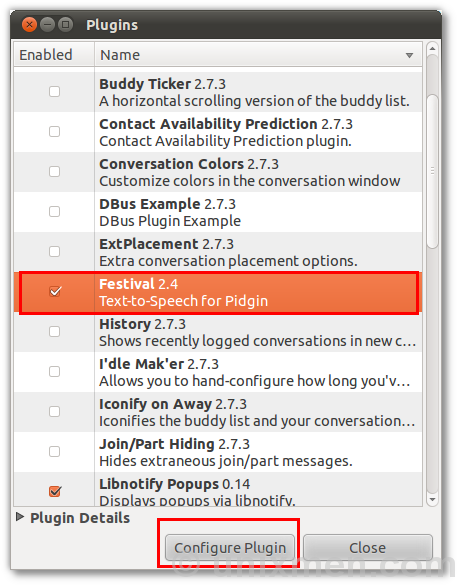
After, click configure plugin and setup
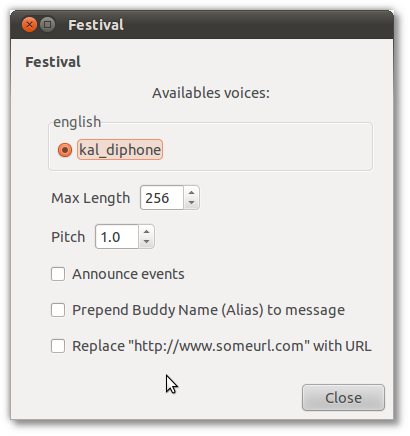
3- Install more Languages speakers
To install more languages speakers, open terminal and enter the following command:
sudo apt-cache search festvox
Output:
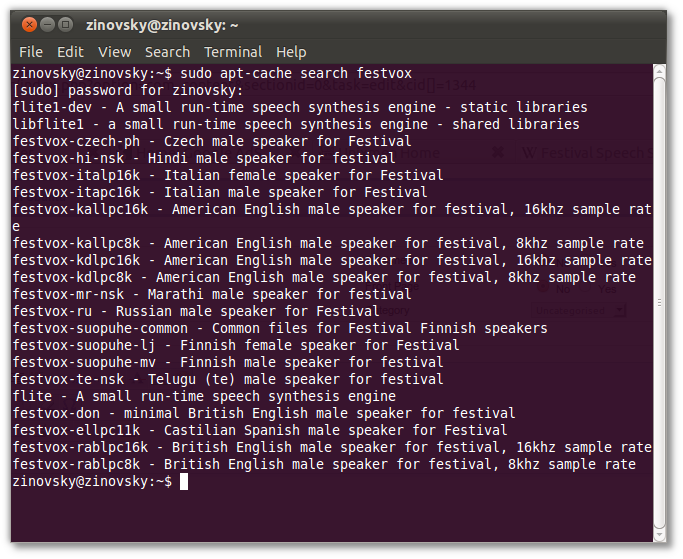
Is done.
For me worked perfectely without any issue. If you got any troubleshouting we can help you to resolve it. Just share your problem by commenting this post or by using in our Forum.

-
http://www.deansale.com/
-
-
http://www.bestfinance-blog.com
-
http://goodfinance-blog.com
Like us on Facebook
This week Top Posts 
Top Things to do After Installing Ubuntu 13.04 ‘Raring Ringtail’ : Ubuntu 13.04 Raring Ringtail final is almost out. The final release it scheduled for release on Apri...0 comment(s) |
Howto: Upgrade to Ubuntu 13.04 Raring Ringtail from 12.04, 12,10 | Desktop & Server : Updated 05-04-2013: Ubuntu 13.04 Raring Ringtail will be released Soon, If you have ubuntu 12,10, 12...0 comment(s) |
Install lamp with 1 command in Ubuntu 12.10, 13.04 Raring Ringtail & LinuxMint13 : Updated: 10/09/2012 :LAMP (Linux, Apache, MySQL and PHP) is an open source Web development platform ...0 comment(s) |
Configure conky-Lua in Ubuntu (12.10 & 13.04 Raring Ringtail), Fedora, debian and LinuxMint | Howto Conky : Updated 05-04-2013: Conky is a free, light-weight system monitor for X, that displays any informatio...0 comment(s) |
Howto- Resolve nosound problem on Ubuntu 13.04 Raring Ringtail,12.10 and Older : Updated 05/04/2013 : One of the common issues facing Ubuntu users after installing or upgrading Ubun...0 comment(s) |
Install and Configure Samba share in Ubuntu 13.04 Raring Ringtail , 12.10, 12.04| Howto : Updated 05-04-2013: One of the most asked features for Samba is a graphical user interface to help w...0 comment(s) |
Recent Posts
- Secure File from Removal in Linux and Unix
- How to Install Nginx on FreeBSD 9.x
- Create a Launcher in Ubuntu Using Bash
- Scan Your Home Network With Nmap
- Steganography- Hide Your Files Inside An Image in Linux
- Unix/Linux File Recognition. Did You Know?
- Migrate from MySQL to MariaDB in FreeBSD
- Connect Your Android Galaxy Tablet to Ubuntu via USB
- ElementaryOS Beta 1 and 2 Comparison and Review
- Introduction to the Linux Command Line
Recent Comments


Snake
| #
Wow, great. That’s what i’m waiting for too. I want to make DC with LDAP ( Active Directory alternative) and SAMBA on Ubuntu. :-)
Blawer
| #
Thanks!!!!!!!!!!!!!!!!!! you rules!!! all the other “help” in google are useless… yours was very helpful. Thanks again
piCool
| #
Great ! we have another another master trick :-)
Yilmaz Ulugtekin
| #
Just delete the space after the slash (/) it will work.
Pat L
| #
I tried it and it works with a regular zip file, but if you password-protect the .zip file it does NOT work.