Firefox 16, a treat for developers http://t.co/cnd27CzT
Grab VLC Player for your Android!
VLC player by VideoLAN, the popular cross-platform opensource multimedia player, is already a sweetheart for Linux users, particularly. And now to our delight, VLC is available for Android phones!! VLC port to Android paltform will play local video and audio files, also network streams similar to desktop version of VLC. VLC though yet in its beta phase has some impressive features to boast!
VLC (Neon Version) brough to Android by the VLC Mobile team claims ” [VLC for Android] plays most multimedia files as well as discs, devices, and network streaming protocols”. VLC for Android also incorporate a media library housing your Audio and Video files enabling you to browse folders directly. The best feature is however the support for multi-track audio and subtitles. VLC for Android supports auto-rotation aided with the device accelerometer, aspect-ratio adjustments and of course, touch gestures to control volume.
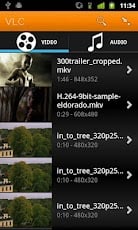

At the moment, VLC for Android is only supported by a limited number of devices with a CPU ARMv7 that will support NEON. Thankfullye, VLC Mobile Team promises to bring the immensely popular video player soon to other Android devices too.
VLC for Android is in its beta phase and intended for Hackers and Powerusers. The teams has put a disclaimer “It might kill your kitten, destroy your house and start the mayan apocalypse.Use it at your own risk. Have Fun! :)”. Despite the limitation, the app has been downloaded over 600 times (in a matter of few hours) from the Google Play store here. The reviews so far are satisfactory and none has reported a fatal crash. We shall bring you a detailed hands on the media player as we play with it for some time.
Grab your copy HERE

-
-
-
Pingback: Przegląd prasy 9/2012 | KDEFamily
-
-
Like us on Facebook
This week Top Posts 
Top Things to do After Installing Ubuntu 13.04 ‘Raring Ringtail’ : Ubuntu 13.04 Raring Ringtail final is almost out. The final release it scheduled for release on Apri...0 comment(s) |
Install lamp with 1 command in Ubuntu 12.10, 13.04 Raring Ringtail & LinuxMint13 : Updated: 10/09/2012 :LAMP (Linux, Apache, MySQL and PHP) is an open source Web development platform ...0 comment(s) |
Howto: Upgrade to Ubuntu 13.04 Raring Ringtail from 12.04, 12,10 | Desktop & Server : Updated 05-04-2013: Ubuntu 13.04 Raring Ringtail will be released Soon, If you have ubuntu 12,10, 12...0 comment(s) |
Install and Configure Samba share in Ubuntu 13.04 Raring Ringtail , 12.10, 12.04| Howto : Updated 05-04-2013: One of the most asked features for Samba is a graphical user interface to help w...0 comment(s) |
How to Find Default Gateway in Linux : A gateway is a node or a router that acts as an access point to passes network data from local netwo...0 comment(s) |
How to use Remote Desktop in Ubuntu : Sometimes, we need to access our computer from other locations when we’re not at home and such. This...0 comment(s) |
Recent Posts
- Setup the Raspberry Pi as a NAS
- How to Monitor Filesystem Events with incron
- Useful Commands for Linux Users – Episode 6
- Deadly Linux Commands
- Determine Your Specifications from Command-Line
- Automatically Change the Desktop Wallpaper Using Variety on Ubuntu/Linux Mint
- How to Find Default Gateway in Linux
- Setup Backup Server Using rsnapshot
- How to Disable/Change Default PDF Viewer in Mozilla Firefox
- Dictionaries in Python
Recent Comments


cave
| #
it can be used to talk or chat through the internet,
it is using strong encryption.
but for example TOR is using some obfuscation because some countrys try to block all outgoing connections which can not be scanned with DPI
And the TOR Project is facing an arms race in obfuscation and encryption detection.
cave
| #
You can friend someone if you give him your public Certificate.
both peers must friend each other.
i suggest to not enter a valid e-mail address. it is not necessary, but pgp needs a mail addy. something@something.so fits perfectly… :)
http://redd.it/18vsq5 <– faq, featurelist, todo, howto, useful links to manual wiki etc, …
you can connect to chatservers, which will give you access to chatlobby, where always some people are lurking.
#1 https://www.f2f-fr.net/w2c/en/
#2 http://retrosharechatserver.no-ip.org/w2c/en/
and in this rooms, you can find other people to talk and friend.
cave
| #
http://redd.it/18vsq5
please have a look at this link. it is a FAQ, QuickTip, HowTo, etc etc etc …
If you want to make friends, please use the Chatservers.
#1 https://www.f2f-fr.net/w2c/en/
#2 http://retrosharechatserver.no-ip.org/w2c/en/
if you enter your certificate, the chatserver adds you as his friend and shows his certificate too add him to your friends.
After the connection to the chatservers is established, you can join a few chatrooms where the chatserver is lurking.
in this rooms are other people too help you and make first friends and get into the network.
add friends only with wisdom. if you friend some policeman, it will be problematic like in real life.
best is to add only people you trust in real life or trust from other communitys too. and not to add random unkown strangers.
If you have questions, ask them in the chatlobbys, there is always someone to answer them.
please read http://redd.it/18vsq5
or question me here :)
Ladi Oyekanmi
| #
Could you please assist in step by step on how to install nagios on solaris
Adhraa
| #
Greate tutorial :)