

Google Plus

Gimp 2.8 is out! | PPA Ubuntu

Written by Bill Toulas on . Posted in News, Software

Gimp is one of the most important tools we Linux users have in our hands being a powerful application that covers the specialized needs of photo manipulators. It may not be perfect, or as good as other commercial applications, but it is getting better and better with every release and is already very powerful and useful. It is natural that the linux world directs its attention to it every time a new major release comes out and this time it is the “majorest” ever!

After 3.5 years of exciting work, the developers of Gimp announced today the release of the long awaited 2.8 version that brings many new things to be happy about.

The most notable of all is the Single window mode option that users can choose over the default multi window mode. This is something that many people have been asking for a long time and it is finally here making things more handy and efficient.
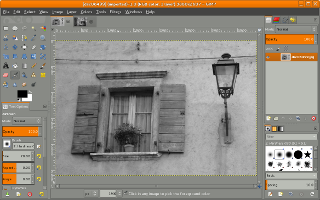
Except for this there have been a ton of changes, improvements and additions of new features and you can read all about them on the release notes. Among them you will find other long anticipated features like layer groups, on-canvas text editing and advanced brush dynamics.

Currently version 2.8 is only available for the GNU/Linux platform but builds for Windows and Mac will soon be available too. If you don’t want to wait for your distribution to make a package for Gimp 2.8 available, proceed and download the source by pressing this button.

If you want to install Gimp2.8 in Ubuntu and LinuxMint you can use the following PPA

sudo add-apt-repository ppa:otto-kesselgulasch/gimp
sudo apt-get update && sudo apt-get install gimp

For other Linux distros, download Gimp2.8 from this link:

Gimp 2.8 source

For questions please refer to our Q/A forum at : http://ask.unixmen.com

Bill Toulas

Contact: billytoulas (at) gmail (dot) com
  • http://twitter.com/droolersdad Party Animal

    Ugh. This broke gimp. Won’t run at all now. OS ubuntu 12.04 LTS

    • zgembo

      Comment out 
      /etc/apt/sources.list.d/otto-kesselgulasch-gimp-precise.list

      apt-get update
      apt-get -f install
      apt-get remove –purge gimp-plugin-registry

      un-comment sources for PPA apt-get update and apt-get install gimp

      • http://twitter.com/droolersdad Party Animal

        first command resuts in this:

        grant@grant-System-Product-Name:~$ apt-get update
        E: Could not open lock file /var/lib/apt/lists/lock – open (13: Permission denied)
        E: Unable to lock directory /var/lib/apt/lists/
        E: Could not open lock file /var/lib/dpkg/lock – open (13: Permission denied)
        E: Unable to lock the administration directory (/var/lib/dpkg/), are you root?
        grant@grant-System-Product-Name:~$

      • http://twitter.com/droolersdad Party Animal

         thank you for the help.

      • http://twitter.com/droolersdad Party Animal

         Thank you for the help!

        result of first command:

        grant@grant-System-Product-Name:~$ apt-get update
        E: Could not open lock file /var/lib/apt/lists/lock – open (13: Permission denied)
        E: Unable to lock directory /var/lib/apt/lists/
        E: Could not open lock file /var/lib/dpkg/lock – open (13: Permission denied)
        E: Unable to lock the administration directory (/var/lib/dpkg/), are you root?
        grant@grant-System-Product-Name:~$

      • http://twitter.com/droolersdad Party Animal

         grant@grant-System-Product-Name:~$ apt-get update
        E: Could not open lock file /var/lib/apt/lists/lock – open (13: Permission denied)
        E: Unable to lock directory /var/lib/apt/lists/
        E: Could not open lock file /var/lib/dpkg/lock – open (13: Permission denied)
        E: Unable to lock the administration directory (/var/lib/dpkg/), are you root?
        grant@grant-System-Product-Name:~$

        • Cakezula

          sudo. you need to type sudo before apt. you will then be prompted for your password.

          • http://twitter.com/droolersdad Party Animal

             Thank you. I ended up backing up the data & reinstalling.

      • Elyumbo

         this worked for me, but I also had to install the latest babl version ftp://ftp.gtk.org/pub/babl/0.1/babl-0.1.10.tar.bz2
        now, gimp 2.8 is running :)

  • Dustin Miller

    Broken here too. KDE Mint 12.

  • http://twitter.com/droolersdad Party Animal

    Correction. Broke my system.

  • http://twitter.com/droolersdad Party Animal

    software centre will not run either. cannot uninstall gimp.

  • http://twitter.com/droolersdad Party Animal

    software centre will not run either. cannot uninstall gimp.

  • http://twitter.com/droolersdad Party Animal

     Been trying to reply. Won’t allow me to reply to you, zgembo.

    First command into terminal results in this:

    grant@grant-System-Product-Name:~$ apt-get update
    E: Could not open lock file /var/lib/apt/lists/lock – open (13: Permission denied)
    E: Unable to lock directory /var/lib/apt/lists/
    E: Could not open lock file /var/lib/dpkg/lock – open (13: Permission denied)
    E: Unable to lock the administration directory (/var/lib/dpkg/), are you root?
    grant@grant-System-Product-Name:~$

    • Peter

      try it with sudo

    • mellouli ahmed

       you must be a root write sudo apt-get update

  • Brian King

    You have to uninstall old version first ;-)
    disable ppa and update 

  • Bill

    I had to go to synaptic package manager and uninstall everything to do with gimp.  then  go to software center and reinstall gimp 2.6.  ubuntu 12.04 is not ready yet for 2.8…this fixed my system…

  • MyName

    Well, at least, after broken packages and all that pain of fixing… I understand that building separate gimp version from git source is much easier.

  • Dominik232

    GIMP in one window! My dreams come true *,*

  • The Changeup

    when will they add the delete background feature with one click like photoshop?

    • Bill de Berg

       when you get in there and code it, smart guy

  • http://www.facebook.com/masternetra Brandon Kline

    Works perfectly for me, from a fresh install Ubuntu 12.04 (32bit).

  • Zikuic

    Nice,

    Can’t wait to put it thru it’s paces! This has been a long time coming!
    Wonder how it will stack up against PS CS6. I use both these programs
    and love em both!

    Nice work!

  • Wafa_pl

    Will this repository work under Debian testing ?

  • Sicofante

    Besides the idiotic new Save/Export “philosophy”, it’s a great version. Especially if you add the newer bit depth options.

  • Zlatko Nikolic

    This PPA brok my Ubuntu software center, now always ask to repair some Packag catalog. This instal was no good for me. Next time I will stick with official version.
    Regards

    • http://thepeoplescube.com/ Privacy Cube

       be less vague

  • James

    For everyone who has had trouble installing after upgrading to 12.04, make sure to go back into synaptic and check the top four boxes on the first tab of the repositories window.  They seem to revert back to being unchecked when I upgraded over the internet.  Once rechecked, the install goes smoothly.

  • http://thepeoplescube.com/ Privacy Cube

    Why is

    ppa:otto-kesselgulasch/gimp

    “better” than

    ppa:matthaeus123/mrw-gimp-svn

    mentioned in your “top things to do”

    (assume ubuntu 12.04 64bit)


    • Privacy Cube

       ohhhh.. nevermind that.. but you should update your own article to avoid foobaring people

  • Privacy Cube

    how do you recommend installing

    G’MIC

    for GIMP 2.8

    ( GREYC’s Magic Image Converter )

Like us on Facebook

This week Top Posts

Write for us

Recent Comments

Blawer

|

Thanks!!!!!!!!!!!!!!!!!! you rules!!! all the other “help” in google are useless… yours was very helpful. Thanks again

piCool

|

Great ! we have another another master trick :-)

Yilmaz Ulugtekin

|

Just delete the space after the slash (/) it will work.

Pat L

|

I tried it and it works with a regular zip file, but if you password-protect the .zip file it does NOT work.

SK

|

Yes we can. What kind of help you need? We are doing outsourcing and technical support for Linux and Open source worldwide. To know more about the details visit here.

 
IDG Tech Network
Copyright © 2008-2013 Unixmen.com .
Maintained by Anblik .