

Google Plus

Bleeding Edge script is available for Ubuntu 12.04

Written by M. Zinoune on . Posted in Linux tutorials, Ubuntu, Uncategorized

Bleeding Edge is now available for Ubuntu 12.04, this is  a shell script designed for Ubuntu 32 and 64bit. It installs repositories, keys, and software – such as Gimp2.8, adobe reader, dropbox, media players, codecs, MS fonts, drivers, etc with one click. It also cleans up the system.

1- Download the script

Download Bleeding Edge script

2- Open terminal, cd the folder where you downloaded the script and then make it executable

sudo chmod +x BleedingEdge12_4_8.sh

3- Run the script using the command:

sudo ./BleedingEdge12_4_8.sh
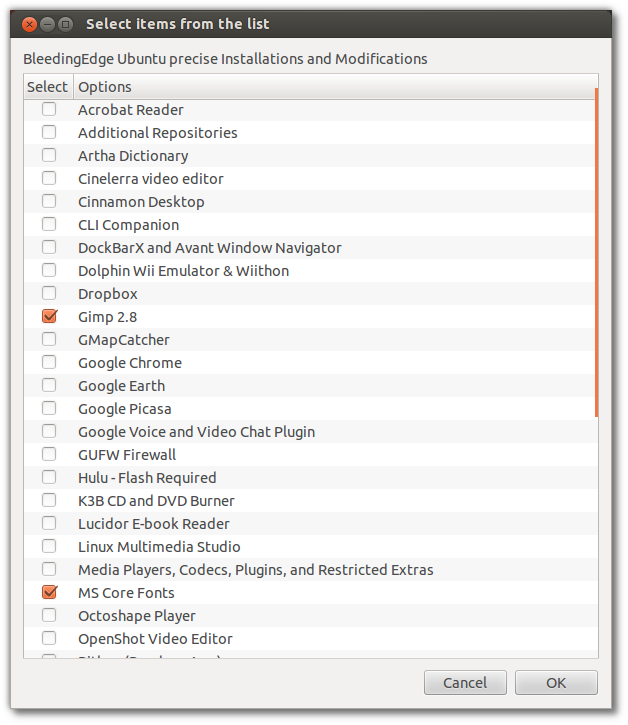
For questions please refer to our Q/A forum at : http://ask.unixmen.com

  • http://proubuntu.com.ua/ Максим Мишутин

    Ubuntu 12.04
    ./BleedingEdge12_4_8.sh: 2: ./BleedingEdge12_4_8.sh: Syntax error: newline unexpected

  • Smyttie41

    Open terminal, cd the folder where you downloaded the script. This is my issue with using Linux what does this mean it is never explained just like I’m suppose to know I’m a die Hard Linux user, well try to be and then I always run into something like this and I’m done, wish I knew where to learn all of this . Thanks everyone

    • Slade752

      say you want to navigate to a folder inside your home folder you would open up terminal and type “cd ~/name of folder” cd is just a command to tell the system to navigate, and dont worry the more you use linux things will just click eventually, ive been using it for 2 years and im still learning  lol

    • theCAMPVS

      cd = change directory. It’s how you navigate around folders from the command line (terminal). ls = list, which will show the contents of the current directory. Let’s say you’ve downloaded the shell script and you’re not sure how to get to your Downloads folder. Open the terminal and it starts you in your home folder. Type ls and it lists all of the folders and files there. When you see Downloads among the options, you can get to it by typing cd Downloads.

      Also, sudo chmod +x means you’re logging in with SuperUser privileges to DO (sudo) the following action: CHange the MODe (chmod) of the file so that it can be eXecutable (+x).

  • MADHUSUDAN707

    Nice 1….But u should also add “Check All” Uncheck All” Button…!!

  • jjpdijkstra

    How about the dropbox not getting the right priviliges? Can I fix it somehow?

Like us on Facebook

This week Top Posts

Write for us

Recent Comments

abhishek Bagusetty

|

Hey Mel,

First of all, its good that you have figured a way to block torrents using iptables. I am new to networking and would like to do couple of things.

1) Monitor the network activity in the home network

2) Block all the torrents from downloading.

Is there a tool or a way in linux which could give me some solutions to meet the above mentioned cases. I dont want to use any commercial programs as I am more towards OpenSource. It would be greatful if you could offer me some help.

Thanks,

Abhi

Abhishek

Department of Chemical Engineering

The University of Utah

Ernesto Gutierrez

|

Mel, I’ve been unsuccessful at installing citrix receiver on a 64 bit fedora install.
Eventhough I am following your instructions to the T.

Can you provide guidance via email?

SK

|

Yes you can. It should work.

LinuxSytesNet

|

Yesterday watched a movie with Morgan Freeman called ‘ A long came a spider ‘ and must say that I was quite impressed how they exchanged encrypted messages hidden in pictures. Thank you for the tutorial :)

 
IDG Tech Network
Copyright © 2008-2013 Unixmen.com .
Maintained by Anblik .
