


Firefox 16, a treat for developers http://t.co/cnd27CzT
Nmap reaches version 6
Nmap, the widely used free and opensource utility for network discovering and security auditing, has released version 6.00 today bringing major improvements in all sectors.
The development team announced that “It is the product of almost three years of work, 3,924 code commits, and more than a dozen point releases since the big Nmap 5 release in July 2009. Nmap 6 includes a more powerful Nmap Scripting Engine, 289 new scripts, better web scanning, full IPv6 support, the Nping packet prober, faster scans, and much more! We recommend that all current users upgrade.”

Among the many improvements that took place, there are six that highlight greatly the evolution of the application.
- The Nmap scripting engine capabilities were greatly enriched. The script count has grown from 59 in Nmap 5 to 348 in Nmap 6.
- Nmap 6 offers better web scanning, keeping pace with the web-centric logic of web services.
- Full support for IPv6. Partial support was available since 2002.
- There is a new tool on this version of Nmap called Nping. This tool can be used for network packet generation, response analysis and response time measurement. Nping can generate network packets for a wide range of protocols, allowing full control over protocol headers.
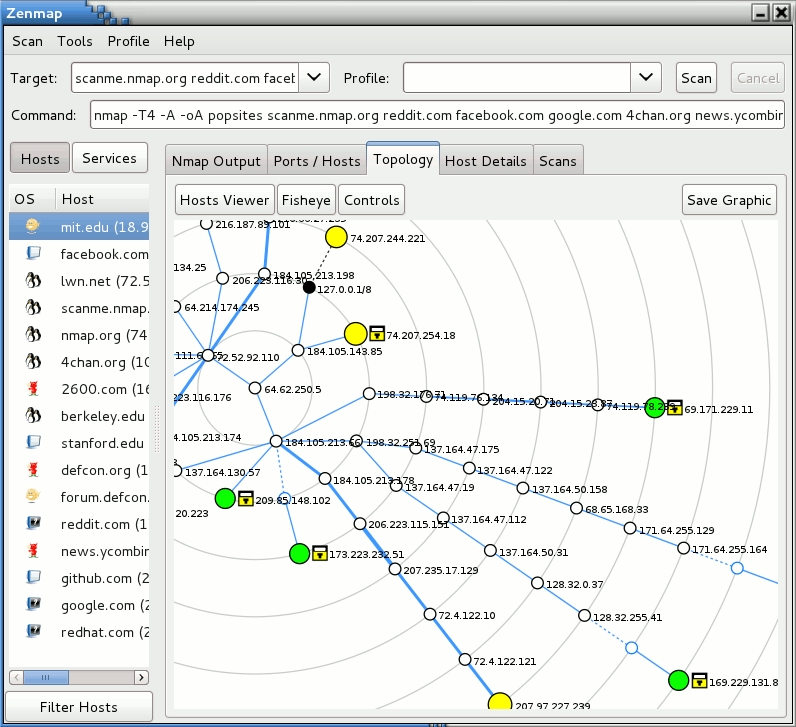
- One of the things I like about Nmap is how easily it can be used through Zenmap, so I was glad to see that Zenmap GUI and the results viewer received many improvements, that include support for more languages and more user-friendly script selection interface.
- Nmap 6.0 scans faster than version 5.x. This is very important for Nmap users, as some scans could last for a very long time, thus sacrificing accuracy.
Visit Nmap website for fully detailed information about every improvement that took place on this version.

Like us on Facebook
This week Top Posts 
Top Things to do After Installing Ubuntu 13.04 ‘Raring Ringtail’ : Ubuntu 13.04 Raring Ringtail final is almost out. The final release it scheduled for release on Apri...0 comment(s) |
Howto: Upgrade to Ubuntu 13.04 Raring Ringtail from 12.04, 12,10 | Desktop & Server : Updated 05-04-2013: Ubuntu 13.04 Raring Ringtail will be released Soon, If you have ubuntu 12,10, 12...0 comment(s) |
Install lamp with 1 command in Ubuntu 12.10, 13.04 Raring Ringtail & LinuxMint13 : Updated: 10/09/2012 :LAMP (Linux, Apache, MySQL and PHP) is an open source Web development platform ...0 comment(s) |
Configure conky-Lua in Ubuntu (12.10 & 13.04 Raring Ringtail), Fedora, debian and LinuxMint | Howto Conky : Updated 05-04-2013: Conky is a free, light-weight system monitor for X, that displays any informatio...0 comment(s) |
Scan Your Home Network With Nmap : Who should read this article? Everyone who is interested in computer security and computer networkin...0 comment(s) |
Install and Configure Samba share in Ubuntu 13.04 Raring Ringtail , 12.10, 12.04| Howto : Updated 05-04-2013: One of the most asked features for Samba is a graphical user interface to help w...0 comment(s) |
Recent Posts
- Secure File from Removal in Linux and Unix
- How to Install Nginx on FreeBSD 9.x
- Create a Launcher in Ubuntu Using Bash
- Scan Your Home Network With Nmap
- Steganography- Hide Your Files Inside An Image in Linux
- Unix/Linux File Recognition. Did You Know?
- Migrate from MySQL to MariaDB in FreeBSD
- Connect Your Android Galaxy Tablet to Ubuntu via USB
- ElementaryOS Beta 1 and 2 Comparison and Review
- Introduction to the Linux Command Line
Recent Comments


Snake
| #
Wow, great. That’s what i’m waiting for too. I want to make DC with LDAP ( Active Directory alternative) and SAMBA on Ubuntu. :-)
Blawer
| #
Thanks!!!!!!!!!!!!!!!!!! you rules!!! all the other “help” in google are useless… yours was very helpful. Thanks again
piCool
| #
Great ! we have another another master trick :-)
Yilmaz Ulugtekin
| #
Just delete the space after the slash (/) it will work.
Pat L
| #
I tried it and it works with a regular zip file, but if you password-protect the .zip file it does NOT work.