

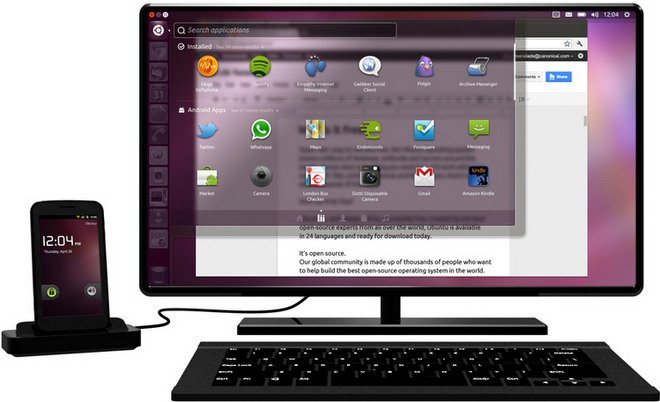
Ubuntu on Android! So you are guessing that your Android smartphone will have a dual boot or you will be able to boot Ubuntu on your Android phone? Certainly none of that is possible as yet. Ubuntu for Android is simply full-fledged Ubuntu hidden in your Android phone that that remains inoperative until docked. Once your smartphone is plugged into the dock connected to a moniter the OS (ubuntu) surfaces and starts making use of peripherals such as mouse and keyboard. All of that sounds interesting however neither it is new or useful. Let’s find how!
As you might already know that Motorola has already done the trick with its Atrix early last year, thus the idea to merge mobile and desktop computing is not new or unique to Ubuntu. However what makes the news noteworthy is the tight integration of two closely linked Oss, Android and Ubuntu, both sharing the same Linux Kernel and expectantly emerging ecosystem (that Apple has and Google doesn’t). This tight integration makes possible seamless transition between the two environments—Android on the go and Ubuntu on desktop. Ubuntu on Android means you will be able to use your phonebook, bookmarks, apps, office and 3G/4G connections of your phone on a bigger and better screen hence freeing yourself from the indication posed by small screen and virtual keyboard. Your phone will be your two-in-one device, phone on the go and desktop when docked. Apparently the mechanism looks promising; nevertheless does it bring any betterment to the life of an average user?
First consideration: The cost
Ubuntu on Android is only supported on very high end smartphones with minimum requirement as follows:
– Video acceleration: shared kernel driver with associated X driver; Open GL, ES/EGL
– Storage: 2GB for OS disk image
– HDMI: video out with secondary frame buffer device
– USB host mode512 MB RAM
This of course means that this is not any ordinary smartphone, it is of supreme quality. And consequently this means that such a smartphone is also pretty heavy on your pocket and might be slightly heavier physically than super sleek phones. For this we can simply say that as technology advances we can hope better specs coming at low prices, however that does not seem to come very soon.
Second consideration: Usability
Canonical suggests that once your phone is plugged in Ubuntu starts to operate, getting input from a keyboard and mouse and sending display output to a monitor. The whole system makes a little sense to me. Lets analyze the problem in various scenarios.
Scenario 1: You reach a workplace you have a monitor, keyboard and a mouse (why on the earth such a place exist that has all of it but not a CPU?) They say “Why carry two devices, when you could carry only one” even in this particular scenario I am carrying a number of things with me. Lets count on, a (very)smartphone, a docking station and an HDMI out wire at least.
Scenario 2: You reach a workplace you have a monitor, keyboard and a mouse and a CPU, but I am adamant to use my smartphone’s hidden OS on the desktop to get completely synchronized feel.
So you have a CPU yet you decide to plug in your smartphone and pick your browsing just from the place you left when you were in your car. But, is your smartphone smarter than a CPU to even compete with its speed and performance? Probably no. Moreover if you have a CPU you have a whole new world of options! Have an internet connection? Well and good; not one? Tether your mobile. You don’t need synchronization from your phone, lets see how:
- An all in one address book: An online/cloud-based address book will do your work.; one most of us already have
- Web bookmarks: today, this is certainly not a problem. The simplest of all solutions in the new Chrome for Android that gets you synchronize tabs and bookmarks from all your devices. Further there are services like Instapaper and Readitlater that can provide webpages for offline viewing.
- Messaging from desktop: number of apps does this for me, not to forget Texty.
- Attend a call on desktop: do you mean an additional peripheral?
- Share documents? Plenty of cloud based solutions out there. Drag your document to the cloud-storage app on phone and get it right on the desktop.
What I am gathering is that to actually make a full use of the mechanism you will need to carry a monitor and a handful of peripherals too! Only then you will actually make use of the hidden OS and enjoy completely mobile-desktop probably on your hut in the beech.
Third consideration: The battery Life
Yes one of the most important considerations is the battery Life of the smartphones. Unfortunately the Android phones is quiet notorious. Having a complete OS being driven by a smartphone will impose a serious question to phone’s battery life.
That is not to say that Ubuntu on Android is completely useless however it might not worth as much as you spend on it. Of course Ubuntu for Android can be preferable in a number of situations most obvious being a public computer. However, even having a smartphone with a desktop OS might not actually give you the speedy computation you are looking for away from home or workplace. Nevertheless the whole idea is promising and not to mention the on preview video Ubuntu was quiet fluid. So let’s have our fingers crossed until the end of 2012 when these high end phones are expected to reach consumers.


