Google Plus

whowatch- Linux and UNIX interactive, process and users monitoring tool

Written by Mel Kham on . Posted in linux command

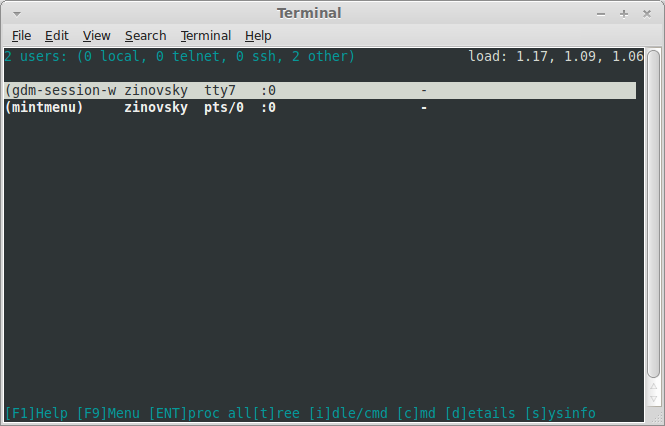
whowatch is a interactive, ncurses-based, process and users monitoring tool, which updates information in real time. This is a perfect tool for local and remote servers. It displays information about the users currently logged on to the machine, in real-time. Besides standard information (login name, tty, host, user’s process), the type of the connection (ie. telnet or ssh) is shown. Display of users command line can be switch to tty idle time.

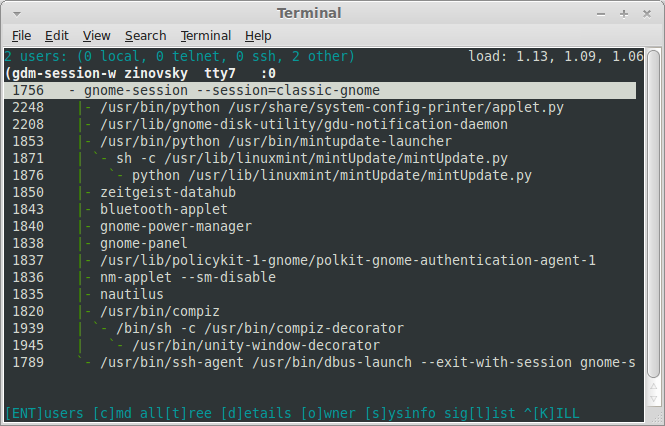
Certain user can be selected and his processes tree may be viewed as well as tree of all system processes. Tree may be displayed with additional column that shows owner of each process. In the process tree mode SIGINT and SIGKILL signals can be sent to the selected process. Killing processes is just as simple and fun as deleting lines on the screen.

You can install who watch using the command:

sudo apt-get install whowatch


You can start it by entering “whowatch” in a terminal, you will got this screen
Terminal 044

Terminal 045

Useful Links: commandlinefu

For questions please refer to our Q/A forum at : http://ask.unixmen.com

Mel Kham

Founder of Unixmen, Living in Amsterdam. Am working in my free time to help people to understand the Opensource and to explain them in easy way how to make the fist steps to the the light. Working day and night with my Co-founder Zinovsky to keep this website live even with less resources.
  • http://goodfinance-blog.com BrianaMCCARTHY

    When you’re in uncomfortable position and have no cash to go out from that, you would have to take the business loans. Just because it would aid you for sure. I get student loan every single year and feel myself OK because of that.

  • http://goodfinance-blog.com Kristi32Blankenship

    Some time before, I did need to buy a building for my firm but I didn’t have enough cash and couldn’t purchase something. Thank heaven my comrade adviced to try to take the business loans from reliable bank. Thus, I acted that and used to be satisfied with my bank loan.

  • http://goodfinance-blog.com Meyer30Ronda

    I received 1 st personal loans when I was 20 and it helped my business very much. However, I need the financial loan once again.

Like us on Facebook

This week Top Posts

Write for us

Recent Comments

Pat L

|

I tried it and it works with a regular zip file, but if you password-protect the .zip file it does NOT work.

SK

|

Yes we can. What kind of help you need? We are doing outsourcing and technical support for Linux and Open source worldwide. To know more about the details visit here.

ClintB

|

After install as above, run shell script /opt/Citrix/ICAClient/wfica.sh manually and note lib errors still occur. I had the x64 motif loaded but had to manually install the x86 too. Got that from http://rpmfind.net/linux/rpm2html/search.php?query=libXm.so.4 Even after that, I still had to do a “yum install alsa-lib.i686 alsa-lib.x86_64″ to resolve any additional libasound.so.2 errors. Once those two lib issues were resolved, Citix Web Interface launched apps fine by telling browser to open launch.ica using /opt/Citrix/ICAClient/wfica.sh. Good luck Ernesto!

AD

|

I need some Help on Linux,can you guide me ?

Edson Carlos

|

In debian no found. I need link download install in linux debian

 
IDG Tech Network
Copyright © 2008-2013 Unixmen.com .
Maintained by Anblik .