

Firefox 16, a treat for developers http://t.co/cnd27CzT
Vokoscreen: A new screencasting tool for Linux
The last few years, many users upload their how-to videos (also known as videorials — like tutorials) in Youtube, showing their Linux desktop and explaining how to do a bunch of stuff. So instead of reading an article or a guide with static images and multiple pages, maybe there is a quick educational video waiting for you somewhere in the Internet. There are several tools who help you to do this job, like Kazam and Record-My-Desktop but, both of them are not as expected.
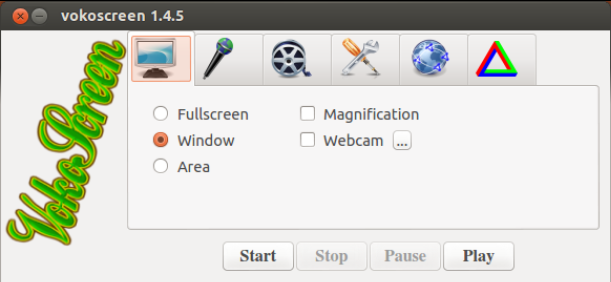
Vokoscreen is a new application that helps you to record your Linux desktop. It’s very simple and it uses a minimalistic GUI.
Even though it is a new application (let’s say in beta phase), it manages to record your desktop (zoom in or zoom out) efficiently. Furthermore, it can capture your face using a webcam in the same time, so this feature is especially suitable for screencasting purposes. Truth to be told, there are many things yet to be fixed and optimized in Vokoscreen, but it surely worths your attention.
The application is available in GitHub, while Ubuntu-related distros (like Mint) have their own repository.
ppa:vokoscreen-dev/vokoscreen
Type following commands in terminal:
sudo add-apt-repository ppa:vokoscreen-dev/vokoscreen
sudo apt-get update
sudo apt-get install vokoscreen
Vokoscreen is very simple to use, thanks to its minimalistic GUI. It basically uses FFMPEG. Take a look at the following demonstration:
Download YouTube Video | YouTube Converter
Vokoscreen provides you with an easy click-and-capture way of doing your screencasting. But, if you are up to screencast your gaming experience then you are probably going to have some FPS-drop problems. This is not because of ffmpeg, but because of your computer hardware. You need a monster PC in order to screencast in full HD and play your game smoothly in full graphics. For my system (Intel Core i5 2500K overclocked up to 4.8GHz) I used this command:
ffmpeg -f alsa -i pulse -f x11grab -s 1920×1080 -i :0.0 -c:a libmp3lame -ab 128k -ac 2 -c:v mpeg2video -qscale:v 0 amnesia_mpeg_0.avi
Let me show you my experiment results using mpeg4 and Amnesia via Steam (please watch it in 1080p in fullscreen):
Download YouTube Video | YouTube Converter
In my system, this is the best I can do for gamecasting purposes, thus H.264 needs a lot of more horsepower.
I hope you find this article useful and do some screencasting video as well;)

-
-
http://www.ubuntuxtream.com/
-
-
http://www.ubuntuxtream.com/
-
-
-
-
-
-
-
-
Pingback: Vokoscreen: A new screencasting tool for Linux | Linux A.I
-
Pingback: Vokoscreen: A new screencasting tool for Linux | Unixmen | The Daily Kebab
-
http://learnwithsimeon.tk/
Like us on Facebook
This week Top Posts 
Top Things to do After Installing Ubuntu 13.04 ‘Raring Ringtail’ : Ubuntu 13.04 Raring Ringtail final is almost out. The final release it scheduled for release on Apri...0 comment(s) |
Howto: Upgrade to Ubuntu 13.04 Raring Ringtail from 12.04, 12,10 | Desktop & Server : Updated 05-04-2013: Ubuntu 13.04 Raring Ringtail will be released Soon, If you have ubuntu 12,10, 12...0 comment(s) |
Unix/Linux File Recognition. Did You Know? : Did you know that Unix and Linux has no concept of a file extension? What is a file name extension?
...0 comment(s) |
Install lamp with 1 command in Ubuntu 12.10, 13.04 Raring Ringtail & LinuxMint13 : Updated: 10/09/2012 :LAMP (Linux, Apache, MySQL and PHP) is an open source Web development platform ...0 comment(s) |
Howto- Resolve nosound problem on Ubuntu 13.04 Raring Ringtail,12.10 and Older : Updated 05/04/2013 : One of the common issues facing Ubuntu users after installing or upgrading Ubun...0 comment(s) |
Configure conky-Lua in Ubuntu (12.10 & 13.04 Raring Ringtail), Fedora, debian and LinuxMint | Howto Conky : Updated 05-04-2013: Conky is a free, light-weight system monitor for X, that displays any informatio...0 comment(s) |
Recent Posts
- Unix/Linux File Recognition. Did You Know?
- Migrate from MySQL to MariaDB in FreeBSD
- Connect Your Android Galaxy Tablet to Ubuntu via USB
- ElementaryOS Beta 1 and 2 Comparison and Review
- Introduction to the Linux Command Line
- A Secure Password
- Linux Kernel 3.10. It’s BIG!
- Monitoring Users Activity Using psacct or acct Tools in Linux
- Run Your Own Social Network Using elgg on RHEL / CentOS and Scientific Linux
- Getting Debian 7.0 ‘Wheezy’ Up and Running
Recent Comments


Dominik Bauer
| #
thx a lot!
Maximiliano Osorio
| #
Osom. Thank you.
Sam
| #
Thanks much. It worked like a charm.
HailsandNails
| #
Actually, what I see too much of, and what Microsoft actually (sorta) did with Windows 8 is think forward. And let’s be brutally honest. Windows 8 is actually NOT as bad as people is making it out, they’re just freakishly afraid of change (which Linux users are as well, it seems)
SK
| #
Yes i will. Keep visiting. Subscribe us to get daily updates. Thanks for the comment