


Firefox 16, a treat for developers http://t.co/cnd27CzT
Proprietary Browser vs. Open Source Browser [Market Share Analysis]
With time open source software have emerged as potential contenders to proprietary software. Unlike the traditional understanding, open source software have proven to be as capable (or even more capable) than counterpart proprietary software and have been successful in claiming substantial market share. While we occasionally analyze the browser market share, this time we decide to compare the open source and proprietary browser market share and investigate how trends are shaping up in browser market.

The browsers we have selected to analyze are:
Microsoft’s Internet Explorer and Apple’s Safari being the prominent browsers in proprietary group while Google’s Chrome and Mozilla’s Firefox in open source camp. Other Browsers (notably Opera) have been excluded from the analysis as claiming only a very small market share that is persistently constant.
A look at the current market share for each browser (as for September 2012)
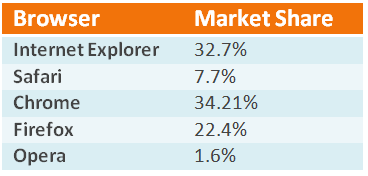
We shall analyse the browser trends prevalent from January 2011 to September 2012. Now lets first have a look at the the browser market share for proprietary market share.
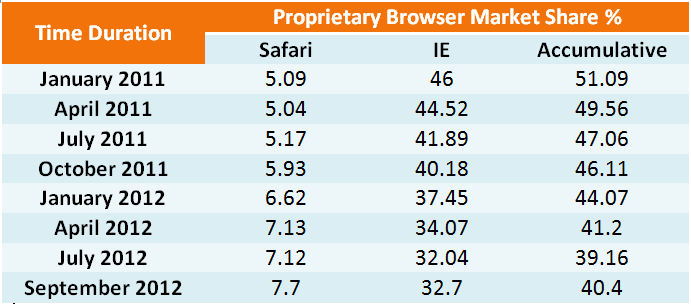
Having seen the market share for proprietary browsers, lets see individual and accumulative market share for each browser in Open source camp.
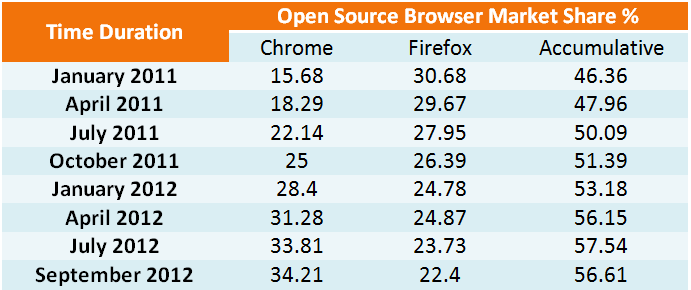
Combining the above tables into a clearer table:
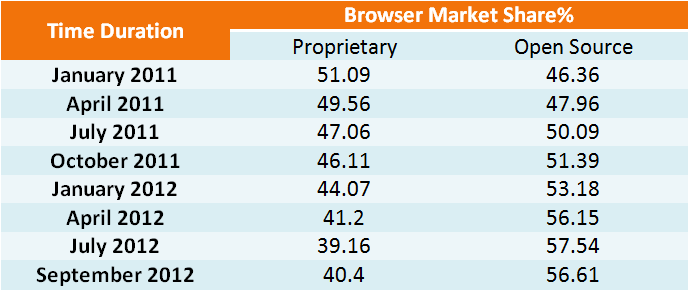
The investigations yields the following graph:
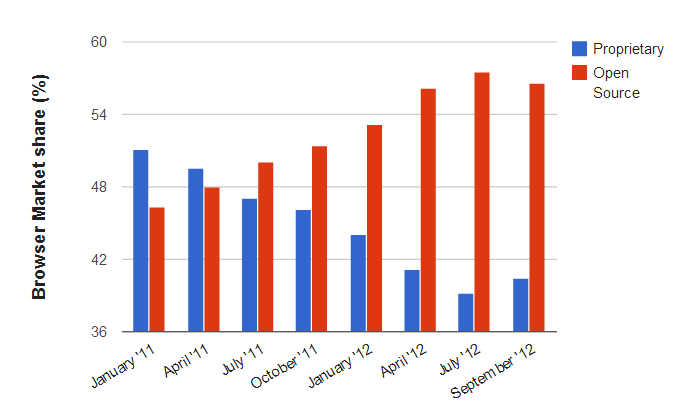
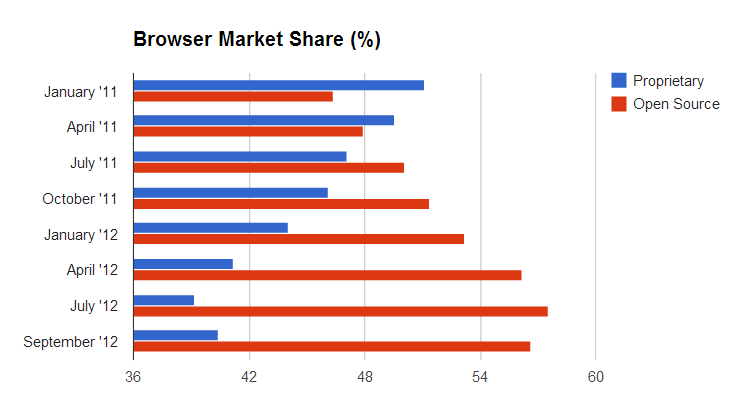
Comparing the two browser growth relatively:
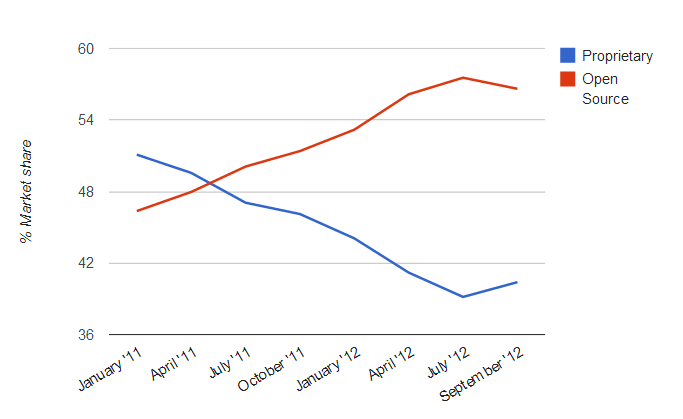
The graphs clearly show the trends favoring open source browsers currently. This trend is expected to continue as more and more developers continue to contribute their creativity to open source browser projects making open source browser richer in features ,faster and efficient.

-
http://www.facebook.com/aquaokama
-
-
-
http://twitter.com/sinekonata
-
-
-
-
-
-
-
-
-
http://twitter.com/sinekonata
-
-
http://www.facebook.com/daya.phiri
-
http://twitter.com/sinekonata
-
-
-
-
-
Pingback: Comparison of project-management software | Think Tank
Like us on Facebook
This week Top Posts 
Top Things to do After Installing Ubuntu 13.04 ‘Raring Ringtail’ : Ubuntu 13.04 Raring Ringtail final is almost out. The final release it scheduled for release on Apri...0 comment(s) |
Howto: Upgrade to Ubuntu 13.04 Raring Ringtail from 12.04, 12,10 | Desktop & Server : Updated 05-04-2013: Ubuntu 13.04 Raring Ringtail will be released Soon, If you have ubuntu 12,10, 12...0 comment(s) |
Install lamp with 1 command in Ubuntu 12.10, 13.04 Raring Ringtail & LinuxMint13 : Updated: 10/09/2012 :LAMP (Linux, Apache, MySQL and PHP) is an open source Web development platform ...0 comment(s) |
Scan Your Home Network With Nmap : Who should read this article? Everyone who is interested in computer security and computer networkin...0 comment(s) |
Configure conky-Lua in Ubuntu (12.10 & 13.04 Raring Ringtail), Fedora, debian and LinuxMint | Howto Conky : Updated 05-04-2013: Conky is a free, light-weight system monitor for X, that displays any informatio...0 comment(s) |
Howto- Resolve nosound problem on Ubuntu 13.04 Raring Ringtail,12.10 and Older : Updated 05/04/2013 : One of the common issues facing Ubuntu users after installing or upgrading Ubun...0 comment(s) |
Recent Posts
- Secure File from Removal in Linux and Unix
- How to Install Nginx on FreeBSD 9.x
- Create a Launcher in Ubuntu Using Bash
- Scan Your Home Network With Nmap
- Steganography- Hide Your Files Inside An Image in Linux
- Unix/Linux File Recognition. Did You Know?
- Migrate from MySQL to MariaDB in FreeBSD
- Connect Your Android Galaxy Tablet to Ubuntu via USB
- ElementaryOS Beta 1 and 2 Comparison and Review
- Introduction to the Linux Command Line
Recent Comments


Snake
| #
Wow, great. That’s what i’m waiting for too. I want to make DC with LDAP ( Active Directory alternative) and SAMBA on Ubuntu. :-)
Blawer
| #
Thanks!!!!!!!!!!!!!!!!!! you rules!!! all the other “help” in google are useless… yours was very helpful. Thanks again
piCool
| #
Great ! we have another another master trick :-)
Yilmaz Ulugtekin
| #
Just delete the space after the slash (/) it will work.
Pat L
| #
I tried it and it works with a regular zip file, but if you password-protect the .zip file it does NOT work.