


Google Plus

Enable Logout Option In Fedora18

Written by Mel Kham on . Posted in Fedora, Frequently Asked Questions, Linux distributions

Fedora18   is  coming  with this  strange  option that the  Log Out is  standard   disabled.

How to enable Log Out  in fedora 18  ?

First run dconf-editor  and then go to  org > gnome > shell Then check in the option “always-show-log-out”
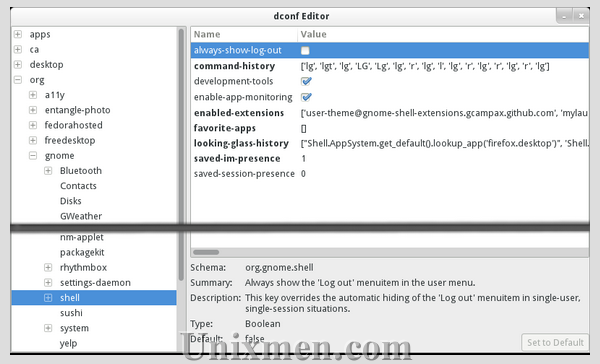


Now  you  have  to reboot  to activate  this  permanently.

For questions please refer to our Q/A forum at : http://ask.unixmen.com

Mel Kham

Founder of Unixmen, Living in Amsterdam. Am working in my free time to help people to understand the Opensource and to explain them in easy way how to make the fist steps to the the light. Working day and night with my Co-founder Zinovsky to keep this website live even with less resources.

Like us on Facebook

This week Top Posts

Write for us

Recent Comments

Edson Carlos

|

In debian no found. I need link download install in linux debian

jacky can

|

You can actually unzip your secret archive by leaving out the -t option, instead using:

unzip newPhoto.jpg

DragonFartOutLoud

|

it went to china.

DragonFartOutLoud

|

great review! i’ve been using it as my main OS since Beta 1 release. its been a awesome ride so far :)

jet li

|

i try the method, and i unzip the image contain zip secret, i dont find the file that i was hide, where it go? and how to open it? :s

 
IDG Tech Network
Copyright © 2008-2013 Unixmen.com .
Maintained by Anblik .