


Bacula is an open source, network backup software, used to allow the System Administrators to manage backup, recovery and send the verification of data’s from any systems in any location across the network.
Install Bacula
In this how-to i am using MySQL for database, you can use either PostgreSQL or MySQL. My Backup server hostname and IP Address are “server.unixmen.local” and “192.168.1.101/24” respectively. Change the values as per your scenario. This how-to was tested on CentOS 6.5, although it should work with RHEL, Scientific Linux 6.x versions too.
First let us install Bacual and mysql server using command:
# yum install bacula-director-mysql bacula-console bacula-client bacula-storage-mysql mysql-server mysql-devel -y
Start MySQL service and create root password for mysql.
Note: In this tutorial, i am using password as “centos” wherever i need to setup password . Define your own.
# service mysqld start
# chkconfig mysqld on
# mysqladmin -u root password centos
Next run the following commands one by one to create database and necessary tables for Bacula. Here “-u root” means that login with root account and “-p” means prompt for mysql root password i.e “centos” in my case.
# /usr/libexec/bacula/grant_mysql_privileges -u root -p
# /usr/libexec/bacula/create_mysql_database -u root -p
# /usr/libexec/bacula/make_mysql_tables -u root -p
# /usr/libexec/bacula/grant_bacula_privileges -u root -p
Now set bacula user password on MySQL. To do that, log in to your MySQL server with command:
# mysql -u root -p
And set password as shown below:
Welcome to the MySQL monitor.  Commands end with ; or \g.
Your MySQL connection id is 67
Server version: 5.5.35 MySQL Community Server (GPL) by Remi

Copyright (c) 2000, 2013, Oracle and/or its affiliates. All rights reserved.

Oracle is a registered trademark of Oracle Corporation and/or its
affiliates. Other names may be trademarks of their respective
owners.

Type 'help;' or '\h' for help. Type '\c' to clear the current input statement.

mysql> UPDATE mysql.user SET password=PASSWORD("centos") WHERE user='bacula';
Query OK, 2 rows affected (0.00 sec)
Rows matched: 2  Changed: 2  Warnings: 0

mysql> FLUSH PRIVILEGES;
Query OK, 0 rows affected (0.01 sec)

mysql> exit
Bye
Now update all Bacula configuration files with new password and addresses as shown below.
Update Bacula Director
Edit file /etc/bacula/bacula-dir.conf,
# vi /etc/bacula/bacula-dir.conf
Update Bacula server hostname, bacula mysql user password, Bacula console password, Bacula file daemon password etc. Be mindful that you should use a fully qualified domain name for adding clients or simply use the IP address instead.
[...]
Director {                            # define myself
  Name = bacula-dir
  DIRport = 9101                # where we listen for UA connections
  QueryFile = "/usr/libexec/bacula/query.sql"
  WorkingDirectory = "/var/spool/bacula"
  PidDirectory = "/var/run"
  Maximum Concurrent Jobs = 1
  Password = "centos"         # Console password
  Messages = Daemon

[...]

# Client (File Services) to backup
Client {
  Name = bacula-fd
  Address = 192.168.1.101
  FDPort = 9102
  Catalog = MyCatalog
  Password = "centos"          # password for FileDaemon
  File Retention = 30 days            # 30 days
  Job Retention = 6 months            # six months
  AutoPrune = yes                     # Prune expired Jobs/Files
}

[...]
# Definition of file storage device
Storage {
  Name = File
# Do not use "localhost" here
  Address = 192.168.1.101                # N.B. Use a fully qualified name here
  SDPort = 9103
  Password = "centos"
  Device = FileStorage
  Media Type = File
}

[...]
# Generic catalog service
Catalog {
  Name = MyCatalog
# Uncomment the following line if you want the dbi driver
# dbdriver = "dbi:sqlite3"; dbaddress = 127.0.0.1; dbport =
  dbname = "bacula"; dbuser = "bacula"; dbpassword = "centos"
}

[...]

Console {
  Name = bacula-mon
  Password = "centos"
  CommandACL = status, .status
}
Update Bacula Console
Edit file /etc/bacula/bconsole.conf,
# vi /etc/bacula/bconsole.conf
Change the console password:
Director {
  Name = bacula-dir
  DIRport = 9101
  address = localhost
  Password = "centos"
}
Update Storage Daemon
Edit file /etc/bacula/bacula-sd.conf,
# vi /etc/bacula/bacula-sd.conf
Update the password, Find the red lines and delete them, do not uncomment them. Also set your Archive device path.
[...]
Director {
  Name = bacula-dir
  Password = "centos"
}

##Delete the following lines (Do not uncomment). As i installed centos minimal server, i don't have a GUI mode, so that i deleted the following section##

# Restricted Director, used by tray-monitor to get the
#   status of the storage daemon
#
Director {
  Name = bacula-mon
  Password = "@@MON_SD_PASSWORD@@"
  Monitor = yes
}

[...]

Device {
  Name = FileStorage
  Media Type = File
  Archive Device = /mybackup
  LabelMedia = yes;                   # lets Bacula label unlabeled media
  Random Access = Yes;
  AutomaticMount = yes;               # when device opened, read it
  RemovableMedia = no;
  AlwaysOpen = no;
}
[...]
Update file daemon
Edit file /etc/bacula/bacula-fd.conf,
# vi /etc/bacula/bacula-fd.conf
Update the password and delete the lines shown in red colour.
# List Directors who are permitted to contact this File daemon
#
Director {
Name = bacula-dir
Password = "centos"
}

##Delete (do not uncomment) these lines if you only using CUI mode in Backup server ##

# Restricted Director, used by tray-monitor to get the
#   status of the storage daemon
#
Director {
Name = bacula-mon
Password = "@@MON_SD_PASSWORD@@"
Monitor = yes
}
As i mentioned in the above configuration, my archive device path is “/mybackup”. So let me create a directory called “mybackup”.
# mkdir /mybackup
# chown bacula /mybackup
Now we finished all passwords and address modifications. Next restart all bacula daemons and make them to start automatically on every reboot.
# service bacula-dir start
# service bacula-fd start
# service bacula-sd start
# chkconfig bacula-dir on
# chkconfig bacula-fd on
# chkconfig bacula-sd on
Bacula has been successfully installed and configured. You can now add clients, jobs and volumes by updating the bacula config files. Alternatively you can use webmin to make the work more simple. It is quite easier then updating the config files manually.
Manage Bacula With Webmin
Webmin is a web-based interface for system administration for Unix. Using any modern web browser, you can setup user accounts, Apache, DNS, file sharing and much more.
Download and install the latest version of webmin from here.
# wget http://sourceforge.net/projects/webadmin/files/webmin/1.660/webmin-1.660-1.noarch.rpm
# rpm -Uvh webmin-1.660-1.noarch.rpm
# service webmin start
# chkconfig webmin on
Adjust Firewall/Router
If you want to access the bacula server through from a remote system, allow the webmin port “10000” and bacula ports “9101”, “9102”, “9103” through your firewall or router.
Edit file /etc/sysconfig/iptables,
# vi /etc/sysconfig/iptables
Add these following lines in your iptables config file.
[...]
-A INPUT -m state --state NEW -m tcp -p tcp --dport 10000 -j ACCEPT
-A INPUT -m state --state NEW -m tcp -p tcp --dport 9101 -j ACCEPT
-A INPUT -m state --state NEW -m tcp -p tcp --dport 9102 -j ACCEPT
-A INPUT -m state --state NEW -m tcp -p tcp --dport 9103 -j ACCEPT
[...]
Restart iptables:
# service iptables restart
Access Webmin
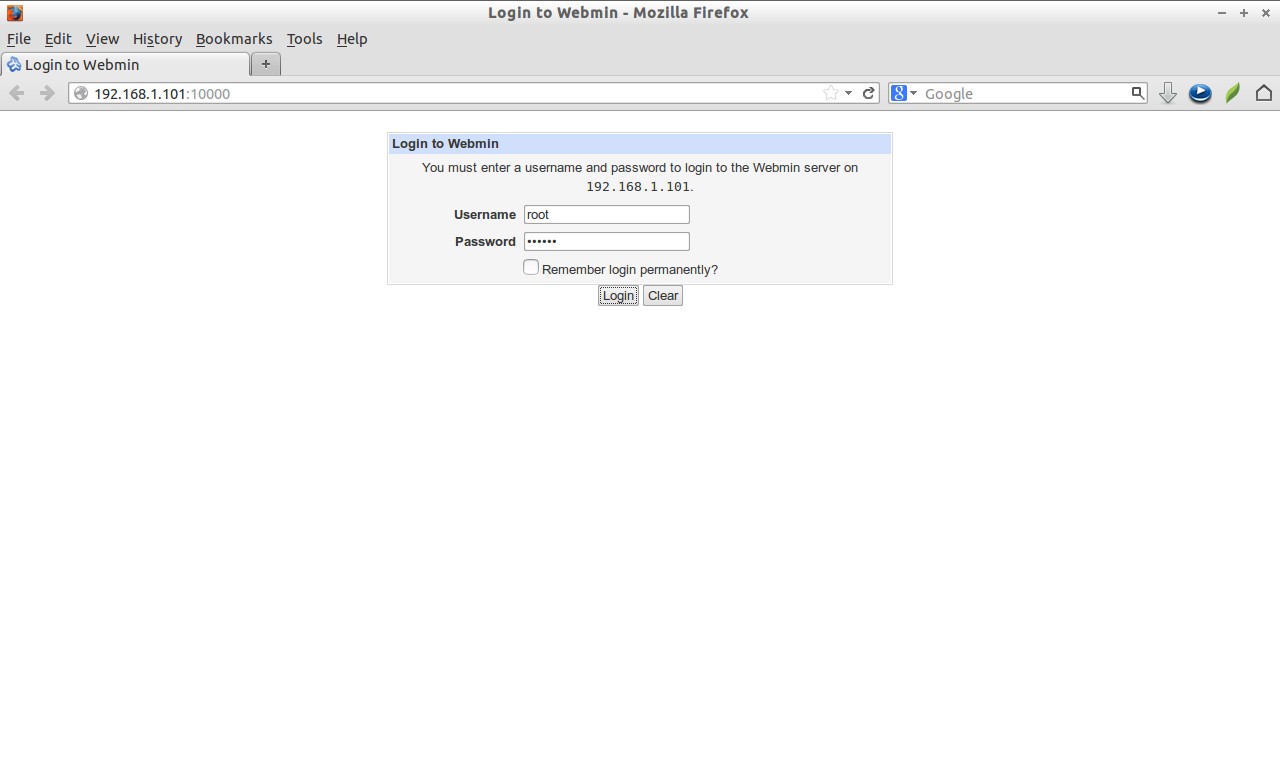
Now you can login through webmin by “//http://server-ip-address:10000” or “http://domain-name:10000/”.
Login to webmin using your root user and its password.
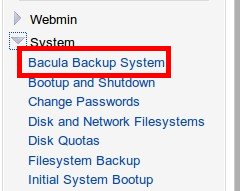
 You will find the Bacula Backup System in the left pane of webmin console under System -> Bacula Backup System. If not is found there, try in the “unused modules” section.
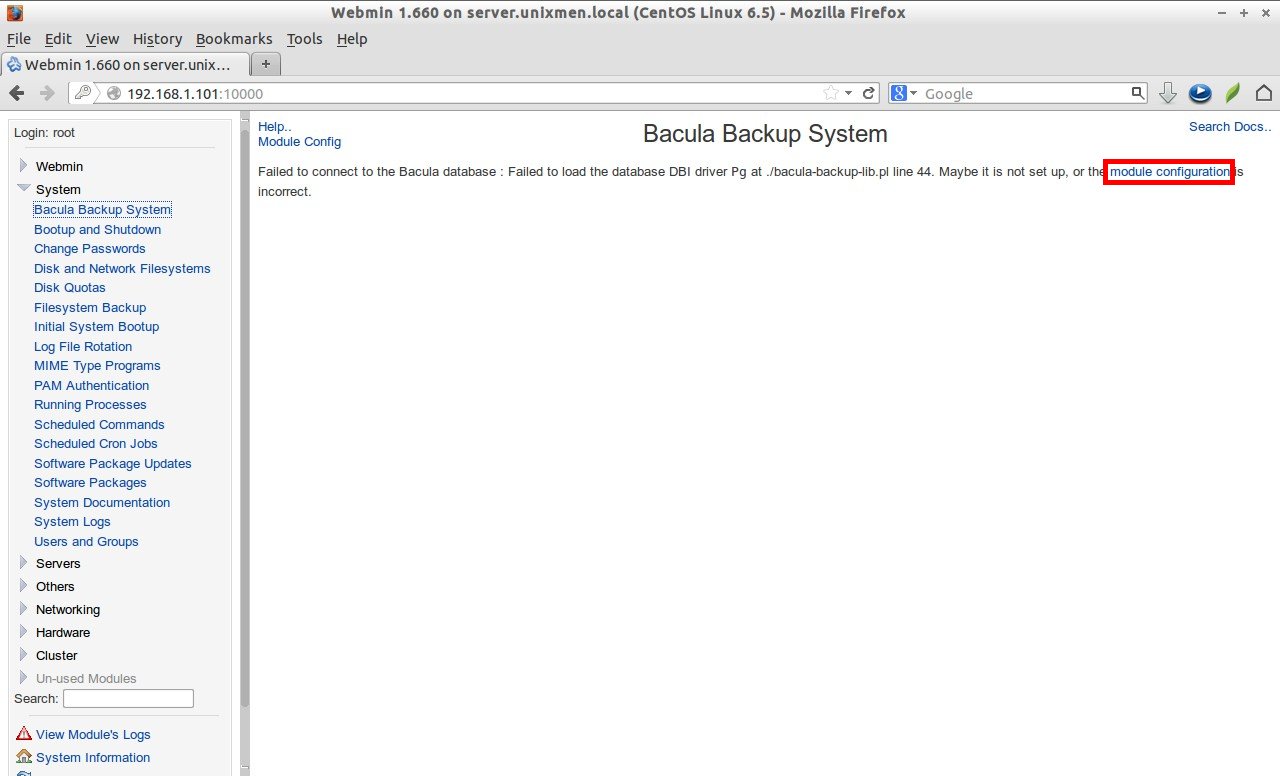
Click on the “Bacula Backup System” link. Initially the Bacula server won’t start automatically. To start Bacula server click on “Module Configuration” link on the right of the “Bacula Backup System” page.
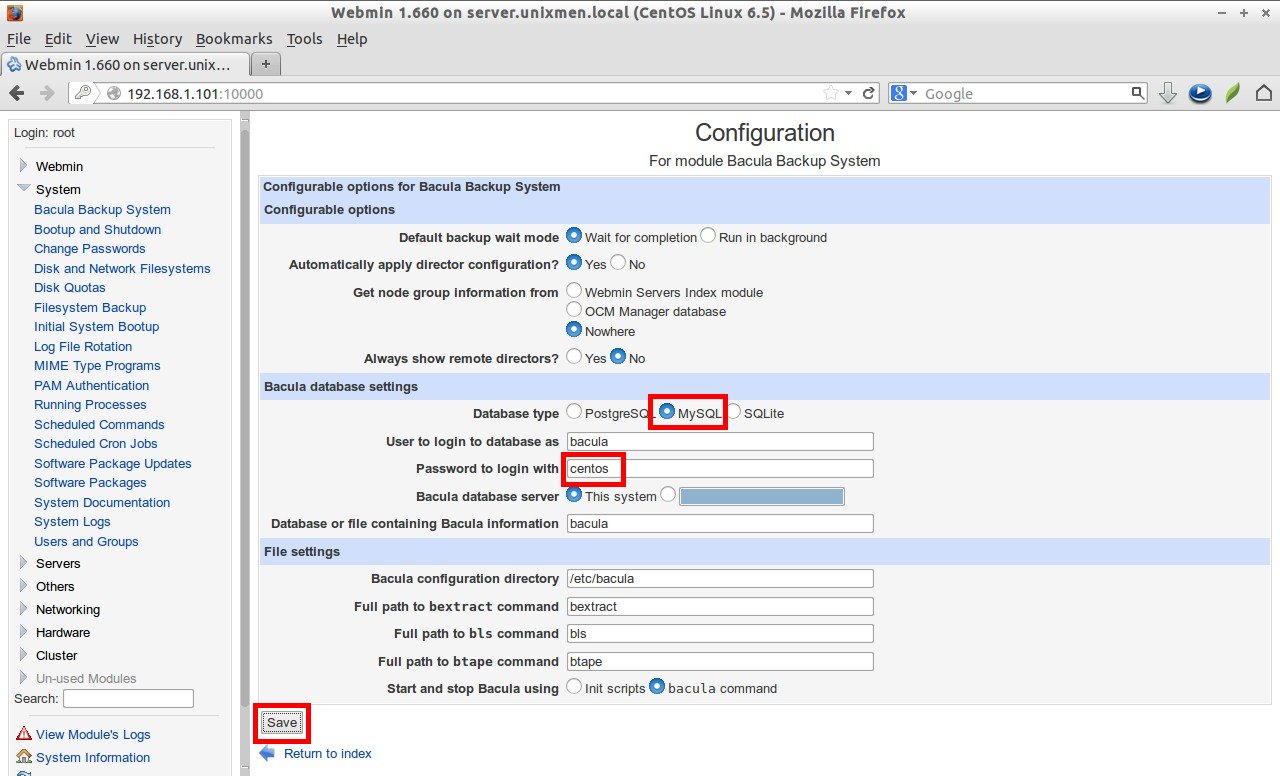
 Select the database i.e “MySQL” in this case and enter the bacula database user password. Then click save.
Now you will get the window like shown below.
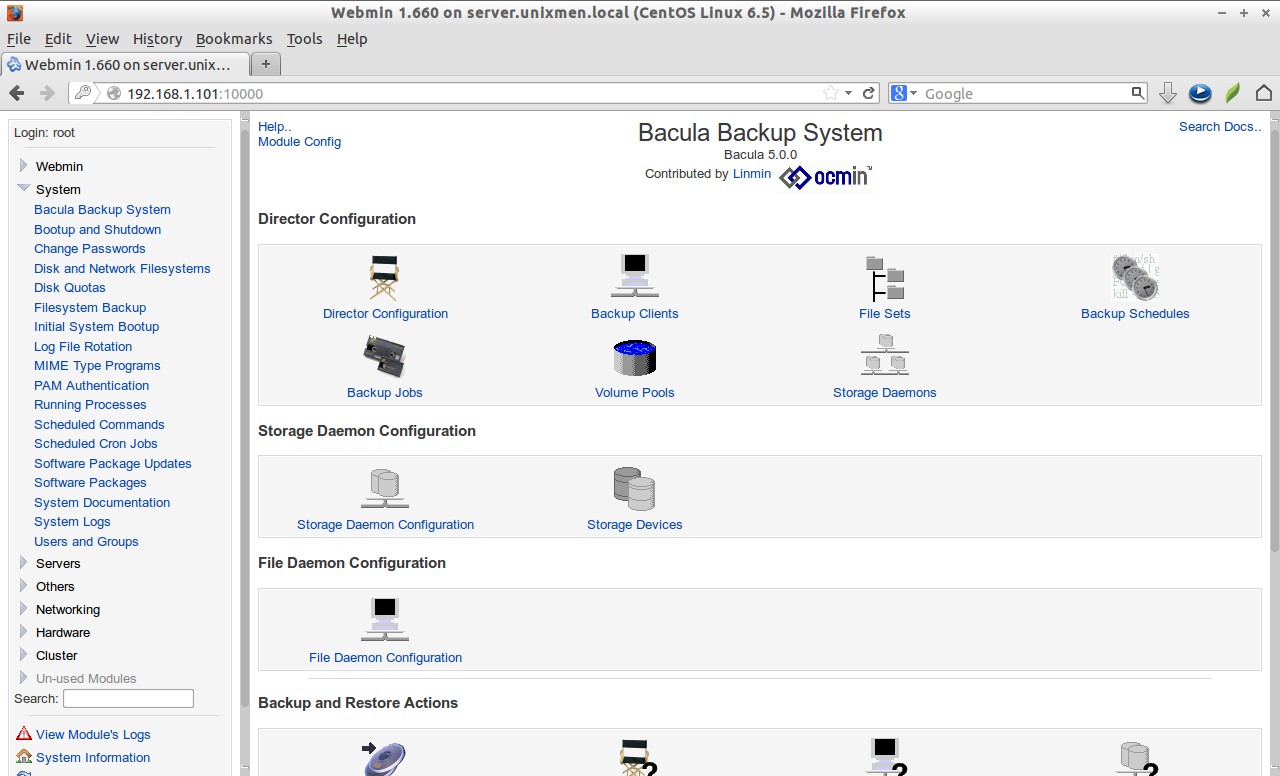 That’s it. From here you can add Backup clients, Volumes and schedule jobs etc.
Good Luck!
Reference Links:



