Google Plus

How to move back from Unity to gnome2 classic in ubuntu 11.04 natty narwhal

If you installed ubuntu 11.04 and you didn`t like the new look!!,  The system works too slow with Unity or you missed the old look of ubuntu.  You decided to go back to the old look but you don`t know how to do that?
natty

It is very easy, To make Gnome 2 your default desktop instead of unity , just  follow the following steps:

1- To get Gnome Classic Default simply press the Super ( windows key would be the bottom left of your keyboard ) then go to More applications
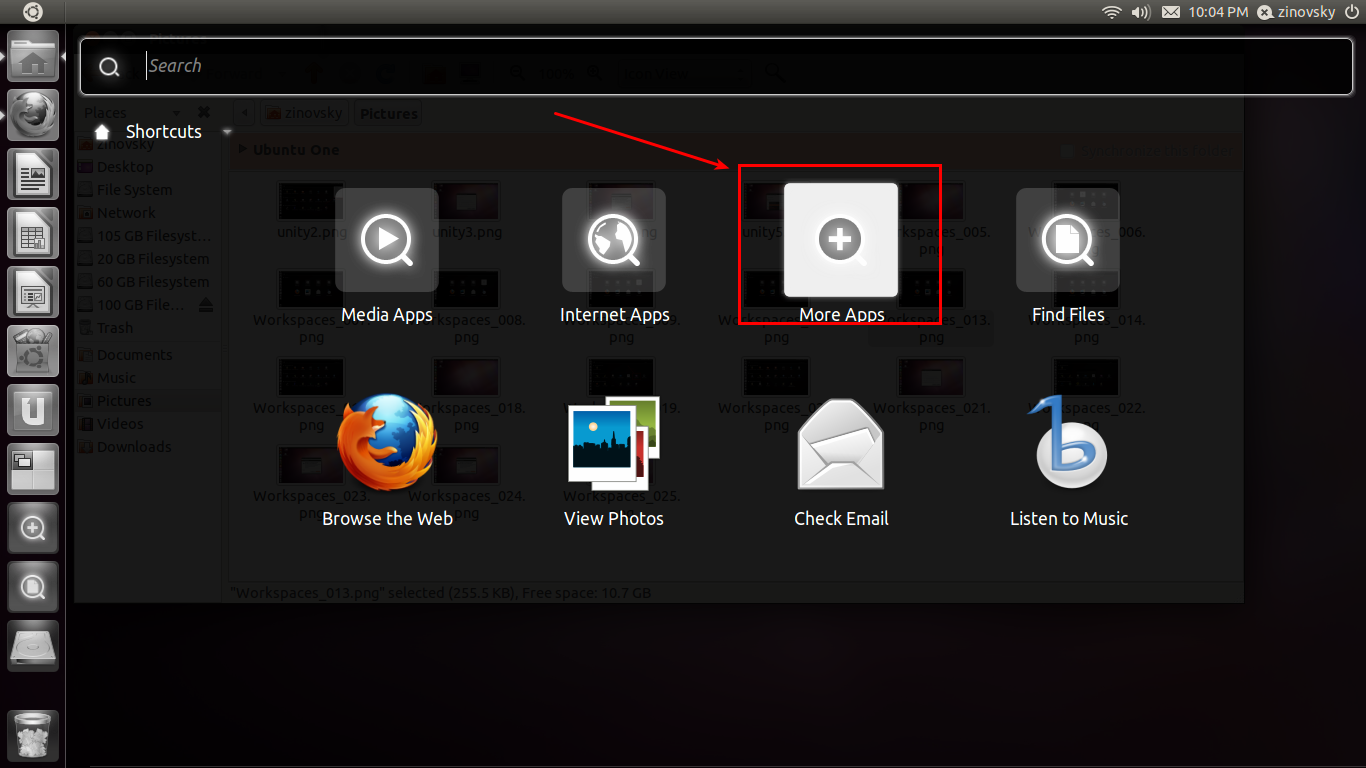
 unity1

2- Go to all applications and choose system
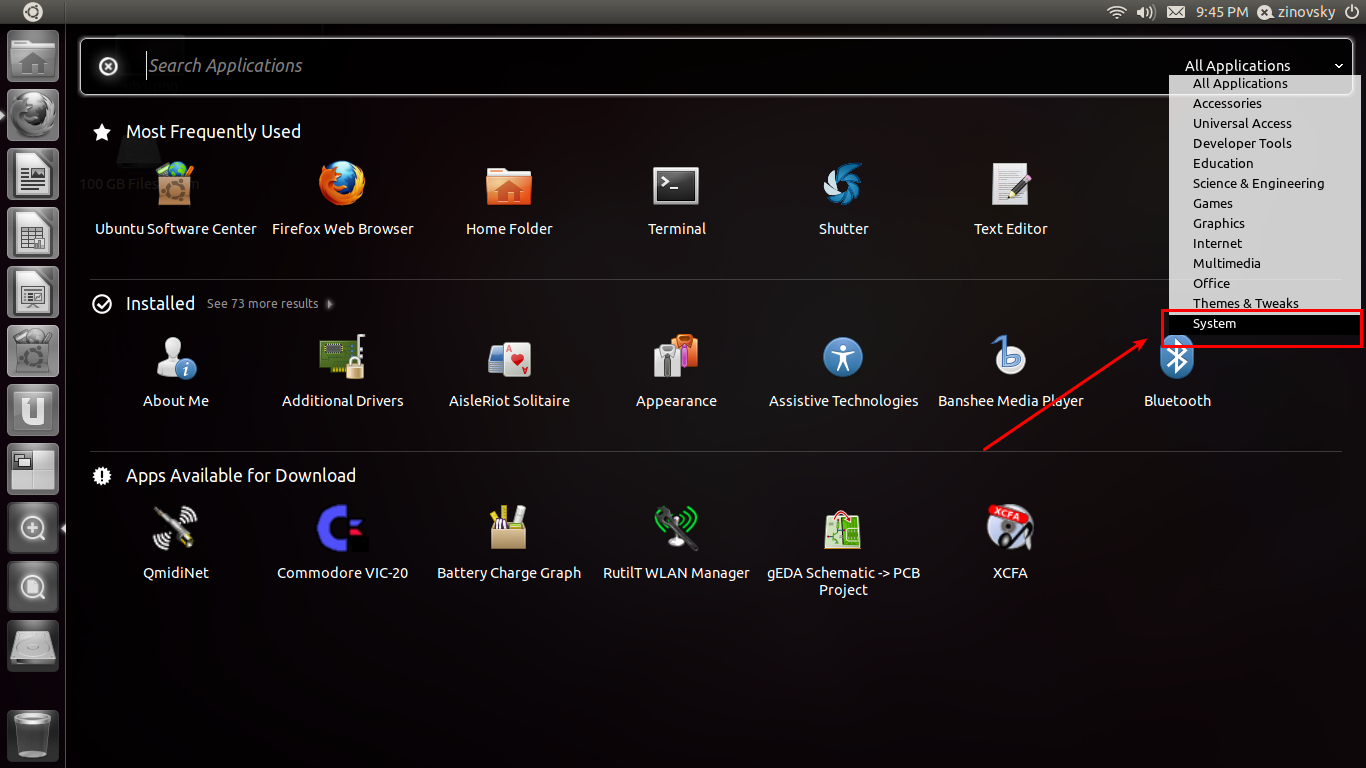
 unity2

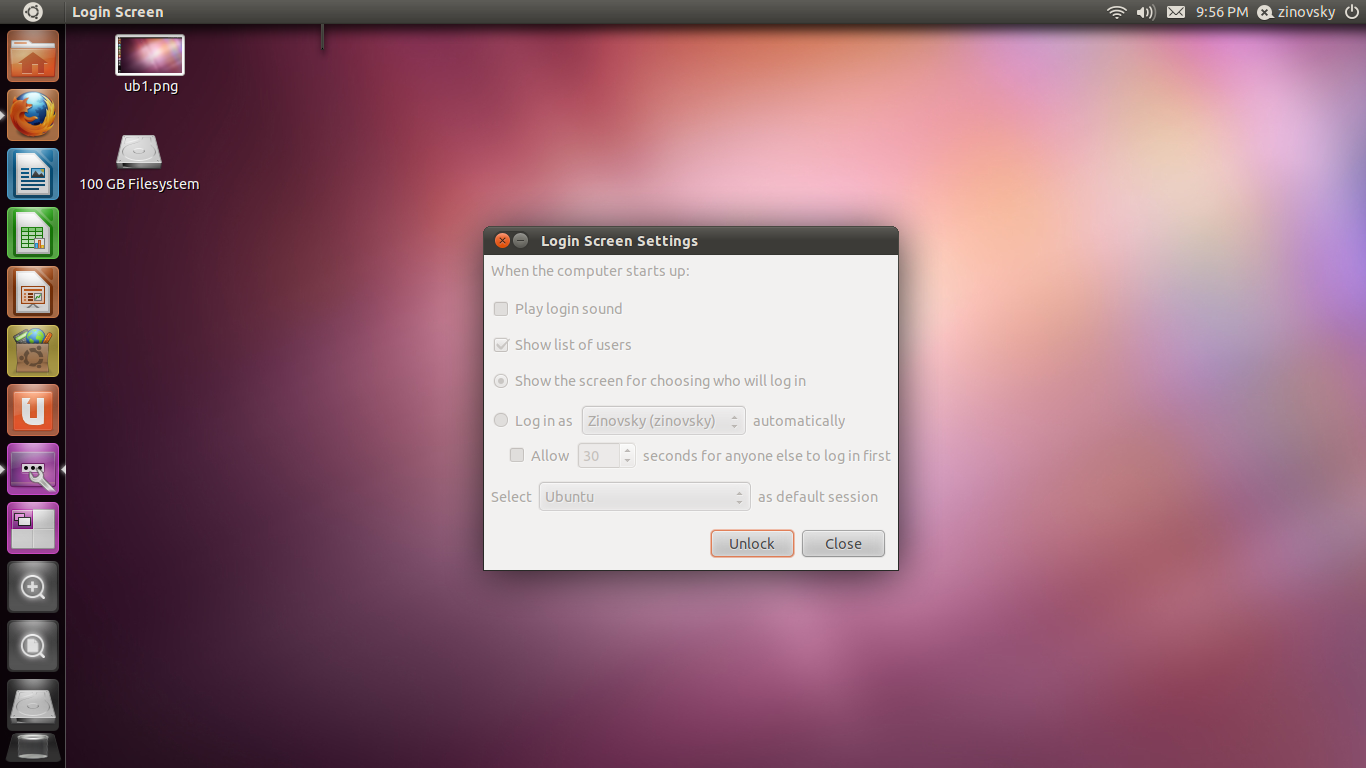
3- Choose Login screen :

Workspaces_019


4- Now click unlock and enter your password
 unity3

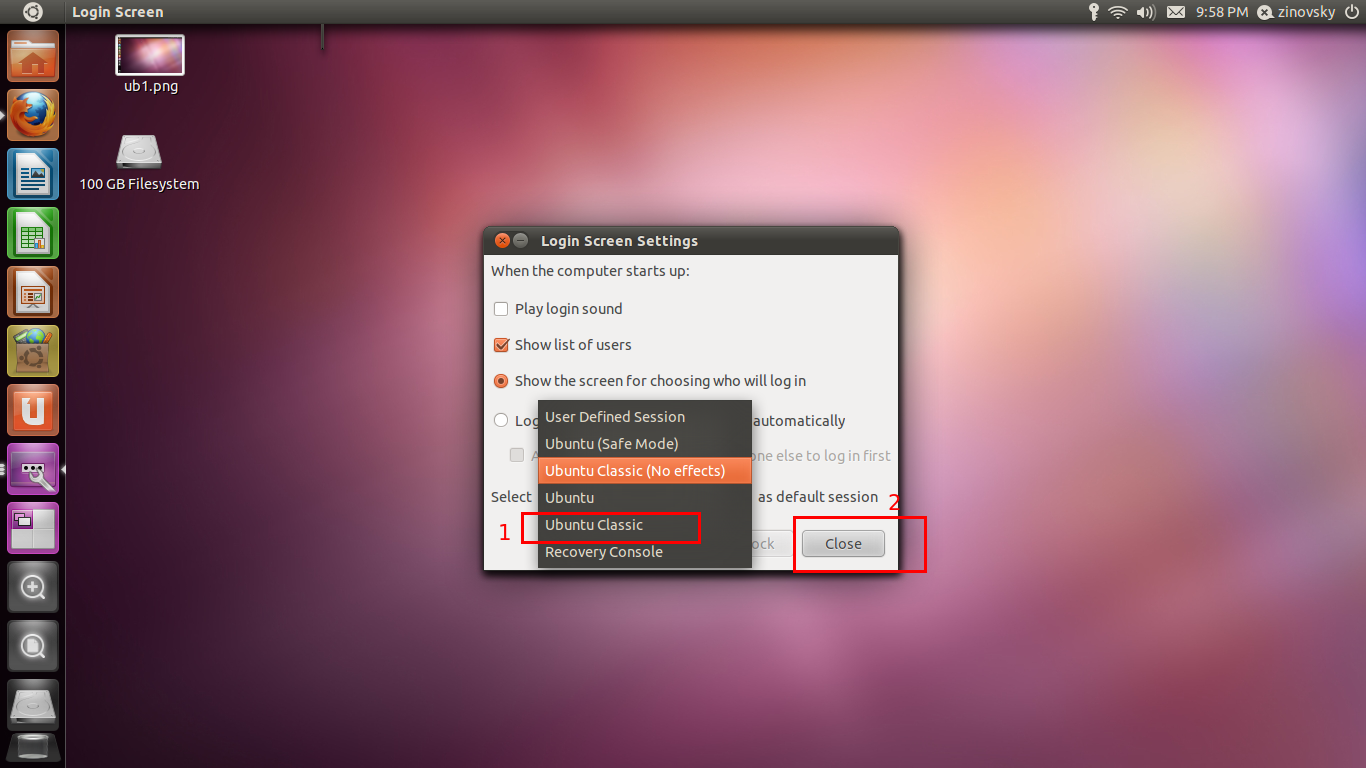
5- Now select ubuntu classic and click close.
unity5

Now reboot your system, you will get back to the classic Ubuntu desktop (Gnome2). If you want to get back to Unity, just repeat the same steps above.

Via lffl.org

For questions please refer to our Q/A forum at : http://ask.unixmen.com

  • http://ubuntumanual.org/ Thomas

    Before u guys decide to change from Unity,just have alok here, there has been a test conducted to analyze the normal user’s approach towards the Unity interface sporting Ubuntu 11.04 Natty Narhwal. The participants of the Canonical sponsored survey were:
    P1, 19, a student and Mac user,
    P2, 33, an administrator and Mac user,
    P3, 25, a student and Windows user,
    P4, 32, a teacher and Windows user, and some others
    They were given a bare metal installed with Ubuntu Natty and asked to do some basic tasks with the system. They were supposed to be new to the Unity interface and had to be from different platforms.
    To know more in details visit: ubuntumanual.org/posts/288/unity-visually-appealing-and-usable-steep-learning-curve-user-survey

    • http://all-tech-thoughts.blogspot.com CMD

      yes, but you’ll notice 3/5 crashed Unity!

  • greg

    strange-to log out and log in (and chose right environment) it is suposed to do such complicated actions.Where is spoken simplicity and speed?

  • Jim Wallace

    Step 1 uses a SUPER key (Windows?). What if I use a standard 101 keyboard (no Windows keys)?

    • Arkonos

      Forget all those steps
      The one thing I like from Unity is the search function.
      Just click in the top left corner, type in log and you should see the login Screen icon.

      • Jacob

        Stop trying to make things easy. This is Linux after all…

        • Dakshina

          That’s where you guys getting all it wrong… Why the hell you guys want to make Linux a [b]geek only OS[/b]? What about newbies??

          This is a main market consideration where Apple and MS win over Linux

          • pienene

            I was using 10.10 for two weeks, and was very happy – I found it very easy – and I’m new to linux, but then I updated – and it’s a nightmare! those big black windows , that doesn’t display anything I’m looking for! I liked the bar on the left – but not the way it functions! thanks for ubuntu classic!

  • Pedro

    very helpful. Thank you.

  • error0815

    It didnt work for me, unfortunately. I hate unity. I put my system on ubuntu classic, but it started with unity, not gnome2. HELP!

    • Tom

      On the login screen click on your name and choose ubuntu classic from the choices at the bottom of the screen– good luck

      • error0815

        Later on I tried "Ubuntu Classic (without effects)" that’s the one working for me, but that’s no solution. I completly don’t want Unity, without having to choose on a login screen (which i disabled all time before).
        Unfortunately I like some feature in 11.04 rly much, so downgrading will be hard. -.-

  • http://www.neverslair-blog.net Oliver Leitner

    good lord, thanks, this is what i was looking for…

    seriously, just because some other operating system is doing it, doesnt mean, that its any good.

  • Gabe

    Uh .. good info .. but accidently clicked on "User Defines Session" and am now not able to get back to either of the usefull sessions. I get a desktop with nothing on it. Is there a way to fix this from the console?

    • error0815

      That happend to me, aswell. The way i got arround it, was to make a new starter on the desktop with the "gnome-panel" and excecute in terminal (don’t know what exactly the english version says). That should (after executing this starter) the gnome panel back.

  • http://www.wellfleetsoftware.com Farrukh Najmi

    I was quite against Unity when I first encountered it. I am a self professed geek. BUt I decided to give it a try since someone had worked so hard to bring it to us. I must say that I am beginning to like it once I am getting the paradigm shift.

  • Tu madre

    OMG THIS IS A STUPID ARTICLE!!! THE EASIEST WAY TO DO THIS IS TO CHANGE THE SESSION TYPE AT THE LOGIN SCREEN!
    1. Log out
    2. Click on your profile, and before you enter the password, ook at the bottom of the screen.(where it says "Ubuntu)
    4. Click that, and choose "Ubuntu classic".
    5. ENJOY~~

  • Hanna Camille

    Natty kept crashing on my netbook. Actually when I watched movies it just logged out for no apparent reason. Really weird. This even happened in"classic" mode. Anyhoo. Went back to Maverick.

  • jacob

    there is no need to reboot – all you need to do is log out and log back in

  • muteki

    Hi, thanks for the tutorial, but i have some problems. This is how it looks my desktop righ now [url=http://img13.imageshack.us/img13/3082/pantallazopon.png]http://img13.imageshack.us/img13/3082/pantallazopon.png[/url]. It might look like ubuntu classic (no effects) but it’s ubuntu classic, and running it on Virtualbox.

    • http://all-tech-thoughts.blogspot.com CMD

      looks like bad theme file, or missing theme, as that’s the basic theme root uses, try changing to another theme

      • muteki

        I’ve tried but it doesn’t work. It seems that is a bug of Ubuntu there are a lot of opinions but I don’t know… [url=http://www.webupd8.org/2011/06/fix-ubuntu-linux-mint-theme-changing-to.html]This works for me!![/url]

  • Shanda Buckley

    my computer wont boot on restart after upgrade! please help!

    • Zinovsky

      Do you got any error message?

  • hooya

    Thank you! Very helpful :)

  • Anarasha

    Cool, thanks! I was shitting my pants for a moment thinking I would have to work with Unity from now on… :P

  • Jack Splatt

    Who loves faggots and niggers? Your mom does.

  • http://profiles.google.com/keithdtyler Keith Tyler

    I don’t know why people keep saying “you get gnome 2 back”. That’s not true. You get gnome 3 trying to look like gnome 2. But under the hood, in the important details, they are functionally incompatible.

    • Nicklas

      Keith
      Here they are talking about 11.04. So it really is Gnome 2. Last chance since as you say in 11.10 you get some buggy gnome 3 instead.

  • straightawaykid

    Thanks so much, I searched for quite a while.  Classic drop-down menu desktop without all the idiotic tablet buttons on the left!  Sys Mon still shows Gnome 2.32.1, Natty 11.04, so doing this really changes from Ubuntu to Ubuntu classic desktop environment – I was not sure if it was possible without going back to a previous Ubuntu release.

  • Ramsgsl

    is there any way to do the same using CLI?