

Firefox 16, a treat for developers http://t.co/cnd27CzT
Gooseberry – An alternative to Raspberry Pi
Gooseberry is another alternative to Raspberry Pi, and according to the manufacturers it is three times faster than its rival. This new berry comes with a new ARM A10 processor running at 1GHz stock frequency, while there is enough headroom for overclocking up to 1.5 GHz. Also, it has twice the RAM of Raspberry Pi, meaning 512MB for this board. As for its power consumption, Gooseberry board consumes on average 4 watts of power when in use. When idle consumes 3.5 watts of power and when on standby consumes 2.3 watts of power.
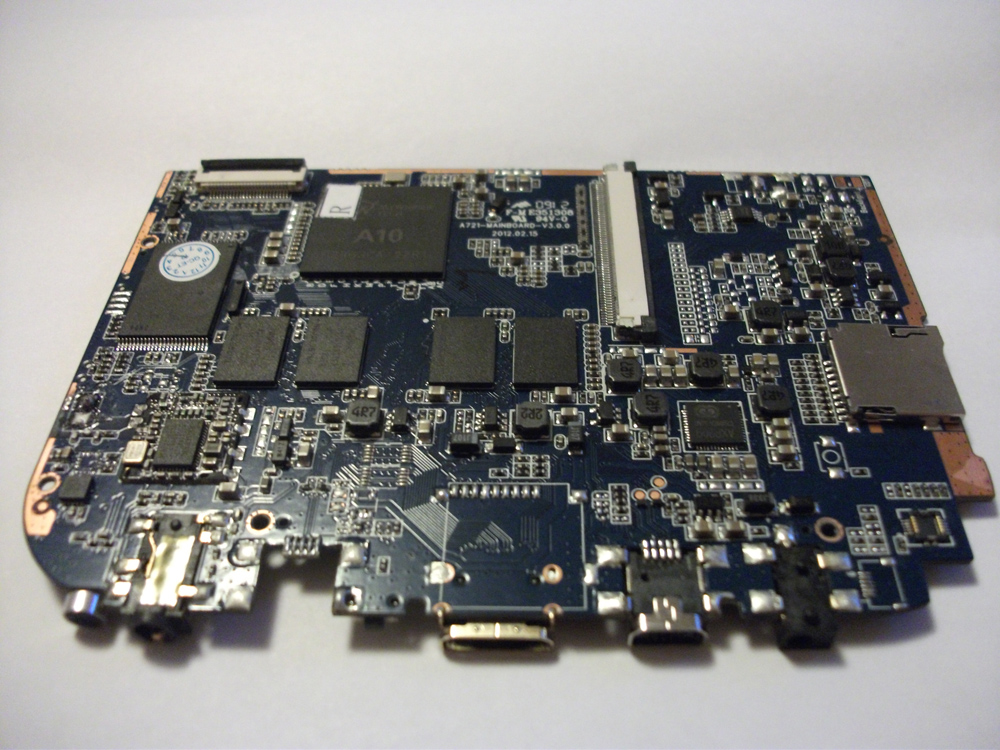
Currently, it comes with Android 4.0 ICS operating system and soon there will be an Ubuntu dedicated version but currently without graphics acceleration and also an Arch Linux distribution targeted to its hardware. In addition, developers claim that Gooseberry users will constantly update on the latest version of Arch Linux, thanks to its rolling release cycle and small package size. For those who might ask, you ‘ll find Kernel sources right here.
So what can you do with your Gooseberry ?
Download YouTube Video | YouTube Converter
Price wise, this board costs $62 and it ships with a UK charger but without a case. Please note, if you live outside of the EU, additional import taxes may apply. The initial release sold out 500 pieces, so there is no way to buy it today, but it will become available again sometime in the near future.
Specifications
CPU:A10 1 Ghz overclockable to 1.5 Ghz (1.2 Ghz highest stable overclock on android)
Graphics Processor : Mali 400 MHz
Onboard Storage: 4Gb (upgradeable by Micro SD memory card- 32gb)
Wifi: 802.11 b/g/n
Connectivity: Ac jack, 1x 3.5mm Earphone Jack, 1x Mini Usb, 1x Hdmi Out, Micro Sd slot
Compatible software: Android ICS is the only compatible OS! Ubuntu and Arch linux are expected in the future
Output Connectivity
Monitor: Mini Hdmi cable (Beware: there is no VGA analog port)
Mouse/Keyboard: Male Micro usb to female usb cable
Network: Use Wifi (Beware: there is not LAN port)
External hard drives: it is recommended to use an active USB hub
Flashing the NAND: Micro USB to USB to connect board to computer
For further information about Gooseberry board visit their forum.

-
-
-
-
http://twitter.com/akaSassinak
-
-
-
Pingback: Gooseberry - alternativa Raspberryju? | Linux Za Sve
-
Pingback: Émission #19 du 2 août 2012 – Votre chien est mort
-
Pingback: Gooseberry – alternativa Raspberryju? - b4sh-blog.orgb4sh-blog.org
Like us on Facebook
This week Top Posts 
Top Things to do After Installing Ubuntu 13.04 ‘Raring Ringtail’ : Ubuntu 13.04 Raring Ringtail final is almost out. The final release it scheduled for release on Apri...0 comment(s) |
Install lamp with 1 command in Ubuntu 12.10, 13.04 Raring Ringtail & LinuxMint13 : Updated: 10/09/2012 :LAMP (Linux, Apache, MySQL and PHP) is an open source Web development platform ...0 comment(s) |
Howto: Upgrade to Ubuntu 13.04 Raring Ringtail from 12.04, 12,10 | Desktop & Server : Updated 05-04-2013: Ubuntu 13.04 Raring Ringtail will be released Soon, If you have ubuntu 12,10, 12...0 comment(s) |
Steganography- Hide Your Files Inside An Image in Linux : Nowadays, our personal computer is not only a work tool, it is also our private space where we sto...4 comment(s) |
How to use Remote Desktop in Ubuntu : Sometimes, we need to access our computer from other locations when we’re not at home and such. This...0 comment(s) |
Configure conky-Lua in Ubuntu (12.10 & 13.04 Raring Ringtail), Fedora, debian and LinuxMint | Howto Conky : Updated 05-04-2013: Conky is a free, light-weight system monitor for X, that displays any informatio...0 comment(s) |
Recent Posts
- Steganography- Hide Your Files Inside An Image in Linux
- Unix/Linux File Recognition. Did You Know?
- Migrate from MySQL to MariaDB in FreeBSD
- Connect Your Android Galaxy Tablet to Ubuntu via USB
- ElementaryOS Beta 1 and 2 Comparison and Review
- Introduction to the Linux Command Line
- A Secure Password
- Linux Kernel 3.10. It’s BIG!
- Monitoring Users Activity Using psacct or acct Tools in Linux
- Run Your Own Social Network Using elgg on RHEL / CentOS and Scientific Linux
Recent Comments


DragonFartOutLoud
| #
it went to china.
DragonFartOutLoud
| #
great review! i’ve been using it as my main OS since Beta 1 release. its been a awesome ride so far :)
jet li
| #
i try the method, and i unzip the image contain zip secret, i dont find the file that i was hide, where it go? and how to open it? :s
zinovsky
| #
Yes, it is possible using Steganography, we will post another quick howto do that in the next few days
SK
| #
Hey Abhishek
Yes there are many open source tools available to meet your requirements. They are easy to manage and has a decent web gui to configure. We will publish all of them one by one shortly. Stay tuned with us.