

Firefox 16, a treat for developers http://t.co/cnd27CzT
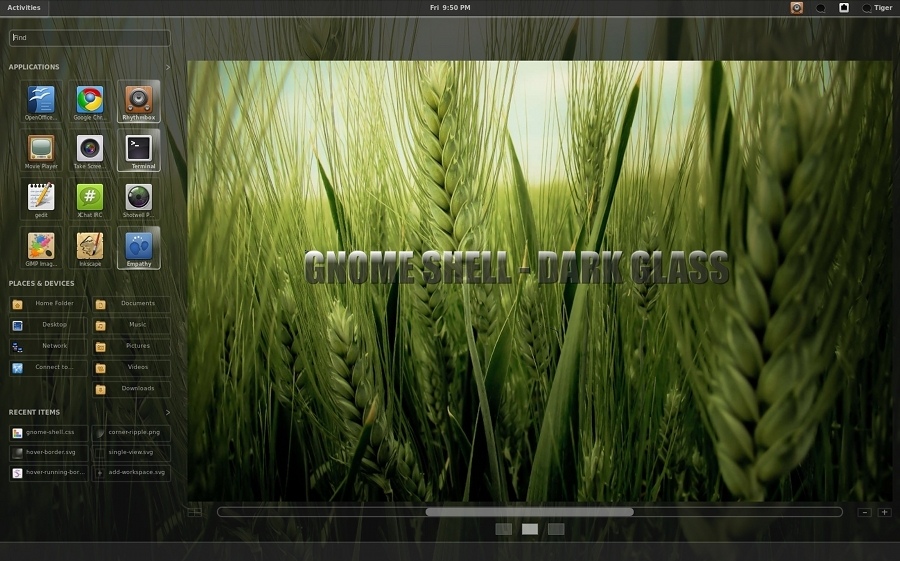
GNOME Shell Theme Pack- A nice collecion of themes for Gnome shell

This is a nice pack of themes for Gnome shell, the pack contains 6 nice themes : deviantart theme that is based on the deviantART website, Gaia theme based on gaia style, a site raising awareness of climate change, Dark Glass, Elementary -Based on the GTK theme, Equinox Ambiance Light theme ,Ambiance – (Based on the GTK theme in Ubuntu 10.04), Sonar – Based on the GTK theme in openSUSE and finally Tron Legacy.
{yoogallery src=[/images/stories/Themes/gnome-shell-pack/] width=[200]}
Installation:
Extract the tar.bz2 and inside each directory theme name is a theme directory. Copy the “theme” directory to /usr/share/gnome-shell. Backup /usr/share/gnome-shell/theme first.
sudo cp -fr/usr/share/gnome-shell/theme /usr/share/gnome-shell/theme.bkp
Then restart GNOME Shell by Alt, f2, and typing restart.
You can install gnome-shell by typing the following command:
sudo apt-get gnome-shell gnome3-session
This will put an option in your session manager so you can login to it.
– Fedora 14 version of GNOME Shell runs via the Desktop Effects, you’ll see a gnome3 option.
{xtypo_warning}IMPORTANT:
Please read the README file I have provided, since there is important information in regard to GNOME Shell versions. GNOME Shell 2.31.2/2.31.5 recommended. Tested with 2.31.5, newer versions like Git, use these themes at your own risk. If you’re unsure, stick to what Ubuntu 10.10, Linux Mint 10 or Fedora 14 provide{/xtypo_warning}
Via Gnome-Look
{module user9-footer}
-
http://www.buyelggthemes.com/index.php
-
-
-
Like us on Facebook
This week Top Posts 
Top Things to do After Installing Ubuntu 13.04 ‘Raring Ringtail’ : Ubuntu 13.04 Raring Ringtail final is almost out. The final release it scheduled for release on Apri...0 comment(s) |
Steganography- Hide Your Files Inside An Image in Linux : Nowadays, our personal computer is not only a work tool, it is also our private space where we sto...4 comment(s) |
Install lamp with 1 command in Ubuntu 12.10, 13.04 Raring Ringtail & LinuxMint13 : Updated: 10/09/2012 :LAMP (Linux, Apache, MySQL and PHP) is an open source Web development platform ...0 comment(s) |
Howto: Upgrade to Ubuntu 13.04 Raring Ringtail from 12.04, 12,10 | Desktop & Server : Updated 05-04-2013: Ubuntu 13.04 Raring Ringtail will be released Soon, If you have ubuntu 12,10, 12...0 comment(s) |
How to use Remote Desktop in Ubuntu : Sometimes, we need to access our computer from other locations when we’re not at home and such. This...0 comment(s) |
Install and Configure Samba share in Ubuntu 13.04 Raring Ringtail , 12.10, 12.04| Howto : Updated 05-04-2013: One of the most asked features for Samba is a graphical user interface to help w...0 comment(s) |
Recent Posts
- Steganography- Hide Your Files Inside An Image in Linux
- Unix/Linux File Recognition. Did You Know?
- Migrate from MySQL to MariaDB in FreeBSD
- Connect Your Android Galaxy Tablet to Ubuntu via USB
- ElementaryOS Beta 1 and 2 Comparison and Review
- Introduction to the Linux Command Line
- A Secure Password
- Linux Kernel 3.10. It’s BIG!
- Monitoring Users Activity Using psacct or acct Tools in Linux
- Run Your Own Social Network Using elgg on RHEL / CentOS and Scientific Linux
Recent Comments


Edson Carlos
| #
In debian no found. I need link download install in linux debian
jacky can
| #
You can actually unzip your secret archive by leaving out the -t option, instead using:
unzip newPhoto.jpg
DragonFartOutLoud
| #
it went to china.
DragonFartOutLoud
| #
great review! i’ve been using it as my main OS since Beta 1 release. its been a awesome ride so far :)
jet li
| #
i try the method, and i unzip the image contain zip secret, i dont find the file that i was hide, where it go? and how to open it? :s