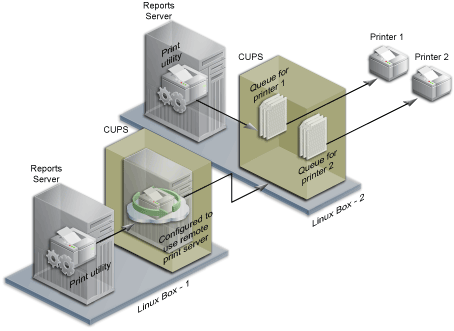
CUPS is the standards-based, open source printing system developed by Apple Inc. for Mac OS® X and other UNIX®-like operating systems.
We Linux users have been using CUPS for a long time now, and although some replacing works have already begun for obvious reasons, CUPS is still a very important and useful tool for every one of us.
What’s new in this release?
CHANGES IN CUPS V1.6.0
– Document changes (STR #4131)
– Added new Catalan (STR #4107) and Spanish (STR #4137) localizations.
CHANGES IN CUPS V1.6rc1
– Added a new Japanese localization (STR #4122)
– The SNMP backend no longer exits if it is unable to obtain an IPv6
socket (STR #4109)
– The LPD backend incorrectly used “localhost” in the control file
instead of the current hostname.
CHANGES IN CUPS V1.6b1
– Documentation updates (STR #3927, STR #3980, STR #4010, STR #4068)
– The scheduler now consolidates all PPD updates from filters at the
end of the job (STR #4075)
– CUPS now supports color management using colord (STR #3808)
– CUPS now supports Bonjour using Avahi (STR #3066)
– The PreserveJobFiles and PreserveJobHistory directives now support
specification of a time interval (STR #3143)
– PPD files can now be archived in (gzip’d) tar files to further reduce
the disk space used by PPD files (STR #3772)
– The network backends now deal with printers that report their levels
in percent but do not specify a maximum capacity of 100 (STR #3551)
– The network backends now report full/almost-full waste bins in
printers along with end-of-life for cleaning pads (STR #4017)
– Added a configure option to set the permissions of the installed
cupsd (STR #3459)
– Added a new WITH-ALL-VALUES directive to ipptool EXPECT predicates
(STR #3949)
– CUPS now supports a User directive in client.conf and the CUPS_USER
environment variable for overriding the default username (STR #3114)
– Now set the PJL USERNAME variable as needed (STR #3100)
– Added support for usernames and passwords longer than 32 characters
(STR #2856)
– Added a new MaxHoldTime directive to automatically cancel jobs that
have been held indefinitely after a specific number of seconds
(STR #2291)
– The LPD backend now uses the originating host name when it is not the
local system (STR #2053)
– CUPS now prefers the suffix “dpcm” when reporting resolution in dots-
per-centimeter (STR #4006)
– The configure script and build system no longer support building of
separate 32-bit and 64-bit libraries.
– The “brightness”, “columns”, “fitplot”, “gamma”, “hue”,
“natural-scaling”, “penwidth”, “position”, “ppi”, “saturation”, and
“scaling” options are not longer supported (STR #4010)
– The “page-bottom”, “page-left”, “page-right”, “page-top”,
“prettyprint”, and “wrap” options have been deprecated (STR #4010)
– The scheduler now reports the standard “number-of-documents” attribute
instead of the CUPS-specific “document-count” attribute in
job objects.
– Added new destination connection and enumeration functions (STR #3924)
– Added new option, localization, and job submission functions that do
not depend on PPD files (STR #3925)
– Added a new MaxJobTime directive for cupsd that specifies the maximum
amount of time allowed for a job to complete before it is canceled.
– The default password callback now supports passwords up to 127
characters.
– The scheduler now supports a DefaultAuthType of “auto” to
automatically choose between Basic (username/password) and Negotiate
(Kerberos) authentication.
– cupsSideChannelSNMPGet/Walk now support OIDs and values up to 64k in
length.
– CUPS no longer supports automatic remote printers or implicit classes
via the CUPS, LDAP, or SLP protocols (STR #3922, STR #3923)
– The PPD APIs are now deprecated and will be removed in a future
version of CUPS (STR #3927)
– The default IPP version for requests is now 2.0 (STR #3929)
– The IPP APIs no longer expose the ipp_t or ipp_attribute_t structures
and instead provide accessor functions (STR #3928)
– The scheduler will no longer run programs with group write permission.
– The PHP module has been removed (STR #3932)
– The bannertops, commandtoescpx, commandtopclx, imagetops,
imagetoraster, pdftops, rastertoescpx, rastertopclx, and texttops
filters have been removed (STR #3930)
– The serial and parallel backends have been removed (STR 3935)
———————————————————————————————————————————-
CUPS currently offers drivers for 1249 printers and you can search yours to see if any drivers are available.
As this is a stable version I suggest the update to everyone, but keep in mind that the first bugfix releases will come out in 6-8 weeks.