

Google Plus

How can i configure Debian Squeeze to work behind a proxy?| FAQs

Written by Mel Kham on . Posted in Frequently Asked Questions

Question :  How  can i configure Debian Squeeze to work behind a proxy?

Answer :


1-   Add network proxy  from   System>Preferences>Network Proxy


For  Browsers like Epiphany, itis  working  with  the  above  configuration. If  you are   using iceweasel  browser  , you  have  to add  manual proxy by editing:   Edit>Preferences>Network>Settings


2-Synaptic package manager

Open Synaptic –> Settings–>preferences–>Network and enter your  proxy  and port.
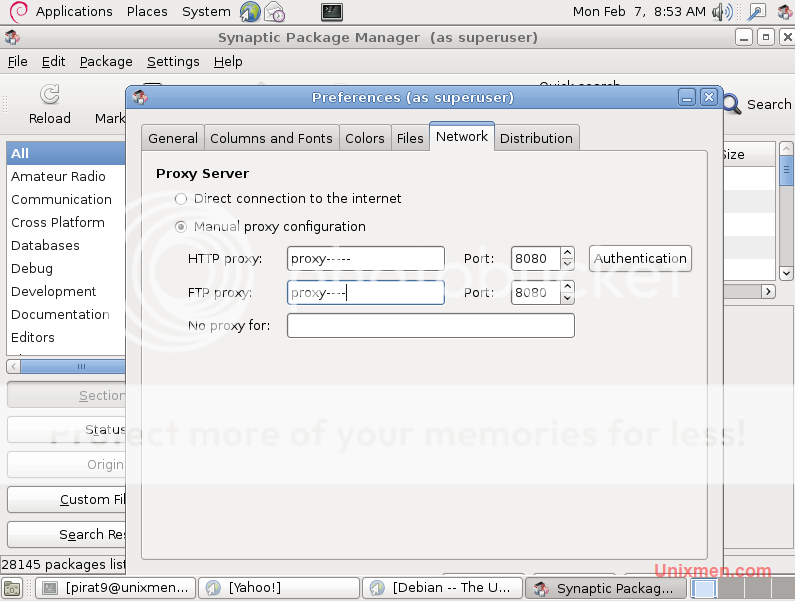
After  Close  and  reload. Find  new  packages  download  and  install.

3- Command  Line (wget /aptitute/apt-get)

To configure debian to work behind a proxy using command line, you need to edit apt.conf file:

vi /etc/apt/apt.conf

Then at the end of the file add the following line:

Acquire::http::Proxy "http://proxy-hotname:port/";
Acquire::ftp::Proxy  "http://proxy-host:port/";

if  you are using  proxy with a  password  the  config file  will  be (Don`t forget to chnage user:pass with you artual proxy usermane and password)

 Acquire::http::Proxy "http://user:pass@proxy-hotname:port/";
 Acquire::ftp::Proxy  "http://user:pass@proxy-host:port/";


Save and  exit

For questions please refer to our Q/A forum at : http://ask.unixmen.com

Mel Kham

Founder of Unixmen, Living in Amsterdam. Am working in my free time to help people to understand the Opensource and to explain them in easy way how to make the fist steps to the the light. Working day and night with my Co-founder Zinovsky to keep this website live even with less resources.

Like us on Facebook

This week Top Posts

Write for us

Recent Comments

Pat L

|

I tried it and it works with a regular zip file, but if you password-protect the .zip file it does NOT work.

SK

|

Yes we can. What kind of help you need? We are doing outsourcing and technical support for Linux and Open source worldwide. To know more about the details visit here.

ClintB

|

After install as above, run shell script /opt/Citrix/ICAClient/wfica.sh manually and note lib errors still occur. I had the x64 motif loaded but had to manually install the x86 too. Got that from http://rpmfind.net/linux/rpm2html/search.php?query=libXm.so.4 Even after that, I still had to do a “yum install alsa-lib.i686 alsa-lib.x86_64″ to resolve any additional libasound.so.2 errors. Once those two lib issues were resolved, Citix Web Interface launched apps fine by telling browser to open launch.ica using /opt/Citrix/ICAClient/wfica.sh. Good luck Ernesto!

AD

|

I need some Help on Linux,can you guide me ?

Edson Carlos

|

In debian no found. I need link download install in linux debian

 
IDG Tech Network
Copyright © 2008-2013 Unixmen.com .
Maintained by Anblik .

