

Firefox 16, a treat for developers http://t.co/cnd27CzT
Cleaning up Ubuntu after every Upgrade or fresh Install | oneiric ocelot
Each time you upgrade your system, some packages, or well, data get left behind in your system that have absolutely no use. They do nothing, but take up your HDD space and in turn, waste your systems’ valuable resources. This little tutorial will show you how to clean up Ubuntu after every upgrade or fresh install.
Thankfully, Ubuntu now includes an utility called ‘Computer Janitor’ to make our lives much easier. If you’re from a windows background, you may compare this to the ‘Disk Cleanup’ tool.
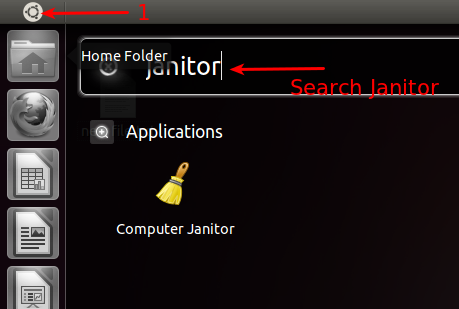
If you don’t know where to find it, just bring up the launcher and search for ‘Computer Janitor’
You’ll be presented with a list of packages and why it’s not needed anymore. Review them as you see fit and choose to keep or throw away.
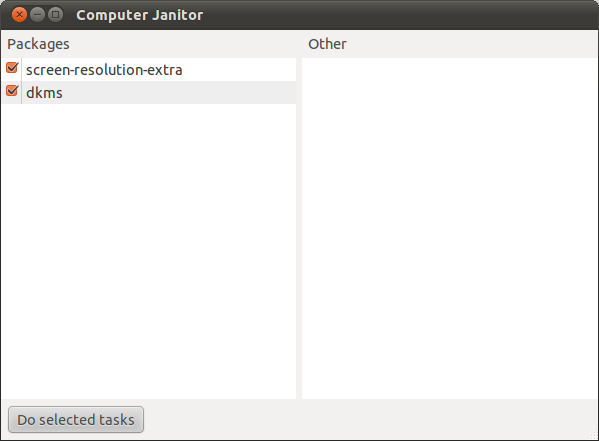
After you’re done, just click on ‘Do Selected Tasks’ to prune the selected packages from your system.
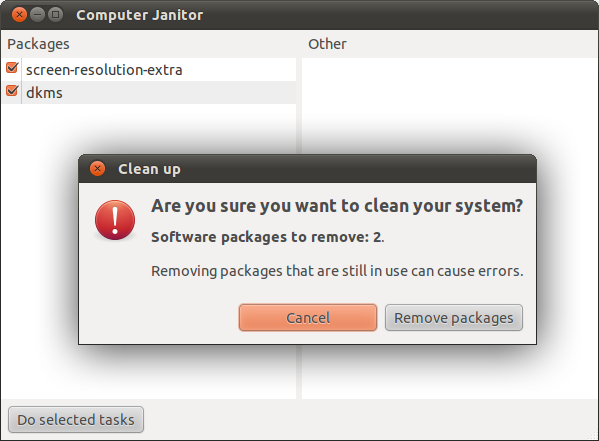
When prompted, confirm it by clicking on ‘Remove Packages’. That’s all there’s to it. Enjoy!

Like us on Facebook
This week Top Posts 
Top Things to do After Installing Ubuntu 13.04 ‘Raring Ringtail’ : Ubuntu 13.04 Raring Ringtail final is almost out. The final release it scheduled for release on Apri...0 comment(s) |
Install lamp with 1 command in Ubuntu 12.10, 13.04 Raring Ringtail & LinuxMint13 : Updated: 10/09/2012 :LAMP (Linux, Apache, MySQL and PHP) is an open source Web development platform ...0 comment(s) |
Howto: Upgrade to Ubuntu 13.04 Raring Ringtail from 12.04, 12,10 | Desktop & Server : Updated 05-04-2013: Ubuntu 13.04 Raring Ringtail will be released Soon, If you have ubuntu 12,10, 12...0 comment(s) |
Steganography- Hide Your Files Inside An Image in Linux : Nowadays, our personal computer is not only a work tool, it is also our private space where we sto...4 comment(s) |
How to use Remote Desktop in Ubuntu : Sometimes, we need to access our computer from other locations when we’re not at home and such. This...0 comment(s) |
Install and Configure Samba share in Ubuntu 13.04 Raring Ringtail , 12.10, 12.04| Howto : Updated 05-04-2013: One of the most asked features for Samba is a graphical user interface to help w...0 comment(s) |
Recent Posts
- Steganography- Hide Your Files Inside An Image in Linux
- Unix/Linux File Recognition. Did You Know?
- Migrate from MySQL to MariaDB in FreeBSD
- Connect Your Android Galaxy Tablet to Ubuntu via USB
- ElementaryOS Beta 1 and 2 Comparison and Review
- Introduction to the Linux Command Line
- A Secure Password
- Linux Kernel 3.10. It’s BIG!
- Monitoring Users Activity Using psacct or acct Tools in Linux
- Run Your Own Social Network Using elgg on RHEL / CentOS and Scientific Linux
Recent Comments


Edson Carlos
| #
In debian no found. I need link download install in linux debian
jacky can
| #
You can actually unzip your secret archive by leaving out the -t option, instead using:
unzip newPhoto.jpg
DragonFartOutLoud
| #
it went to china.
DragonFartOutLoud
| #
great review! i’ve been using it as my main OS since Beta 1 release. its been a awesome ride so far :)
jet li
| #
i try the method, and i unzip the image contain zip secret, i dont find the file that i was hide, where it go? and how to open it? :s