


Firefox 16, a treat for developers http://t.co/cnd27CzT
Cinnarch – Where Arch meets Cinnamon
Arch Linux is now one of the most popular Linux distributions out there and that is for a good reason. It is the distribution with the largest number of available packages, the most recent/up-to-date packages, the rolling release nature, one of the most complete and comprehensive documentations and one of the biggest userbases out there (that is certainly the most knowledgeable too).
What most people that try Arch find difficult is to install and maintain it, but basically install it. Arch isn’t going to offer any pre-installed desktop environments making it difficult for Linux newbies to enjoy it, and a challenge even for the experienced as you’ll either need to have a second machine available in order to read on-line instructions, or write them down somewhere and just go for it!

This is completely stupid and I can’t think of any real reason why Arch developers choose to do that other than the fact that they want to keep their userbase “newbies-immaculate”. Thankfully, there are many distributions out there that offer an Arch based and 100% Arch compatible system with a desktop environment pre-installed like ArchBang and Bridge Linux.
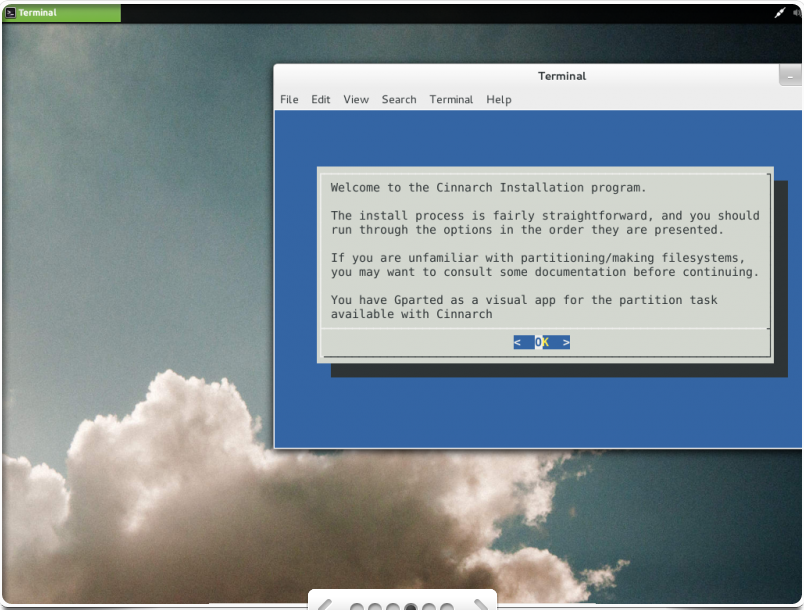
Cinnarch is just another example of that kind, as it is a 32 and 64-bit distribution that offers a completely Arch based and compatible system with Cinnamon pre-installed. Apart from the popular desktop environment, it offers every day use applications like the Chromium browser, LibreOffice suite, Adobe Flash Player etc. The installer is not there yet as it is a text installer, but I am sure this won’t a problem for the majority of you.
Download YouTube Video | YouTube Converter
And even if you hate text installers and you just don’t want to do things this way, you will be please to know that a graphical installer is coming round the corner…
Download YouTube Video | YouTube Converter
Cinnarch uses the Arch Linux official repo and AUR providing tons of available packages for every need and as it is based on Arch, it is also a rolling release distribution so you’ll only install it once and then upgrade/update for ever and ever till the end of times, which is exactly the way every Linux distribution in the year 2012 that respects itself and its users should be working like.
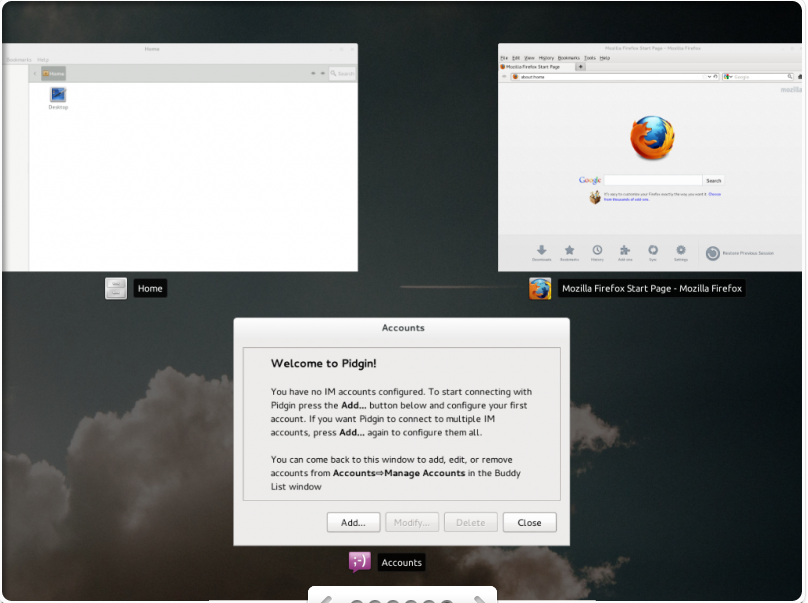
Now what if you don’t like Cinnamon? What if you want something else like Gnome Shell or KDE? Still it is much easier to install Cinnarch and then install the desktop environment of your choice like a human being :) plus you will have most of the applications you need pre-installed. You can either keep Cinnamon as a back up DE in case something goes wrong with your other DE of choice, or uninstall it later! Why install a simple Arch? Go for Cinnarch!

Like us on Facebook
This week Top Posts 
Top Things to do After Installing Ubuntu 13.04 ‘Raring Ringtail’ : Ubuntu 13.04 Raring Ringtail final is almost out. The final release it scheduled for release on Apri...0 comment(s) |
Install lamp with 1 command in Ubuntu 12.10, 13.04 Raring Ringtail & LinuxMint13 : Updated: 10/09/2012 :LAMP (Linux, Apache, MySQL and PHP) is an open source Web development platform ...0 comment(s) |
Howto: Upgrade to Ubuntu 13.04 Raring Ringtail from 12.04, 12,10 | Desktop & Server : Updated 05-04-2013: Ubuntu 13.04 Raring Ringtail will be released Soon, If you have ubuntu 12,10, 12...0 comment(s) |
Install and Configure Samba share in Ubuntu 13.04 Raring Ringtail , 12.10, 12.04| Howto : Updated 05-04-2013: One of the most asked features for Samba is a graphical user interface to help w...0 comment(s) |
How to use Remote Desktop in Ubuntu : Sometimes, we need to access our computer from other locations when we’re not at home and such. This...0 comment(s) |
Configure conky-Lua in Ubuntu (12.10 & 13.04 Raring Ringtail), Fedora, debian and LinuxMint | Howto Conky : Updated 05-04-2013: Conky is a free, light-weight system monitor for X, that displays any informatio...0 comment(s) |
Recent Posts
- Automatically change the Desktop wallpaper using Variety on Ubuntu / Linux Mint
- How to find Default Gateway in Linux
- Setup Backup server using rsnapshot on RHEL / CentOS / Ubuntu / Debian
- How to disable/change default PDF viewer in Mozilla Firefox
- Dictionaries in Python
- How to Install uTorrent Client on Ubuntu/Debian/Linux Mint
- Lists in Python
- Argument Handling in Python
- Setup your own Wikipedia like website using MediaWiki
- Administer your Server using Ajenti Server Manager
Recent Comments


cave
| #
it can be used to talk or chat through the internet,
it is using strong encryption.
but for example TOR is using some obfuscation because some countrys try to block all outgoing connections which can not be scanned with DPI
And the TOR Project is facing an arms race in obfuscation and encryption detection.
cave
| #
You can friend someone if you give him your public Certificate.
both peers must friend each other.
i suggest to not enter a valid e-mail address. it is not necessary, but pgp needs a mail addy. something@something.so fits perfectly… :)
http://redd.it/18vsq5 <– faq, featurelist, todo, howto, useful links to manual wiki etc, …
you can connect to chatservers, which will give you access to chatlobby, where always some people are lurking.
#1 https://www.f2f-fr.net/w2c/en/
#2 http://retrosharechatserver.no-ip.org/w2c/en/
and in this rooms, you can find other people to talk and friend.
cave
| #
http://redd.it/18vsq5
please have a look at this link. it is a FAQ, QuickTip, HowTo, etc etc etc …
If you want to make friends, please use the Chatservers.
#1 https://www.f2f-fr.net/w2c/en/
#2 http://retrosharechatserver.no-ip.org/w2c/en/
if you enter your certificate, the chatserver adds you as his friend and shows his certificate too add him to your friends.
After the connection to the chatservers is established, you can join a few chatrooms where the chatserver is lurking.
in this rooms are other people too help you and make first friends and get into the network.
add friends only with wisdom. if you friend some policeman, it will be problematic like in real life.
best is to add only people you trust in real life or trust from other communitys too. and not to add random unkown strangers.
If you have questions, ask them in the chatlobbys, there is always someone to answer them.
please read http://redd.it/18vsq5
or question me here :)
Ladi Oyekanmi
| #
Could you please assist in step by step on how to install nagios on solaris
Adhraa
| #
Greate tutorial :)