


Google Plus

Wxcam – Another great application that convert your webcam into a security camera

Written by M. Zinoune on . Posted in Linux tutorials

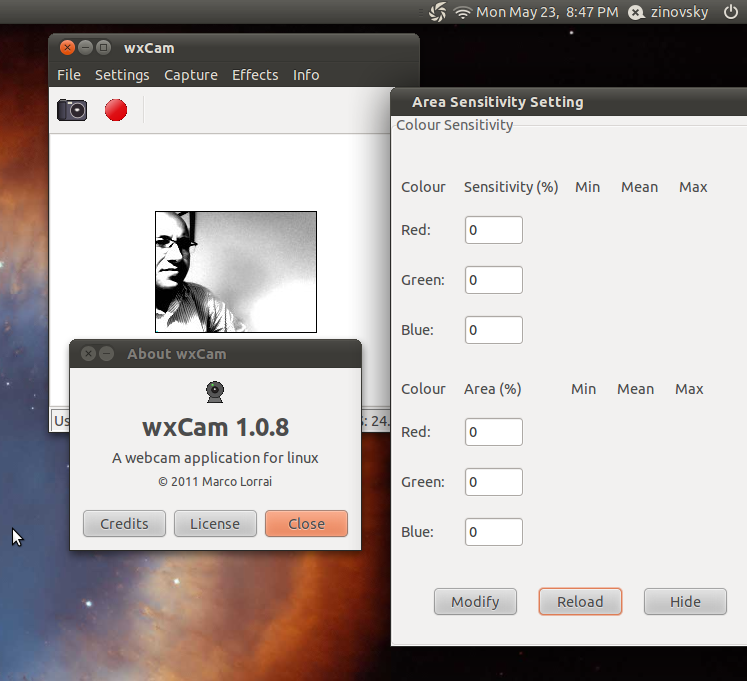
wxCam is a webcam application for linux. It supports video recording (in an avi uncompressed and Xvid format), snapshot taking, and some special commands for philips webcams, so you can also use the program for astronomy purposes. It supports both video4linux 1 and 2 drivers, so it should work on a very large number of devices.

.

.
wxcam

wxcam 1.0.8 is released, this version added support to BGGR16, GBRG8, GRBG8, SPCA561 frame formats, and fixed compiling in Ubuntu 11.04 Natty Narwhal.

Wxcam Features:

  •  Frame grabbing using video4linux 1 and 2 api;
  •  Adjust resolution, brightness, contrast, gamma and saturation;
  •  Support for some special controls for philips webcam: frame rate, gain and shutter speed;
  •   Snapshot taking in various formats, including BMP, PNG, JPEG, TIF, PCX, XPM.
  •   There are graphics effects such color correction, negative, edge, monochrome, upturned, laplacian, and mirror.
  •   Video recording without audio in an avi uncompressed format: e.g., useful for astronomy purpose (lunar and planetary video recording) because it is totally lossless.
  •   Video recording with audio, in the Xvid format: it is a lossy video format, but with great hard disk space saving.
  •   Video recording on movement detection.

Installation:

For Ubuntu, download one of the following debian packages:

Download Ubuntu 11.04 Natty i386/amd64

Ubuntu download Maverick i386/amd64 10.10

Lucid i386/amd64 download Ubuntu 10.04

- For other Linux distribution:

First make sure you to install some dependencies before to start the installation :

sudo apt-get install libwxgtk2.8 libwxgtk2.8-dev ibxvidcore4 and libxvidcore4-dev libv4l-dev libgtk2.0-0 libgtk2.0-dev libglade2-dev

You need also to install cimgLibrary , an open source, C++ toolkit for image processing, download the latest stable package CImg-1.4.8.zi

after the above packages are installed, we can start installing th wxcam software

1- Download the latest packege from this link

2- extract the package and cd the extracted directory

 tar vxf wxcam-1.0.8.tar.gz

3- Cd the extracted directory

cd /home/username/Downloads/wxcam-1.0.8/

4- Now compile

# ./configure # make # make install

Is done.

If you want to another alternative of wxcam, please check these great one :  Motion and Zoneminder.

{module user9-footer|none}

For questions please refer to our Q/A forum at : http://ask.unixmen.com

  • http://www.facebook.com/fendijr fendijr

    First :

    [color=red][b]jimmy@jimmy-Aspire-4925:~$ sudo apt-get install libwxgtk2.8 libwxgtk2.8-dev ibxvidcore4 and libxvidcore4-dev libv4l-dev libgtk2.0-0 libgtk2.0-dev libglade2-dev
    sudo: unable to resolve host jimmy-Aspire-4925
    [sudo] password for jimmy:
    Reading package lists… Done
    Building dependency tree
    Reading state information… Done
    Note, selecting ‘libwxgtk2.8-0′ for regex ‘libwxgtk2.8′
    Note, selecting ‘libwxgtk2.8-dbg’ for regex ‘libwxgtk2.8′
    Note, selecting ‘libwxgtk2.8-dev’ for regex ‘libwxgtk2.8′
    Package libgtk2.0-dev is not available, but is referred to by another package.
    This may mean that the package is missing, has been obsoleted, or
    is only available from another source

    Package libglade2-dev is not available, but is referred to by another package.
    This may mean that the package is missing, has been obsoleted, or
    is only available from another source

    E: Unable to locate package ibxvidcore4
    E: Unable to locate package libxvidcore4-dev
    E: Unable to locate package libv4l-dev
    E: Package ‘libgtk2.0-dev’ has no installation candidate
    E: Package ‘libglade2-dev’ has no installation candidate
    jimmy@jimmy-Aspire-4925:~$[/b]
    [/color]

    2nd :

    [b]
    jimmy@jimmy-Aspire-4925:~$ tar vxf wxcam-1.0.8.tar.gz
    tar: wxcam-1.0.8.tar.gz: Cannot open: No such file or directory
    tar: Error is not recoverable: exiting now
    jimmy@jimmy-Aspire-4925:~$ [/b]

    3rd :

    [b]jimmy@jimmy-Aspire-4925:~$ cd /home/username/Downloads/wxcam-1.0.8/
    bash: cd: /home/username/Downloads/wxcam-1.0.8/: No such file or directory
    jimmy@jimmy-Aspire-4925:~$ [/b]

    4th :

    [b]jimmy@jimmy-Aspire-4925:~$ # ./configure
    jimmy@jimmy-Aspire-4925:~$ # make
    jimmy@jimmy-Aspire-4925:~$ # make install
    jimmy@jimmy-Aspire-4925:~$ [/b]

    That`s all just happened aftaer trying to install wxcam.I`m newbie, so please guide me until success. Even the things that has downloaded also i don`t know how to install. Just know how to cammand in terminal only. really need some guide.
    Tq

  • Tarun

    After running the command

    sudo apt-get install libwxgtk2.8 libwxgtk2.8-dev ibxvidcore4 and libxvidcore4-dev libv4l-dev libgtk2.0-0 libgtk2.0-dev libglade2-dev

    I get this message

    [sudo] password for infinite:
    Reading package lists… Done
    Building dependency tree
    Reading state information… Done
    Note, selecting ‘libwxgtk2.8-0′ for regex ‘libwxgtk2.8′
    Note, selecting ‘libwxgtk2.8-dbg’ for regex ‘libwxgtk2.8′
    Note, selecting ‘libwxgtk2.8-dev’ for regex ‘libwxgtk2.8′
    E: Unable to locate package ibxvidcore4
    E: Unable to locate package libxvidcore4-dev

Like us on Facebook

This week Top Posts

Write for us

Recent Comments

AD

|

I need some Help on Linux,can you guide me ?

Edson Carlos

|

In debian no found. I need link download install in linux debian

jacky can

|

You can actually unzip your secret archive by leaving out the -t option, instead using:

unzip newPhoto.jpg

DragonFartOutLoud

|

it went to china.

DragonFartOutLoud

|

great review! i’ve been using it as my main OS since Beta 1 release. its been a awesome ride so far :)

 
IDG Tech Network
Copyright © 2008-2013 Unixmen.com .
Maintained by Anblik .

