

For android users, here are another three must have Applications for Android.
1- 3G Watchdog
.
.
.
.
.
.
.
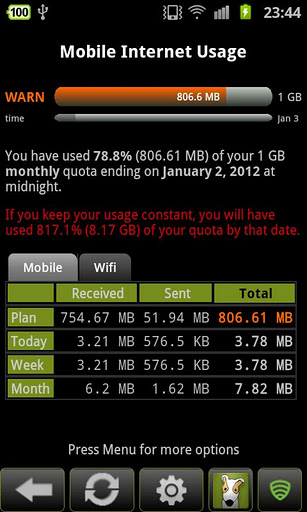
If you are using Android, you know how Internet data hungry it is. Many Android users get surprised to see their monthly data rates if they have postpaid plans and the prepaid users are shocked to see how their data gets exhausted so soon.
But now there is a solution for you to keep a watch on all your data usage whether 3G, Edge or GPRS. Watchdog helps you keep a close watch on costly internet data usages. It monitors the Mobile Internet as you are consuming the data and shows the status icon (green/orange/ red) in the notification bar. You can also get the detailed report of the data usage.
Watchdog has more than 1 million users. It’s available for free, but the pro or paid version offers added features like: data consumed by each application, data usage history in various ways, five custom widget styles and much more.
2- AirDroid
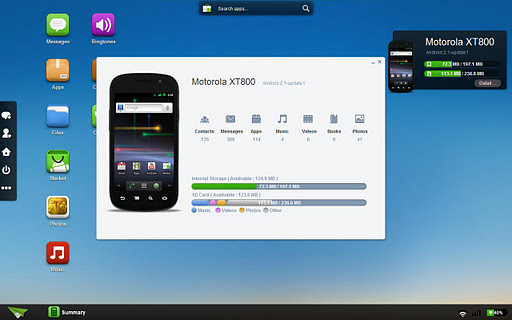
Android offers endless opportunities, and one of them is AirDroid, a highly innovative, fast and free application. AirDroid enables you to manage and control your Android devise from your web browser over-the-air or WiFi. Right from your web browser you can perform a number of over-the-air operations.
Here are some of the highlights of AirDroid for Android:
Transfer the files wirelessly: This feature lets you transfer files to and from the device via the web browser using the wireless or WiFi connection.
Everything from the browser: You don’t require any client in your computer as you can perform all the functions and use the features directly from the web browser. No drivers are required and there are no limitations of computer environment.
Manage SMS from desktop: Manage your contacts and groups from the desktop and send the individual or group SMSs from the comforts of your desktop.
Media management: Manage your music and photos from your desktop and also see them on your desktop.
AirDroid offers many other features like application manager, tools for managing your device from the desktop etc. all from the web browser.
3- ASTRO File Manager
ASTRO File Manager is one of the most popular applications in the Android market and has had more than 19 million downloads. It is considered to be among all-time best Android Applications list and has been recommended in a number of books.
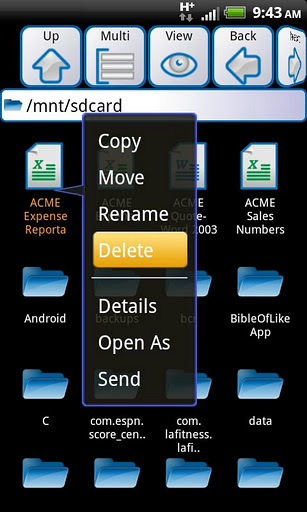
ASTRO File Manager helps you organize all your pictures, movies, music and all other files in your Android mobile. ASTRO File Manager performs the functions in your mobile similar to Windows Explorer or Mac’s Finder in your desktop.
With ASTRO File Manager you can:
Organize all the files: copy, move, rename, backup or zip your pictures, music, videos, or documents.
Share: Share the files freely with other devices with support for Windows networking, Bluetooth and SFTP.
Manage: Uninstall, backup or restore apps. Kill processes that waste battery life and slow device speed. Manage your SD card.


