

Security should be an essential part of any system whether it be for a server running at the department of defense, or a dusty old computer sitting in the corner connected to the internet. The problem is though, most people don’t have a very good understanding of how to protect themselves from unwanted hackers, and even some of the Linux experts can be caught off guard from time to time. Two of the most important keys to securing your Linux system, no matter what
distribution are to use multiple layers of security and to frequently update. TCP wrappers is a prime example of how you can add an additional layer of security to your system with very little effort on your part.
The concept of TCP wrappers is fairly simple. Almost every Linux box running on the internet will be running a service of some sort, particularly those which are acting as servers. Services are constantly listening for connections and as a result they can easily give away information about your system or be exploited by a hacker. In reality only a handful of services should be accessible by the public and all the others should be obscured, this is what TCP wrappers is used for. It is simply a form of access control which allows administrators to allow or deny access to services.
TCP wrappers uses two primary files for holding rules, /etc/hosts.allow and /etc/hosts.deny which can be used to allow or deny access to certain services. It was primarily used for xinetd services such as telnet and TFTP but due to its increasing popularity it can work with many other services as well. In some instances services will work straight out of the box with TCP wrappers, others may need to be compiled with the libwrap library.
TCP wrappers is included by default in many distributions of Linux and BSD, so in most cases it will not need to be installed. To check on red hat distributions if TCP wrappers is installed you can use the following command:
rpm –qa tcp_wrappers
If TCP wrappers is not installed for some reason you can use yum –y install tcp_wrappers to install it.
Next it’s a good idea to find out what services you are running so you can start denying access. The command “netstat –tap” is useful for listing running services on your system.
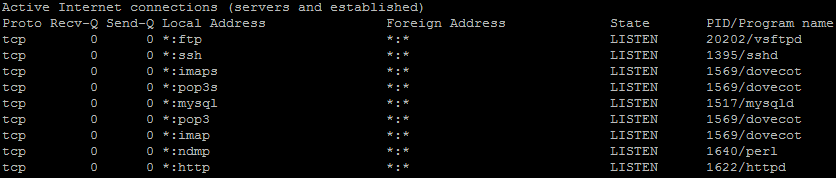
As you can see from the screenshot my server has a number of services running. Some of the services shouldn’t be blocked, because we want everyone to be able to access them, but others can be blocked because they aren’t used by the public.
You can then check if a service is compiled with libwrap by using the following command:
ldd /path/to/service | grep wrap

If the output is blank, then it is not compiled with libwrap, but if it is able to grep the libwrap library, then it can be used with TCP wrappers.
In this example I will block access to MySQL to everyone except the localhost and then block SSH to only be accessible from a certain IP range. I should also note that if you are going to use TCP wrappers with MySQL you will need to compile it from source with the libwrap library.
Starting off with MySQL you will first need to open up your /etc/hosts.deny file and add the following line to the file.
mysql : ALL EXCEPT localhost
This tells TCP wrappers that we want to deny everyone access except localhost. This can be also written as
mysql : ALL EXCEPT 127.0.0.1
Similarly you can also deny all for MySQL in hosts.deny
mysql : ALL
Then for hosts.allow you can accept connections from the local host using the following line
mysql : localhost
This is because everything allowed in hosts.allow is able to override hosts.deny, allowing you to block all traffic and then select the hosts you want to allow.
Next if we take a look at SSH, say for example we don’t have a static IP address which can be used, but instead our administrator is connecting using a certain ISP range. If we know the IP range which the ISP gives us each time we connect we can limit the access to SSH to only those users from the same ISP as you. This can be particularly useful to block access to countries which are more prone to hackers.
There are two main ways we can do this. Firstly we can simply specify the first few digits of an IP address in hosts.deny.
sshd : 123.123.
Alternatively we can also use the network address and netmask to specify the network range which is allowed to connect.
sshd : 192.168.1.0/255.255.255.0


