

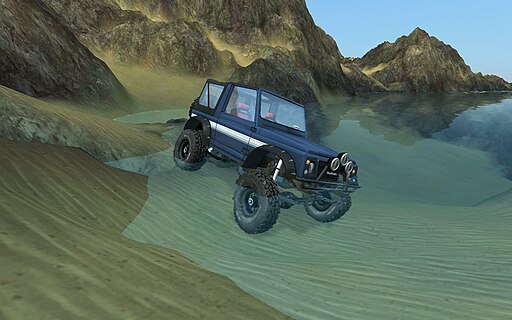
It’s a plane…It’s a boat…It’s a truck…It’s Rigs of Rods!
Rigs of Rods is one of the best open source simulation projects in existence, with thousands of fans and contributors around the world. The project started as a truck simulator, but evolved into being an advanced physics sandbox. Rigs of Rods gives you the opportunity to get into the cockpit of various aircrafts and helicopters, haul trucks and off-road cars, boats, ships and even tractors.
[youtube]http://youtu.be/1y3ksYbf2uE[/youtube]
Rigs of Rods simulator uses soft body dynamics to deliver realistic motion and deformation to the vehicles. To put it simply, if you crash on a wall while at high speed, your car will get ruined realistically, or if you hit a big stone with one of your tires, the tire or the suspension may fail or brake depending on your speed and power of collision. This element alone can make you stuck forever with this game, trying out various things that you can’t or wouldn’t try with a given vehicle in reality.
There are no objectives or anything like that on Rigs of Rods. You basically choose one of the many available maps, a vehicle and then it is all up to your imagination. Every map has different challenges depending on the ground morphology and the terrain material. Almost all vehicles can interact with each other, through various ways. For example you can lift a whole car using a helicopter and a hook, or carry a monster truck on the back of your haul truck. All these you can do alone, or in multiplayer!
[youtube]http://www.youtube.com/watch?v=kaJg970SeqQ[/youtube]
The optical experience of the simulator is generally of a high quality. There are several terrains and vehicles that may be more worked out and beautiful than others, but if you are running a low-spec machine, you will be pleased to find more simplistic maps and vehicles that have less hardware requirements. You can also configure various effects and quality settings to achieve optimum performance and pleasure.
Using Rigs of Rods is quite simple too. Thankfully everything is more or less straight forward and even the “special” abilities and functions of some vehicles are right there at the bottom of your screen to read how to use them.
How to Install Rig of Rods on Linux
Earlier, Rigs of Rods wasn’t easy to install on Linux. The only way to install it was to compile the simulator from scratch until recently.
The newest versions of this game can be installed with just a few commands on all major Linux distributions.
Some of the distributions it supports include Arch Linux, CentOS, Debian, Fedora, Ubuntu, and openSUSE, among others.
The easiest way to install it on any of the supported distros is to install its Snap. Snaps are applications packaged with all their dependencies and can run on all distributions. These can be installed from the Snap Store.
Some newer distros, such as Ubuntu 18.04 and later, come with the Snap package preinstalled. However, you will need to install Snap on most machines.
The steps to installing Snap are different on every distro. However, once you’ve installed it, you can run the following command to install Rigs of Rods:
| sudo snap install rigs-of-rods |



