Google Plus

How to upgrade from Fedora 13 & 14 to Fedora 15

Written by Mel Kham on . Posted in Frequently Asked Questions

QuestionHow to upgrade from Fedora 13 & 14 to Fedora 15?Fedora-logo

 

Answer:

Fedora 15  will be out in few  days , to upgrade from Fedora 13 or 14 to Fedora 15. Please follow  the  steps  as described bellow:

Under root:

1-First, update your current system

yum update -y

2-Install preupgrade package

yum install preupgrade

3-Run the preupgrade tool,

preupgrade

or

preupgrade-cli

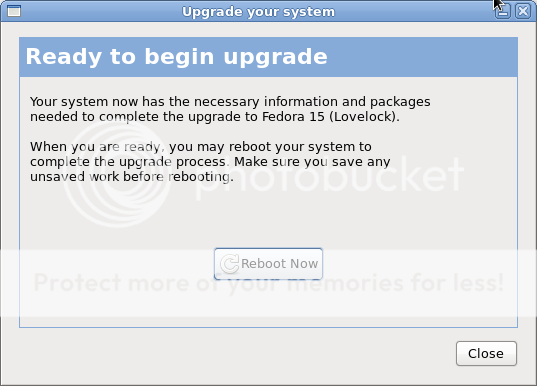
This  will  show  you  the new  release . Now click next to go start  upgrade.  This  step   will  take  some time  to  download  all  packages  of  F15.

After  this,  the  system will  reboot  and  will  complete  the  upgrade  and  clean the old  installations .

Now  login and checkif everything went ok.

[pirat9@localhost ~]$ uname  -a
Linux localhost.localdomain 2.6.38.5-24.fc15.x86_64 #1 SMP Fri May 6 08:00:28 UTC 2011 x86_64 x86_64 x86_64 GNU/Linux

[pirat9@localhost ~]$ cat  /etc/redhat-release
Fedora release 15 (Lovelock)
[pirat9@localhost ~]$

For questions please refer to our Q/A forum at : http://ask.unixmen.com

Mel Kham

Founder of Unixmen, Living in Amsterdam. Am working in my free time to help people to understand the Opensource and to explain them in easy way how to make the fist steps to the the light. Working day and night with my Co-founder Zinovsky to keep this website live even with less resources.
  • cheerio

    Nice!

  • SK Saini

    no Groups available in any repository while upgrading from Fedora 13 to Fedora 15, please help

    • mizo

      SK Saini
      you have to upgrade first from 13 –>14
      then from 14—>15

    • Stig

      If you are behind a proxy, then you need to:
      export http_proxy=http://{proxy-server}:{port}
      export ttp_proxy=http://{proxy-server}:{port}
      export https_proxy=http://{proxy-server}:{port}

      Then run preupgrade/preupgrade-cli.

      /Stig

  • jeff TANG

    I did according your advice. after download all packges of F15, then the system reboot, until the step "trying to unpack rootfs image as initramfs…" it cannot going on.
    also when I use fedora 15 netinst CD to install ,the same situation happen.
    Please tell how to solve the problem.
    Thanks.

  • qbert

    Thanks. I now have F15!

  • selva

    thank u i cleared my doubt

  • Manish Kumar

    how can i upgrade from FC12 to FC14/FC15. Can we follow the similar steps as mentioned above.Please help.

    • Stig

      You cannot upgrade directly from FC12 to FC15. You can jump max 2 versions at any one upgrade.
      Start by upgrading to FC14 – then upgrade to FC15.
      Apart from that, I guess you can follow the above advices.

  • Inda

    Thank you :-)))

  • Phanisundar

    Hello 

              i tried this, After reboot i am not able to login to my system after upgrading to 15. all my old password are not working.

  • Anonymous

    "After this, the system will reboot and will complete the upgrade and clean the old installations" .
    For my situation, I would like yo say:
    reboot yes
    complete the upgrade no
    it stop at "trying to unpack rootfs image as initramfs…"
    please help!

Like us on Facebook

This week Top Posts

Write for us

Recent Comments

cave

|

it can be used to talk or chat through the internet,

it is using strong encryption.

but for example TOR is using some obfuscation because some countrys try to block all outgoing connections which can not be scanned with DPI

And the TOR Project is facing an arms race in obfuscation and encryption detection.

cave

|

You can friend someone if you give him your public Certificate.

both peers must friend each other.

i suggest to not enter a valid e-mail address. it is not necessary, but pgp needs a mail addy. something@something.so fits perfectly… :)

http://redd.it/18vsq5 <– faq, featurelist, todo, howto, useful links to manual wiki etc, …

you can connect to chatservers, which will give you access to chatlobby, where always some people are lurking.

#1 https://www.f2f-fr.net/w2c/en/
#2 http://retrosharechatserver.no-ip.org/w2c/en/

and in this rooms, you can find other people to talk and friend.

cave

|

http://redd.it/18vsq5
please have a look at this link. it is a FAQ, QuickTip, HowTo, etc etc etc …

If you want to make friends, please use the Chatservers.
#1 https://www.f2f-fr.net/w2c/en/
#2 http://retrosharechatserver.no-ip.org/w2c/en/

if you enter your certificate, the chatserver adds you as his friend and shows his certificate too add him to your friends.

After the connection to the chatservers is established, you can join a few chatrooms where the chatserver is lurking.

in this rooms are other people too help you and make first friends and get into the network.

add friends only with wisdom. if you friend some policeman, it will be problematic like in real life.

best is to add only people you trust in real life or trust from other communitys too. and not to add random unkown strangers.

If you have questions, ask them in the chatlobbys, there is always someone to answer them.

please read http://redd.it/18vsq5

or question me here :)

Ladi Oyekanmi

|

Could you please assist in step by step on how to install nagios on solaris

Adhraa

|

Greate tutorial :)

 
IDG Tech Network
Copyright © 2008-2013 Unixmen.com .
Maintained by Anblik .