


Google Plus

GnomishBeige Theme (GTK+ 3.6.X) Under Ubuntu 12.10

Written by Mel Kham on . Posted in eyecandy, Ubuntu, Unix Tutorials

GnomishBeige is a clean beige theme for GTK3, based on the Adwaita engine, plus a matching GNOME-Shell theme. Its dark variant is almost identical to GnomishDark.

You can easily install for  Ubuntu12.10 using the folloing repository:

sudo add-apt-repository ppa:upubuntu-com/gtk3
sudo apt-get update
sudo apt-get install gnomishbeige-theme
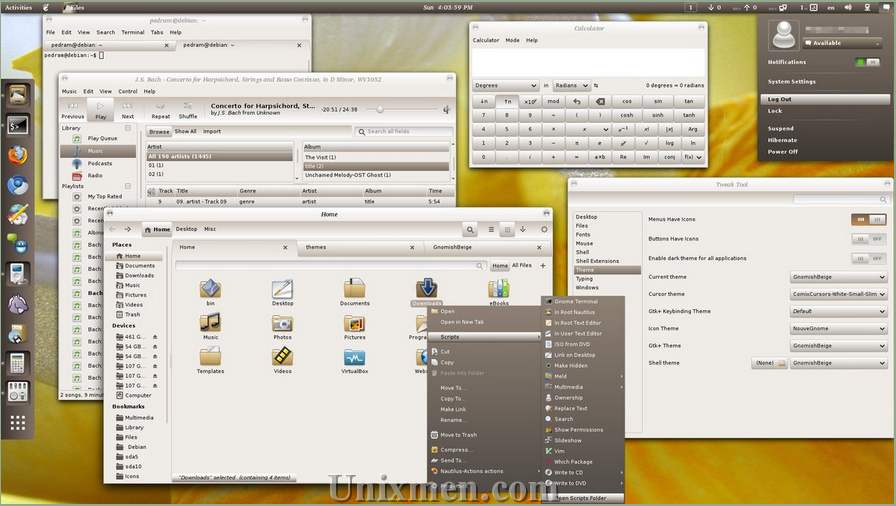
 

You can also remove the  theme using the following :

sudo add-apt-repository --remove ppa:upubuntu-com/gtk3
sudo apt-get remove gnomishbeige-theme
sudo apt-get update

Enjoy

For questions please refer to our Q/A forum at : http://ask.unixmen.com

Mel Kham

Founder of Unixmen, Living in Amsterdam. Am working in my free time to help people to understand the Opensource and to explain them in easy way how to make the fist steps to the the light. Working day and night with my Co-founder Zinovsky to keep this website live even with less resources.

Like us on Facebook

This week Top Posts

Write for us

Recent Comments

nombre apellido

|

Great tool. Thanks a lot

sobriquet

|

use the ‘browse’ option to select the startupconky.sh file from its location.

Snake

|

Wow, great. That’s what i’m waiting for too. I want to make DC with LDAP ( Active Directory alternative) and SAMBA on Ubuntu. :-)

Blawer

|

Thanks!!!!!!!!!!!!!!!!!! you rules!!! all the other “help” in google are useless… yours was very helpful. Thanks again

piCool

|

Great ! we have another another master trick :-)

 
IDG Tech Network
Copyright © 2008-2013 Unixmen.com .
Maintained by Anblik .

