

Google Plus

Canonical launches Ubuntu App Showdown

Written by Ayesha .A on . Posted in News, Ubuntu

Canonical has been recently engaged in attracting third party application developers to their Ubuntu Platform. Last year, Canonical launched a special developer program that was aimed at facilitating developers  to distribute stand-alone applications through the Ubuntu Software Centre. Now, once again, Canonical in its attempt to attract developers, is hosting a contest called the Ubuntu App Showdown

Canonical, through this contest, is geared to publicise its set of tools and frameworks that can be utilised  by Ubuntu users for rapid application development. The company has also produced a series of video tutorials in order to introduce new developers with the Gtk+ widget toolkit, Glade user interface designer and the Python programming language.

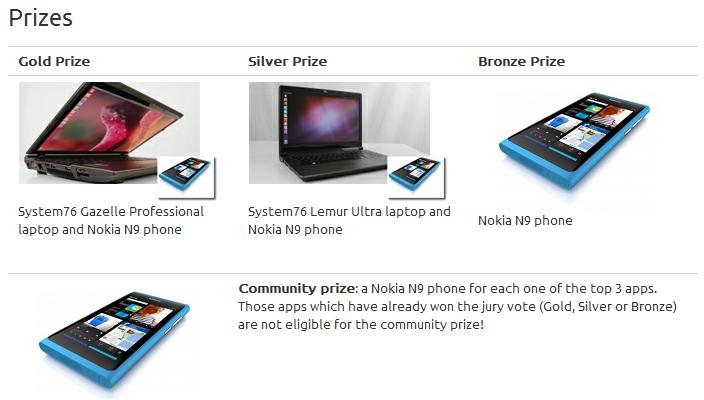
The contest has started on June 18th and will extend till 9th July. Participants have 3 weeks to build and submit a working Ubuntu application from scratch. The apps submitted in the contest will be judged by a panel for Appearance, Stability, Platform Integration, Innovation and Scratching an Itch. The best apps will win some awesome prizes from System76 and Qt including a System76 Gazelle Professional laptop and Nokia N9 phone for the gold prize, a System76 Lemur Ultra laptop and Nokia N9 phone for the silver prize and a Nokia N9 phone for the bronze prize. After the contest the community will vote on all of the apps in the Ubuntu Software Centre and the top 3 most voted app will receive Nokia N9 phones each.
Ubuntu contest

Further details of the contest can be found here. http://developer.ubuntu.com/showdown/

For questions please refer to our Q/A forum at : http://ask.unixmen.com

Like us on Facebook

This week Top Posts

Write for us

Recent Comments

pigmej

|

Just one thing:

What about pep8 in your python code ? How can you give ‘tutorials’ on quite popular website, of such a bad quality ?

Amit Rai

|

I just renamed shared.xml and it logged in and created a new shared.xml.

DB Griffin

|

Larry Page is not being completely honest! The manner in which the PRISM program/project works does not need access from company administrators or owners, so called “direct access”; the access to the information is already there. These tech company CEOs take for granted the actual intelligence of most end users of their products. All it takes is a little digging and reading to go from ignorant to informed on these things especially on exactly how the internet works/functions in the U.S.A. I find Larry Page’s remarks just as laughable as Al Gore’s claim to “inventing” the internet/world wide web!

If you, as an end user, are reading this post; I challenge you to research these matters yourself. It really is quite simple with all the “information sites” that exist on the web today ie Wikipedia, & other online encyclopedias that actually list source material, as well as highly respected tech sites and blogs that also list their source material. Be warned: this is only the tip of the iceberg and these tech CEOs know and understand this; they are scrambling in attempt to perform DAMAGE CONTROL to save the company and what little trust thay have left from their products end users/consumers.

Am I a skeptic? I believe someone has to be or needs to be at this point in time! If your not just a little skeptical of the government, tech companies, and the people that are in charge of these agencies and companies; you need to be, even if just a little skeptic. For your own personal protection and security! I know I was a part of this community for over 14 years!

Anders Jackson

|

As I understand it so do VLC use same encoders as ffmpeg. And yes, there are less code that can break when you use command line instead of a graphical UI.

And may I ask what mono has to do with VLC? *facepalm*

Anders Jackson

|

Just some thoughts about Java.

OpenJDK7 are now THE Java implementation and Oracles are just one more of the reimplementations. So you should not need to install Oracles version.

And you really don’t need to remove the OpenJDK7 installation to also have Sun Java JDK 7. Just run

sudo update-java-alternatives –list

and select which java you want to have as default java of all that is installed.

And if you want to run a program with one special version, check manpage for java-wrappers how to do that.

man java-wrappers

so you can run java program rasterizer like this:

JAVA_FLAVOR=openjdk rasterizer
JAVA_ARGS=-Xmx80m rasterizer

JAVA_BINDIR=/usr/share/

etc

 
IDG Tech Network
Copyright © 2008-2013 Unixmen.com .
Maintained by Anblik .

